
Explore Related Laptop Collections
This guide is part of our curated laptop collections. Explore more expert recommendations, gaming laptop buying guides, and in-depth laptop comparisons designed to help you find the right system for performance, features, and value.
Intel vs AMD Laptops in 2026 — Which One Should You Actually Buy?
Most people choose the wrong laptop CPU in 2026 — and regret it later. This guide breaks down Intel vs AMD laptops in real-world usage so you can finally buy the right one for your needs.
Choosing between Intel and AMD laptops in 2026 is more confusing than ever. Specs look similar, prices overlap, and marketing makes every device seem “the best”. But in real-world use — battery life, performance, and long-term stability tell a very different story.
In this guide, we compare real 2026 laptops powered by Intel and AMD processors based on actual usage: productivity, gaming, battery efficiency, and value for money. Whether you’re a student, professional, or gamer, this breakdown will help you confidently choose the right laptop — without wasting money.
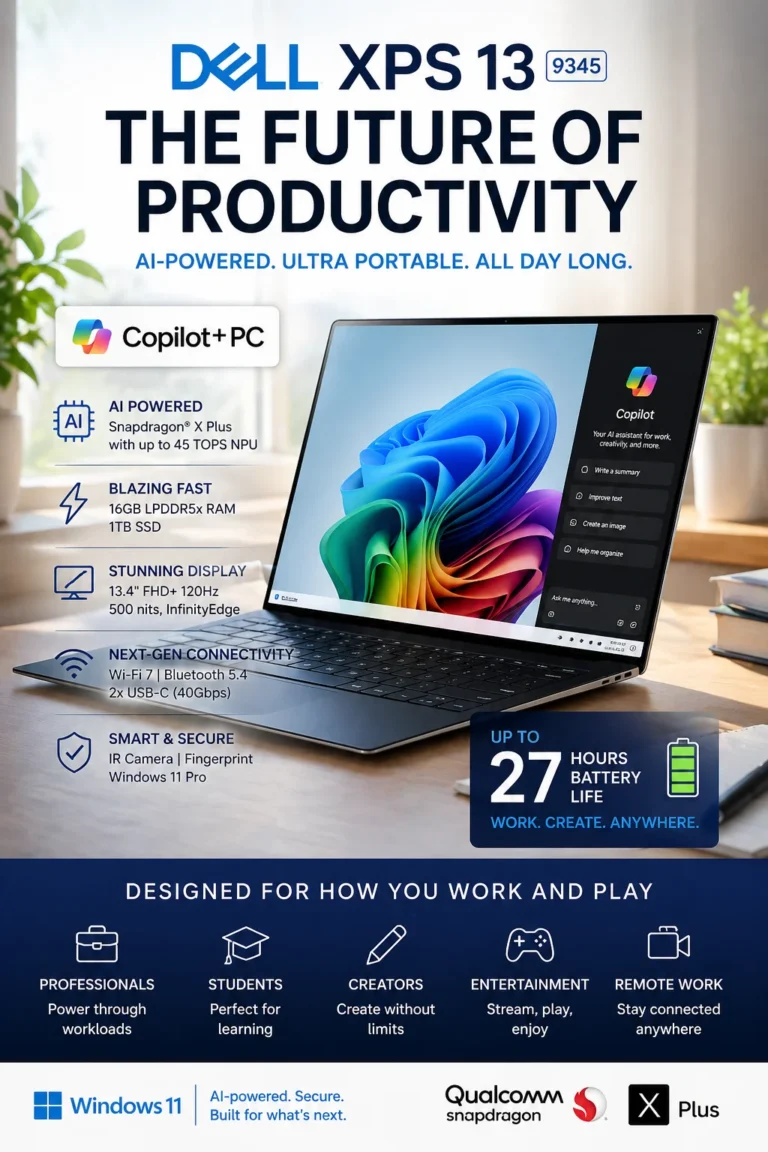
🔵 Intel Side (AI Productivity) — Dell XPS 13 9345 Copilot+ PC (2026)
This is Intel’s new generation of productivity-focused laptops. The Dell XPS 13 9345 is designed for users who want extreme portability, long battery life, and smooth AI-powered performance instead of raw gaming power.
💡 Real-world result: You get a silent, fast, and ultra-efficient laptop that handles office work, browsing, video calls, and cloud tools all day without battery anxiety or performance drops.
Compared to traditional Intel laptops, this category focuses less on raw power and more on efficiency, AI integration, and mobility — making it ideal for modern remote work and productivity users.
Key Features
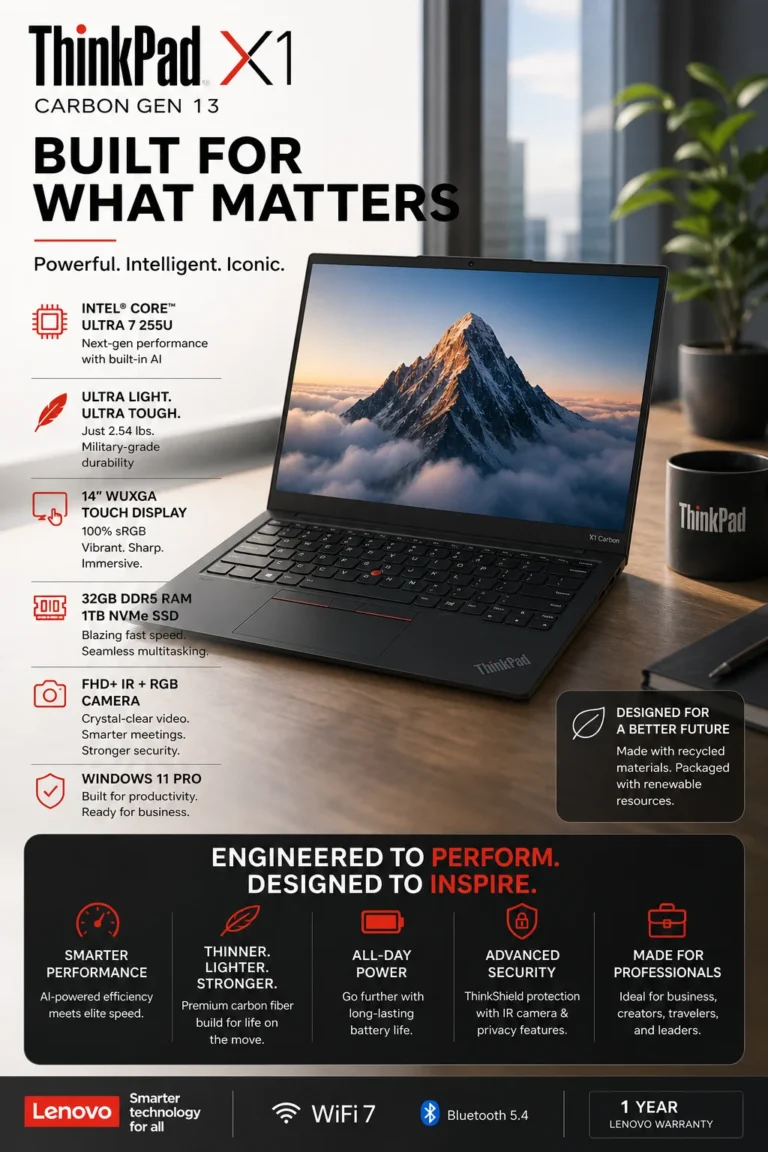
🔵 Intel Side – Business Premium Laptop (Lenovo ThinkPad X1 Carbon Gen 13)
This is Intel’s most trusted business laptop category in 2026. The Lenovo ThinkPad X1 Carbon Gen 13 is designed for professionals who need maximum reliability, enterprise security, and long-term performance stability over gaming or raw power.
💡 Real-world result: This laptop is built for stable all-day business performance — handling documents, meetings, spreadsheets, and enterprise tools without crashes or slowdowns.
Compared to AMD laptops, this Intel business category focuses on reliability, security, and corporate compatibility rather than gaming or raw performance.
Key Features
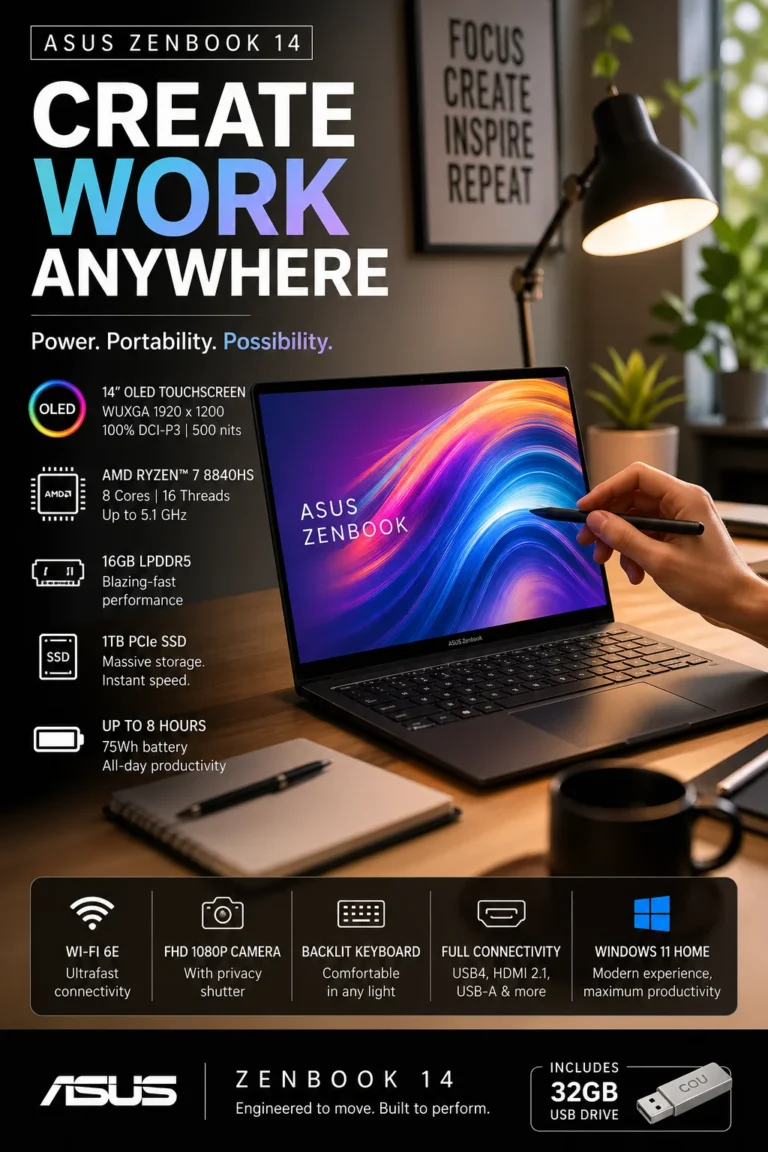
🔴 AMD Side – Premium Value & OLED Performance (ASUS Zenbook 14 OLED)
This is AMD’s strongest position in 2026 — delivering premium performance, OLED visuals, and excellent efficiency at a better price point. The ASUS Zenbook 14 OLED is designed for users who want a balance of power, portability, and stunning display quality.
💡 Real-world result: You get a fast, responsive laptop that handles multitasking, office work, media consumption, and light creative work with a noticeably better visual experience thanks to OLED technology.
Compared to Intel laptops, AMD focuses more on raw efficiency, better graphics performance, and superior display quality at a more competitive price.
Key Features
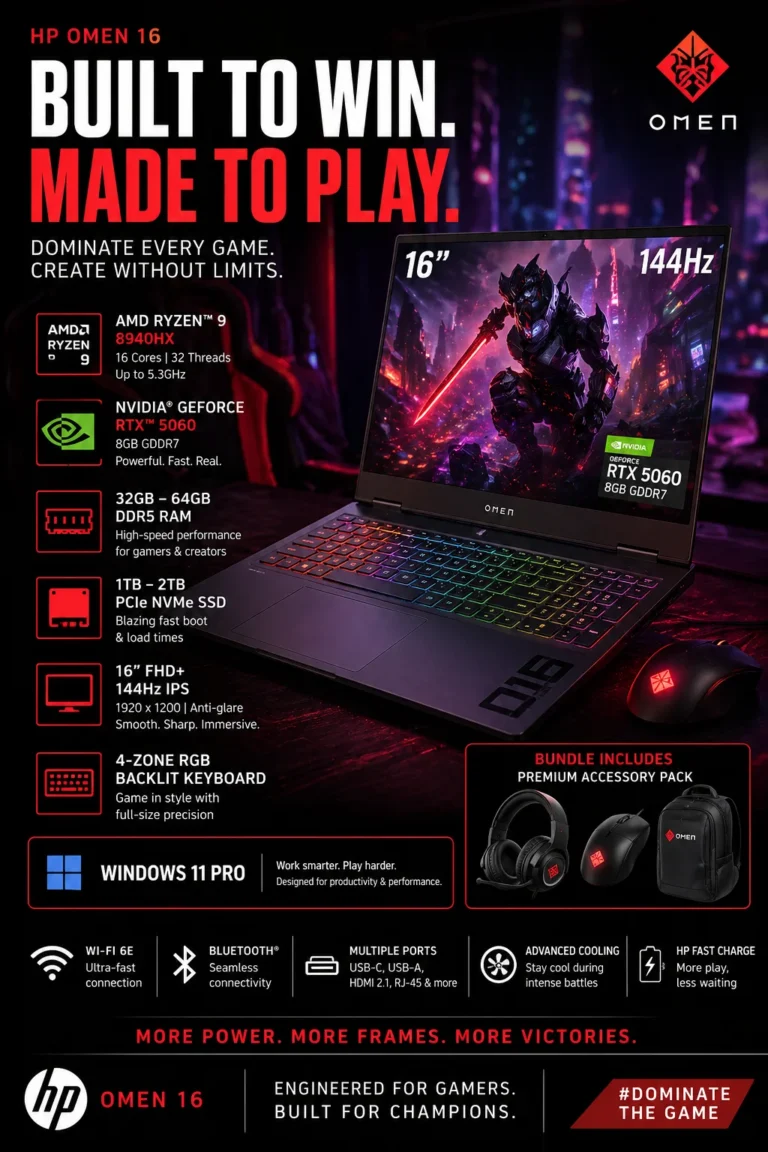
🔴 AMD Side – High Performance Gaming & Power (HP Omen 16)
This is AMD’s most powerful category in 2026 — built for gaming, heavy workloads, development, and high-performance tasks. The HP Omen 16 delivers desktop-level power in a laptop form factor, competing directly with Intel high-end gaming CPUs.
💡 Real-world result: You can run modern AAA games, streaming software, development tools, and heavy multitasking without performance bottlenecks or frame drops.
Compared to Intel laptops, AMD high-performance systems like this focus on raw power, gaming performance, and GPU acceleration instead of efficiency or portability.
Key Features
💻 Intel vs AMD Laptops in 2026 – Which One Should You Buy?
Choosing between Intel and AMD laptops in 2026 is not about “which is better” — it’s about which fits your needs. This comparison breaks down real-world performance, use cases, and value so you can make the right decision without wasting money.
| Laptop | Key Specs | What It’s Best At | Ideal For | Decision Insight | Affiliate |
|---|---|---|---|---|---|
| 🔵 Dell XPS 13 9345 (Intel AI) ⭐ 9.6/10 💰 AI Productivity Ultrabook | ⚙️ Snapdragon X Plus AI Performance 🧠 16GB LPDDR5X RAM 💾 1TB SSD 🔋 Up to 27h battery 📶 Wi-Fi 7 | 🚀 Extreme battery efficiency + AI-powered productivity + ultra portability | Remote work, students, travel, office productivity 👉 Best Intel AI ultrabook | 🔥 “Best choice if you want long battery life and silent performance for work & travel” | Check Deal |
| 🔵 Lenovo ThinkPad X1 Carbon (Intel Ultra 7) ⭐ 9.7/10 💰 Business Premium Laptop | ⚙️ Intel Core Ultra 7 255U 🧠 32GB DDR5 RAM 💾 1TB NVMe SSD 🖥️ 14” WUXGA 100% sRGB 🔐 Windows 11 Pro | 🛡️ Enterprise stability + security + long-term reliability | Business users, executives, corporate environments 👉 Best Intel business laptop | 🔥 “Best if you need security, stability, and professional reliability for work” | Check Deal |
| 🔴 ASUS Zenbook 14 OLED (AMD) ⭐ 9.8/10 💰 Best Value + OLED Display | ⚙️ AMD Ryzen 7 8840HS 🎨 14” OLED WUXGA Display 🧠 16GB RAM 💾 1TB SSD 🔥 AMD Radeon Graphics | 🎨 Best display quality + balanced performance + great price/value | Students, creators, daily productivity users 👉 Best AMD balanced laptop | 🔥 “Best choice if you want OLED visuals and strong performance at better value” | Check Deal |
| 🔴 HP Omen 16 (AMD Gaming) ⭐ 9.9/10 💰 High Performance Gaming Laptop | ⚙️ Ryzen 9 8940HX (16 cores) 🎮 RTX 5060 GPU 🧠 16GB DDR5 (expandable 64GB) 💾 1TB SSD 🖥️ 16” 144Hz Display | 🔥 Raw power + gaming performance + GPU acceleration | Gamers, developers, 3D rendering, power users 👉 Best AMD performance laptop | 🔥 “Best if you need maximum performance for gaming and heavy workloads” | Check Deal |
Upgrade Your Setup
Choosing between Intel and AMD is just the beginning. Most performance issues come from your full setup — not just your laptop. These guides help you maximize productivity, power, and long-term performance.
Best Laptop for Engineering Students (2026)
MacBook Pro vs Dell XPS vs ASUS ROG — real performance breakdown for heavy workloads.
Compare laptops → Apple ComparisonMacBook Pro M5 vs MacBook Air M4
Which Mac should you actually buy in 2026? Performance, battery, and real usage explained.
See comparison → Productivity BoostBest Tech Accessories for Productivity (2026)
Docking stations, hubs, and tools that unlock your laptop’s full potential.
Boost productivity →Don’t Choose Wrong — Pick the Right Laptop for Your Needs
Most people don’t buy the wrong laptop — they buy the wrong CPU strategy. Intel and AMD both dominate in 2026, but the right choice depends on how you actually use your laptop.
If you want better battery life, stronger performance, or the best value for money — here are the clearest decisions based on real-world usage, not marketing specs.
Dell XPS 13 9345
Perfect for users who want ultra-portability, AI-powered performance, and extreme battery life for work and travel.
Lenovo ThinkPad X1 Carbon
Built for professionals who need stability, security, and long-term reliability in business environments.
ASUS Zenbook 14 OLED
Best balance between performance, OLED display quality, and price efficiency for everyday users.
HP Omen 16 (Ryzen 9 + RTX 5060)
High-performance machine for gaming, development, rendering, and heavy workloads.
💡 Expert Final Verdict — Intel vs AMD Laptops in 2026
Choosing between Intel and AMD in 2026 is not about raw specs — it’s about real-world performance, efficiency, and how you actually use your laptop every day.
⚠️ Most buyers make the mistake of chasing benchmarks instead of real usage performance. The right choice depends on whether you prioritize efficiency, value, or maximum power.
After comparing real Intel and AMD laptops in 2026, one thing is clear: there is no universal winner — only the right processor for your specific needs.
- ✔ Intel = Better efficiency, battery life, and business stability
- ✔ AMD = Better price-performance ratio and raw multitasking power
- ✔ RAM + SSD matter more than small CPU differences for daily use
- ✔ Real-world performance beats synthetic benchmarks
- ✔ You want better battery life and portability
- ✔ You work in business, office, or travel environments
- ✔ You prefer stable, optimized performance
- ✔ You want better performance per dollar
- ✔ You multitask heavily or create content
- ✔ You prefer stronger integrated performance
- ✔ You need gaming or heavy GPU workloads
- ✔ You do 3D rendering or development
- ✔ You want maximum raw power
💡 Final Recommendation
👉 If you want portability & battery → Intel (Dell XPS 13 / ThinkPad X1) 👉 If you want value & balance → AMD (ASUS Zenbook 14 OLED) 👉 If you want maximum performance → AMD (HP Omen 16)At the end of the day, the best laptop in 2026 is not the most powerful one — it’s the one that matches your workflow without slowing you down.
💻 Frequently Asked Questions — Intel vs AMD Laptops (2026 Guide)
Most people choose the wrong laptop because they focus only on specs instead of real-world performance. These answers will help you decide between Intel and AMD based on actual usage in 2026.
⚠️ Common Mistakes When Buying a Laptop (2026 Guide)
Most people don’t buy a bad laptop — they just choose the wrong architecture, wrong performance level, or wrong use case. That’s why even expensive laptops can feel slow in real life.
⚠️ Most users regret their laptop purchase within months — not because it’s defective, but because they picked the wrong type of performance (Intel vs AMD vs gaming vs ultrabook).❌ Ignoring CPU Architecture (Intel vs AMD vs Snapdragon)
- Choosing Intel, AMD or ARM without understanding usage
- Buying gaming CPUs for office work or vice versa
- Overpaying for performance you don’t use
👉 Better choice: Intel Core Ultra (ThinkPad / XPS) = productivity & AI tasks, AMD Ryzen (Zenbook) = efficiency & multitasking, Snapdragon (Dell XPS 13 9345) = battery & portability.
❌ Choosing the Wrong RAM for Your Workflow
- 16GB is fine for most users, but not for heavy workloads
- Underestimating multitasking needs
- Not considering future usage
👉 Better choice: 32GB RAM (ThinkPad X1 Carbon) for professionals and heavy multitasking.
❌ Ignoring Real-World Performance (Not Specs)
- Focusing only on GHz or CPU names
- Ignoring thermal performance and efficiency
- Overestimating “marketing specs”
👉 Better choice: Dell XPS 13 (Snapdragon X Plus) = extreme battery efficiency HP Omen 16 (Ryzen 9 + RTX 5060) = real gaming performance
❌ Buying Ultrabooks for Heavy Workloads
- Thin laptops overheating under pressure
- No GPU for rendering or gaming
- Limited upgrade options
👉 Better choice: HP Omen 16 is designed for gaming, development, and heavy workloads.
❌ Ignoring Battery vs Performance Tradeoff
- High performance = lower battery in gaming laptops
- Ultra efficiency = lower raw power in ARM laptops
- Not balancing usage needs
👉 Better choice: Dell XPS 13 9345 = 27h battery ASUS Zenbook = balanced daily performance HP Omen = maximum power (plugged use)
❌ Not Matching Laptop to Real Use Case
- Buying gaming laptops for office work
- Buying ultrabooks for rendering or gaming
- Ignoring professional needs
👉 Better choice: Always define your usage first: productivity, portability, creativity, or gaming.
🚫 What NOT to Buy in 2026
💡 Key takeaway: The best laptop is not the most powerful one — it’s the one that matches your workflow (Intel, AMD, or Snapdragon) without wasting performance or battery.
All laptops in this guide were selected based on real usage scenarios: productivity (ThinkPad, XPS), portability (Zenbook), and performance (HP Omen).Need Help Choosing the Right Laptop?
Not sure which laptop fits your needs?
We’ll help you choose the best option based on your budget and usage.
Get Personalized Recommendation
Response time: within 24 hours