
Explore Related Laptop Collections
This guide is part of our curated laptop collections. Explore more expert recommendations, comparisons, and buying guides tailored to different needs such as gaming performance and student productivity.Best Laptop for Engineering Students in 2026: 3 Expert Picks for CAD, SolidWorks, Programming & 3D Work
Engineering students need more than a fast laptop. Modern engineering workloads can include CAD, SolidWorks, Revit, MATLAB, programming, simulations, 3D modeling, rendering, and demanding technical applications that can quickly expose the limitations of an entry-level machine. The wrong laptop can lead to slowdowns, overheating, compatibility problems, and frustrating performance throughout your degree.
In this guide, we've selected the best laptops for engineering students based on the workloads that matter most in college and professional engineering environments. We compare the Apple MacBook Pro 14-inch with M5 Pro, Dell XPS 16 with Intel Core Ultra 9 and RTX 4060, and ASUS ROG Zephyrus G14 with RTX 5070 across CPU performance, dedicated graphics, CAD and 3D workloads, programming, battery life, portability, multitasking, and long-term usability.
Whether you're studying mechanical engineering, civil engineering, electrical engineering, architecture, computer engineering, or another technical discipline, the right laptop should provide enough performance to handle your current coursework while remaining capable throughout your entire degree. From the efficient MacBook Pro M5 Pro to the balanced Dell XPS 16 and performance-focused ASUS ROG Zephyrus G14, these are our top engineering laptop recommendations for 2026.
Dell XPS 16 (2026)
Best Engineering Laptop for CAD, Programming & Everyday Performance
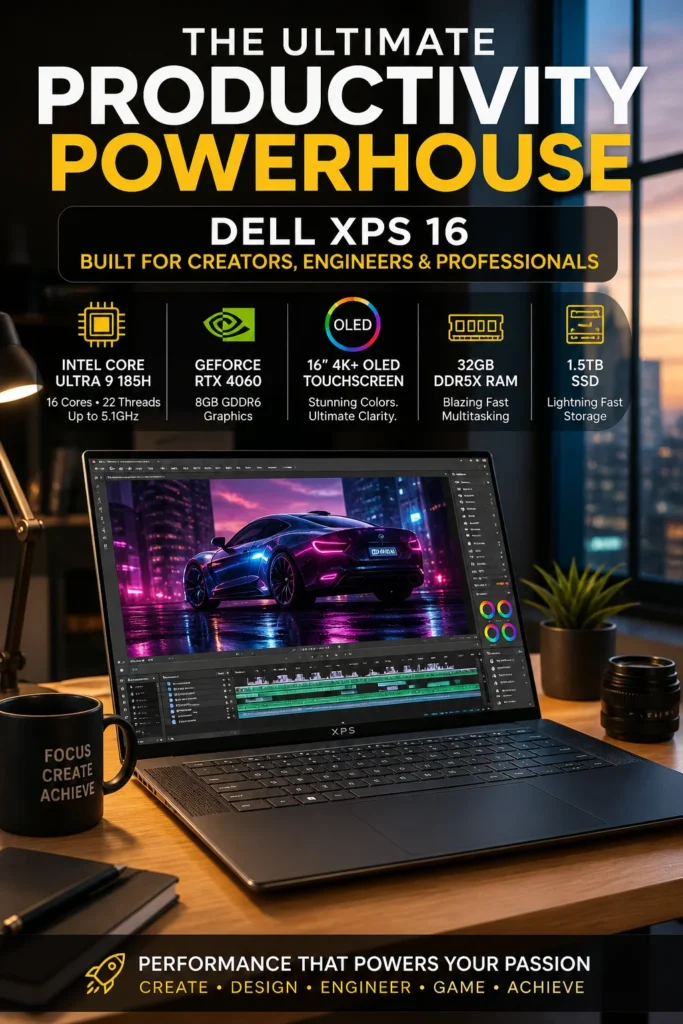
The Dell XPS 16 (2026) is our top recommendation for the best balanced laptop for engineering students. Equipped with a powerful Intel Core Ultra 9 processor, NVIDIA RTX 4060 graphics, 32GB of RAM, and fast SSD storage, it delivers the combination of CPU performance, GPU acceleration, display quality, and portability that engineering students need for demanding university workloads. Whether you're working with AutoCAD, SolidWorks, Revit, MATLAB, programming tools, 3D modeling, engineering simulations, or large technical projects, the XPS 16 provides enough performance for serious engineering work without the size and weight of a traditional desktop replacement workstation.
The Dell XPS 16 earns our Best Balanced Engineering Laptop award because it combines the performance required for serious engineering software with the portability and premium design students need every day. Its RTX 4060 graphics provide an important advantage for CAD, 3D modeling, rendering, and visualization, while the powerful processor and 32GB of RAM keep demanding multitasking workflows responsive.
Compared with the MacBook Pro 14-inch (M5 Pro), the XPS 16 offers a major advantage for students whose engineering programs depend on Windows-specific applications such as SolidWorks and certain CAD or engineering tools. Compared with the ASUS ROG Zephyrus G14 with RTX 5070, it prioritizes a more balanced combination of portability, professional design, display quality, and engineering performance rather than maximum GPU power. For students who want one premium Windows laptop capable of handling both engineering software and everyday university work, the XPS 16 is one of the strongest choices in 2026.
Key Features
Apple MacBook Pro 14 M5 Pro
Best Engineering Laptop for Programming, Battery Life & Long-Term Reliability
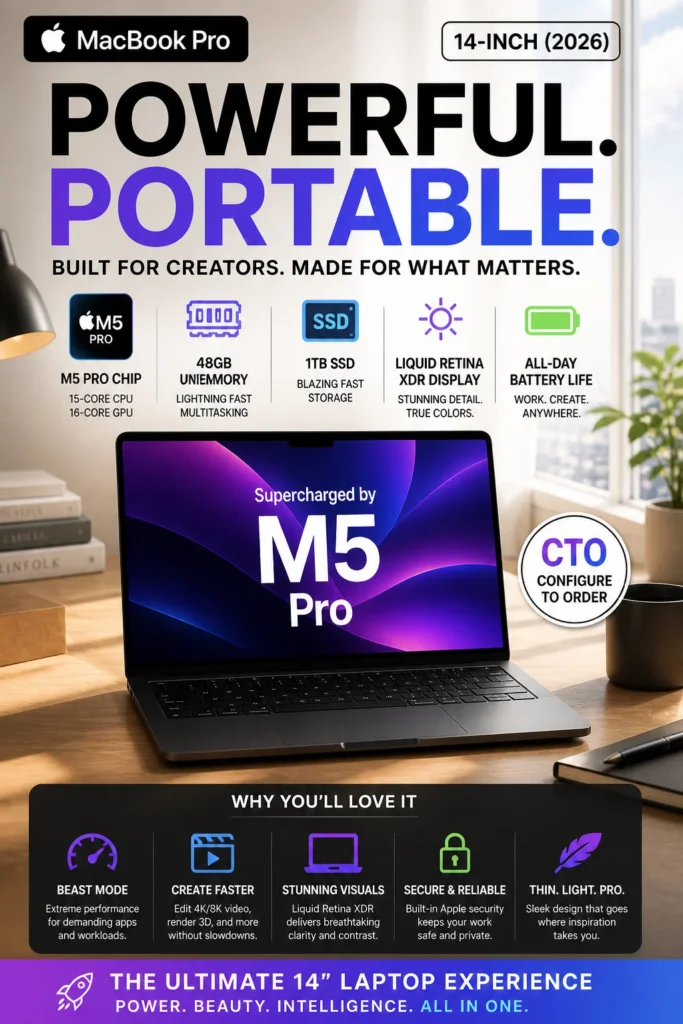
The Apple MacBook Pro 14-inch (M5 Pro) is our top recommendation for engineering students who prioritize battery life, stability, portability, and long-term performance. Equipped with Apple's powerful M5 Pro chip, 48GB of unified memory, and fast SSD storage, it delivers exceptional responsiveness for programming, engineering coursework, simulations that support macOS, technical research, data analysis, and demanding multitasking. For students who spend long days moving between lectures, laboratories, libraries, and study sessions, the MacBook Pro provides a premium combination of performance and efficiency without constantly searching for a charger.
The MacBook Pro 14 earns our Best Engineering Laptop for Battery & Stability award because it excels in the areas that matter most to students who spend long hours studying, programming, researching, and working on technical projects. Its combination of efficient performance, exceptional battery life, premium construction, quiet operation, and large memory capacity makes it an outstanding everyday engineering companion.
Compared with the Dell XPS 16 and ASUS ROG Zephyrus G14, the MacBook Pro takes a different approach to engineering performance. The XPS 16 offers stronger compatibility with Windows-based engineering applications and dedicated RTX 4060 graphics, while the ROG Zephyrus G14 provides significantly more GPU power for demanding 3D and rendering workloads. The MacBook Pro is therefore the better choice for students who prioritize battery life, programming, portability, stability, and everyday academic productivity rather than maximum Windows CAD or GPU performance.
Key Features
ASUS ROG Zephyrus G14 (RTX 5070, 2026)
Best Engineering Laptop for 3D, Rendering, CAD & GPU-Intensive Workloads
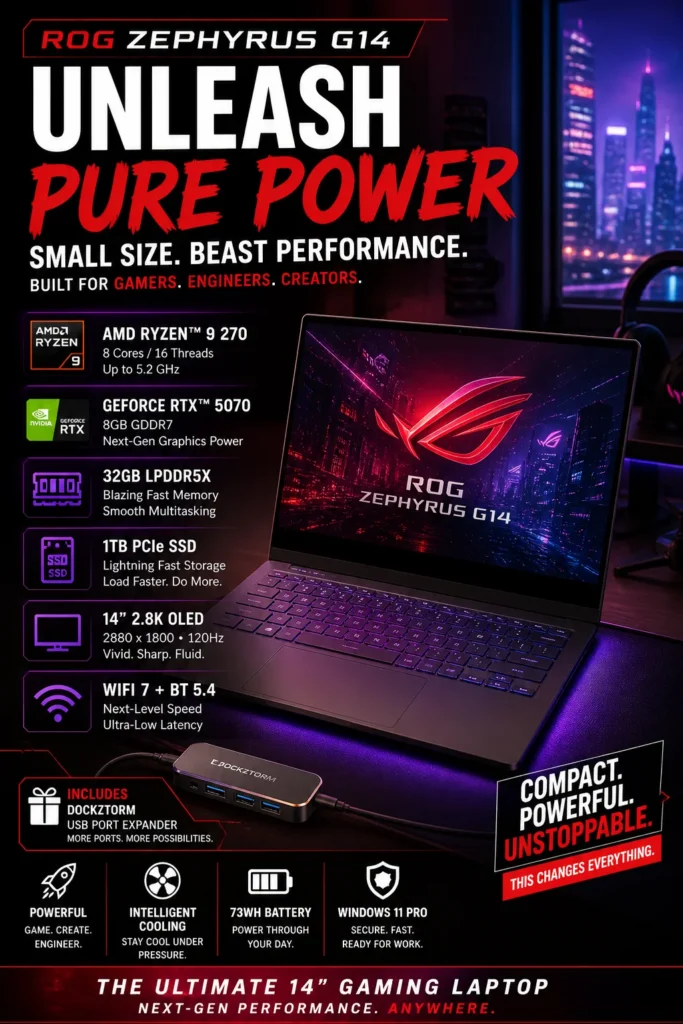
The ASUS ROG Zephyrus G14 (RTX 5070) is our top recommendation for the best high-performance laptop for engineering students in 2026. Built around a powerful RTX 5070 GPU, high-performance processor, 32GB of RAM, and fast NVMe SSD storage, it is designed for demanding engineering workloads that benefit from dedicated graphics power. Whether you're working with SolidWorks, AutoCAD, Revit, 3D modeling, rendering, CAD visualization, simulations, AI tools, or GPU-accelerated applications, the Zephyrus G14 provides the performance headroom needed for advanced projects. For engineering students who prioritize raw performance and GPU acceleration over maximum battery life, this is the most powerful option in our comparison.
The ASUS ROG Zephyrus G14 earns our Best Maximum Performance Engineering Laptop award because it delivers the strongest combination of dedicated GPU power and portability in this comparison. For students working with 3D CAD, rendering, simulations, visualization, and other GPU-intensive engineering applications, its RTX 5070 provides significantly more performance headroom than laptops designed primarily around efficiency and battery life.
Compared with the Dell XPS 16 and MacBook Pro 14-inch, the Zephyrus G14 is the clear choice when dedicated GPU performance is the priority. The Dell offers a more balanced engineering experience, while the MacBook Pro excels in battery life, efficiency, and programming workflows. The G14 is different: it is designed for students who would rather have maximum graphics performance for CAD, 3D modeling, rendering, simulations, and advanced engineering workloads.
Key Features
Best Laptops for Engineering Students (2026)
Ranked by Engineering Performance, CAD & 3D Capability, Battery Life, Portability & Long-Term Reliability
Choosing the best laptop for engineering students isn't simply about buying the most powerful processor or the largest GPU. Engineering students often work with demanding software such as AutoCAD, SolidWorks, Revit, MATLAB, programming environments, simulation tools, 3D modeling applications, rendering software, and large project files. We evaluated these laptops based on real-world engineering workloads, CPU and GPU performance, memory capacity, display quality, portability, battery life, thermal stability, and long-term usability throughout an engineering degree.
| Laptop | CPU & Key Specs | Best For | Why It Wins | Editor's Verdict |
|---|---|---|---|---|
Best Overall Engineering Laptop
Dell XPS 16 (Ultra 9 + RTX 4060)
Check Price
| Intel Core Ultra 9 185H RTX 4060 8GB 32GB RAM 4K OLED Display | Architecture & Civil Engineering CAD & 3D Work Programming & Multitasking | Excellent balance of CPU performance, dedicated RTX graphics, memory capacity, premium display quality, and portability for demanding engineering workloads. | Best All-Around Engineering Laptop |
Best for Battery & Stability
Apple MacBook Pro 14 (M5 Pro)
Check Price
| Apple M5 Pro 48GB Unified Memory Fast SSD Storage 14" Liquid Retina XDR | Programming & Software Engineering Productivity-Focused Students Long Study Sessions | Exceptional efficiency, outstanding battery life, stable sustained performance, and massive unified memory make it ideal for students who prioritize reliability and mobility. | Best Engineering Laptop for Battery Life & Reliability |
Best for Maximum Performance
ASUS ROG Zephyrus G14 (RTX 5070)
Check Price
| AMD Ryzen 9 270 RTX 5070 GDDR7 32GB LPDDR5X 2.8K OLED 120Hz | 3D Modeling & Rendering Engineering Simulations GPU-Heavy Workloads | High-end RTX 5070 graphics, powerful AMD processing, fast memory, and a high-refresh OLED display deliver exceptional performance for demanding engineering applications. | Best Engineering Laptop for Raw GPU Power |
Recommended Next Reads
Explore more expert laptop buying guides for engineering students, programmers, computer science majors, AI learners, and demanding academic workloads.
Whether you're studying mechanical engineering, civil engineering, computer science, software development, or AI and machine learning, these expert laptop guides can help you find the right balance of performance, portability, battery life, and long-term value for your academic and professional work.
Best Programming Laptops for Students in 2026
Compare the best laptops for students learning programming, software development, Python, JavaScript, AI tools, databases, IDEs, and demanding multitasking workflows.
Explore programming laptops →Best Laptops for Computer Science Students in 2026
Find the best laptops for computer science students working with programming, algorithms, databases, development environments, AI tools, and demanding college workloads.
Explore computer science laptops → AI & Machine LearningBest Laptops for AI & Machine Learning in 2026
Explore powerful laptops for Python, TensorFlow, PyTorch, CUDA acceleration, local AI models, data science, and GPU-intensive machine learning workflows.
Explore AI laptops → Student Buying GuideBest Laptops for Students in 2026
Compare the best student laptops across different budgets and majors, from everyday college work and research to programming and demanding academic applications.
Explore student laptops → Budget & PerformanceBest Laptops Under $1500 in 2026
Discover high-performance laptops under $1500 for students who need serious processing power, dedicated graphics, premium displays, and long-term value.
Explore laptops under $1500 → Display & ProductivityBest OLED Laptops in 2026
Compare premium OLED laptops with excellent color accuracy, high resolution, fast refresh rates, and beautiful displays for engineering, design, coding, and productivity.
Explore OLED laptops →EDITOR'S FINAL RECOMMENDATIONS
After comparing CPU performance, GPU power, CAD compatibility, 3D modeling, simulation workloads, display quality, battery life, portability, thermals, and long-term usability, these are our top laptop recommendations for engineering students in 2026.
Dell XPS 16
The best overall engineering laptop for students who need a strong balance of CPU performance, dedicated graphics, portability, and compatibility with demanding Windows engineering software. It is especially well suited for CAD, architecture, programming, and general engineering workloads.
- ✓ Intel Core Ultra 9 Processor
- ✓ NVIDIA RTX 4060 Graphics
- ✓ 32GB RAM
- ✓ Premium 16-inch Display
Apple MacBook Pro 14-inch (M5 Pro)
An excellent choice for engineering students focused on programming, software engineering, productivity, and long study sessions. The M5 Pro platform combines strong sustained performance with exceptional efficiency and battery life, although Windows-only engineering applications may require another solution.
- ✓ Apple M5 Pro Chip
- ✓ 48GB Unified Memory
- ✓ Fast SSD Storage
- ✓ Exceptional Battery Life
ASUS ROG Zephyrus G14
The performance-focused choice for engineering students working with 3D modeling, rendering, simulations, CAD, AI workloads, and GPU-accelerated applications. Its RTX 5070 provides substantially more graphics headroom for demanding engineering workflows.
- ✓ AMD Ryzen 9 Processor
- ✓ NVIDIA RTX 5070 Graphics
- ✓ 32GB LPDDR5X RAM
- ✓ 2.8K OLED 120Hz Display
Which engineering laptop should you buy?
Dell XPS 16
MacBook Pro M5 Pro
ROG Zephyrus G14
Dell XPS 16
MacBook Pro M5 Pro
ROG Zephyrus G14
- Choose the Dell XPS 16 if you want the best overall balance of engineering performance, dedicated graphics, Windows compatibility, portability, and everyday usability.
- Choose the Apple MacBook Pro M5 Pro if your engineering workload is focused on programming, software development, productivity, battery life, and long-term stability rather than Windows-only CAD applications.
- Choose the ASUS ROG Zephyrus G14 if your work involves 3D modeling, rendering, simulations, AI workloads, or other GPU-intensive engineering applications where maximum graphics performance matters.
EDITOR'S FINAL VERDICT
After evaluating CPU performance, dedicated GPU power, CAD compatibility, 3D modeling, simulation workloads, thermals, display quality, battery life, portability, memory capacity, storage, and long-term usability, one conclusion stands out:The best engineering laptop is not necessarily the laptop with the most powerful specifications. It is the machine that matches your engineering discipline, software requirements, workload intensity, and priorities for performance, portability, battery life, and compatibility.
Engineering students can have very different workloads. A software engineering student may spend most of the day inside an IDE, while a mechanical or civil engineering student may depend heavily on CAD, 3D modeling, rendering, and simulation software. Choosing the right laptop therefore starts with understanding what applications and workloads you will actually use throughout your degree.
For most engineering students, the ideal laptop should offer a modern high-performance processor, at least 16GB of RAM, fast SSD storage, a capable cooling system, a high-quality display, and enough CPU or GPU performance to handle the engineering software required by their specific field.- Choose the Dell XPS 16 if you want the best overall balance of CPU performance, dedicated graphics, Windows compatibility, portability, and everyday engineering productivity. It is the safest all-around choice for students working across multiple engineering disciplines.
- Choose the Apple MacBook Pro M5 Pro if your engineering workload focuses primarily on programming, software engineering, productivity, and long study sessions where battery life, efficiency, and sustained performance matter more than dedicated GPU power.
- Choose the ASUS ROG Zephyrus G14 if your engineering work involves 3D modeling, rendering, simulations, CAD visualization, AI workloads, or other applications that benefit significantly from a powerful dedicated NVIDIA GPU.
- Before purchasing, always verify software compatibility for your engineering discipline. Applications such as SolidWorks, Revit, and other Windows-focused engineering tools can make a Windows laptop the more practical choice for certain students.
Top Engineering Laptop Recommendations (2026)
Dell XPS 16
Our Editor's Choice for most engineering students because it provides an excellent combination of processor performance, RTX graphics, premium construction, display quality, and Windows software compatibility for a wide range of engineering workloads.
- ✓ High-performance Intel processor
- ✓ NVIDIA RTX 4060 Graphics
- ✓ 32GB RAM
- ✓ Excellent CAD & Engineering Compatibility
ASUS ROG Zephyrus G14
The performance-focused choice for students who need maximum GPU power for 3D modeling, rendering, simulations, CAD visualization, AI workloads, and other demanding engineering applications.
- ✓ AMD Ryzen 9 Processor
- ✓ NVIDIA RTX 5070 GPU
- ✓ 32GB LPDDR5X RAM
- ✓ 2.8K OLED 120Hz Display
Apple MacBook Pro 14 (M5 Pro)
An excellent option for engineering students whose work centers on programming, software development, productivity, and long academic sessions where efficiency, portability, and battery life are major priorities.
- ✓ Apple M5 Pro Chip
- ✓ 48GB Unified Memory
- ✓ Fast SSD Storage
- ✓ Exceptional Battery Life
- ✓ You need one laptop for multiple engineering disciplines
- ✓ You use CAD or Windows engineering software
- ✓ You want CPU + GPU performance in one machine
- ✓ You want the safest overall engineering choice
- ✓ You work with 3D modeling or rendering
- ✓ You run demanding simulations
- ✓ GPU performance is important to your workflow
- ✓ You prioritize performance over battery life
- ✓ Check compatibility with your required software
- ✓ Choose at least 16GB RAM
- ✓ Prefer 32GB for demanding workloads
- ✓ Prioritize GPU power for 3D and simulation work
An engineering laptop is a tool that students will use for thousands of hours throughout their degree. Performance matters, but software compatibility, thermal stability, display quality, keyboard comfort, battery life, portability, and the ability to handle future projects are equally important.
Among the laptops in this guide, the Dell XPS 16 offers the strongest overall combination of engineering performance, dedicated graphics, Windows compatibility, portability, and versatility, making it our Editor's Choice for the Best Engineering Laptop for Most Students in 2026.
However, students working heavily with 3D modeling, rendering, and simulations should choose the ASUS ROG Zephyrus G14 for its substantially stronger GPU-focused performance, while programming-focused students who prioritize battery life and efficiency may prefer the Apple MacBook Pro M5 Pro.
Compare current prices, RAM and storage configurations, warranty coverage, and availability before choosing the laptop that best matches your engineering discipline, software requirements, and workload.
Check Latest DealsEDITOR'S FAQ
Choosing the best laptop for engineering in 2026 requires more than buying the laptop with the highest specifications. Engineering students work with CAD software, programming environments, 3D modeling tools, simulations, spreadsheets, technical applications, large project files, and demanding multitasking workloads.Below are the most important questions students should consider when choosing a laptop for mechanical, civil, electrical, architectural, industrial, and software-focused engineering programs.
Its combination of a powerful AMD Ryzen processor, NVIDIA RTX 5070 graphics, 32GB of memory, fast NVMe storage, and a high-resolution OLED display makes it particularly well suited for 3D modeling, rendering, simulation, CAD, and GPU-accelerated engineering applications.
However, the best engineering laptop ultimately depends on your field. Students focused primarily on programming and software engineering may prefer the MacBook Pro, while students who need a balance of CPU and GPU performance may prefer the Dell XPS 16.
- Best Maximum Performance → ASUS ROG Zephyrus G14
- Best Programming & Efficiency → Apple MacBook Pro
- Best Balanced Engineering Laptop → Dell XPS 16
The MacBook Pro is an excellent choice for programming, software engineering, data analysis, productivity, and engineering students who primarily use applications that are fully supported by macOS.
The main limitation is software compatibility. Some engineering programs and specialized CAD applications are designed primarily for Windows, which can make a Windows laptop a safer choice for students using applications such as SolidWorks, certain Autodesk tools, or specialized engineering software.
- MacBook → Programming, software engineering, productivity, Unix-based workflows.
- Windows → CAD, SolidWorks, engineering applications, broader software compatibility.
- Dedicated GPU laptops → 3D modeling, rendering, simulation, and GPU-heavy workloads.
Engineering students often run several applications simultaneously, including CAD software, browsers, programming environments, spreadsheets, simulation tools, PDF documentation, and communication applications. Additional memory helps prevent slowdowns when multiple large applications are open.
- 16GB → General engineering coursework, programming, and lighter CAD workloads.
- 32GB → Recommended for CAD, SolidWorks, Revit, multitasking, and demanding projects.
- 48GB+ → Useful for advanced simulation, large datasets, virtualization, and highly demanding professional workflows.
If you expect to keep your laptop throughout most of your degree, 32GB provides considerably more headroom for future engineering software and increasingly complex projects.
Students whose work mainly involves programming, mathematics, documentation, and general productivity can often use integrated graphics successfully.
- Integrated Graphics → Programming, documentation, spreadsheets, and general engineering coursework.
- RTX 4060-class GPU → CAD, 3D modeling, visualization, and moderate rendering workloads.
- RTX 5070-class GPU → Advanced 3D workflows, rendering, AI acceleration, and demanding GPU workloads.
If your degree involves frequent 3D modeling, rendering, simulation, or visualization, investing in a laptop with a dedicated NVIDIA GPU can significantly expand what you can comfortably run.
Applications such as AutoCAD, SolidWorks, and Revit can benefit from strong CPU performance, sufficient memory, and dedicated graphics depending on the complexity of the project and the specific workflow.
- ASUS ROG Zephyrus G14 → Best for demanding 3D modeling, rendering, and GPU-heavy workflows.
- Dell XPS 16 → Strong balanced option for CAD, design, productivity, and multitasking.
- 32GB RAM → Recommended for large projects and professional multitasking.
- Fast NVMe SSD → Helps reduce project loading and file transfer times.
For students whose degree depends heavily on Windows-only engineering software, Windows is generally the safer platform than macOS.
Its Ryzen processor and RTX 5070 graphics provide the CPU and GPU power needed for demanding workloads such as 3D modeling, rendering, visualization, simulation, AI-assisted applications, and other computationally intensive engineering tasks.
- RTX 5070 → Excellent GPU performance for demanding engineering workloads.
- 32GB RAM → Strong multitasking capacity for large projects.
- 2.8K OLED display → Excellent visual clarity for design and visualization.
- Fast NVMe SSD → Rapid project and application loading.
The trade-off is that maximum-performance laptops generally prioritize processing power over battery efficiency, fan noise, and lightweight portability.
Apple's highly efficient architecture allows the MacBook Pro to deliver strong performance while maintaining excellent battery efficiency during programming, research, documentation, browsing, and productivity workloads.
This makes it particularly attractive for students who spend long days moving between classrooms, libraries, laboratories, and study spaces.
- MacBook Pro → Best for efficiency, battery life, and programming-focused workloads.
- Dell XPS 16 → Better balance between performance and portability.
- ROG Zephyrus G14 → Best when maximum performance is more important than battery efficiency.
The right budget depends heavily on your engineering discipline and software requirements.
- $1,000–$1,500 → Suitable for programming, general engineering coursework, and lighter workloads.
- $1,500–$2,000 → Excellent range for most students needing stronger CPUs, 32GB RAM, and dedicated graphics.
- $2,000–$2,500 → Ideal for demanding CAD, 3D modeling, rendering, and simulation workloads.
- $2,500+ → High-end workstation-class or maximum-performance configurations.
Rather than spending as much as possible, prioritize the components that match your engineering software. A student who mainly programs does not need the same GPU as someone studying mechanical engineering and working with complex 3D models.
- Best Overall Performance → ASUS ROG Zephyrus G14
- Best Programming & Software Engineering → Apple MacBook Pro
- Best Balanced Engineering Laptop → Dell XPS 16
- Best for 3D Modeling & Rendering → ASUS ROG Zephyrus G14
- Best for CAD & Windows Engineering Software → Dell XPS 16
- Best for Battery Life → Apple MacBook Pro
- Best for Heavy GPU Workloads → ASUS ROG Zephyrus G14
For most students, the safest strategy is to choose at least 16GB of RAM, preferably 32GB for demanding engineering workloads, a modern high-performance processor, fast SSD storage, and a dedicated GPU if your coursework includes 3D modeling, rendering, CAD, or simulation.
ENGINEERING LAPTOP BUYING GUIDE
Choosing a laptop for engineering is not simply about buying the most powerful machine available. Engineering students work with very different software and workloads, including programming, CAD, SolidWorks, MATLAB, simulations, 3D modeling, rendering, engineering design, and technical applications.The wrong laptop can create compatibility problems, slow project workflows, poor battery life, thermal throttling, or insufficient performance when workloads become more demanding. Before investing in an engineering laptop, avoid these common mistakes and choose hardware that matches your specific field and workload.
The most important decision is not choosing the laptop with the highest specifications. It is choosing the right combination of CPU performance, GPU capability, RAM, cooling, portability, battery life, and software compatibility for your engineering discipline.For most engineering students in 2026, we recommend at least 16GB of RAM, with 32GB preferred for CAD, simulations, multitasking, and professional workloads. A modern high-performance processor, fast SSD storage, and a capable GPU are especially important for students working with 3D applications, rendering, and GPU-accelerated engineering software.
Choosing a Laptop Only by Brand
- Apple, Dell, ASUS, Lenovo, and other brands all offer excellent laptops, but no brand is automatically the best for every engineering discipline.
- Some engineering applications have better compatibility with Windows than macOS.
- A premium brand does not guarantee that the laptop is suitable for your specific software.
Better decision: Choose the laptop based on your engineering software and workload first, then compare brands and models that meet those requirements.
Ignoring Engineering Software Compatibility
- Engineering disciplines use specialized applications with very different hardware and operating system requirements.
- CAD, SolidWorks, Revit, MATLAB, simulation software, and 3D applications can have different CPU, GPU, and operating system requirements.
- Buying a laptop before checking software compatibility can create expensive problems later.
Better decision: Check the requirements of the software used in your degree before choosing the laptop. Windows is often the safer choice for specialized CAD, engineering, and simulation applications.
Choosing Too Little RAM
- Engineering applications can consume significant memory when combined with browsers, documentation, development tools, and other software.
- CAD assemblies, simulations, virtual machines, and large technical projects can quickly increase memory usage.
- Limited RAM can reduce multitasking performance and force the system to rely heavily on slower storage.
Better decision: Choose 16GB RAM as the practical minimum and 32GB for most serious engineering workloads. Consider 64GB for advanced simulations, virtualization, or exceptionally large projects.
Buying a Weak GPU for CAD, 3D, and Rendering
- Some engineering workflows depend heavily on GPU acceleration.
- 3D modeling, rendering, visualization, and certain simulation workloads can benefit significantly from dedicated graphics.
- An entry-level GPU can become a performance bottleneck as projects become larger and more complex.
Better decision: Choose a dedicated RTX GPU when your engineering workload includes 3D modeling, rendering, visualization, AI, or GPU-accelerated applications. For lighter programming-focused engineering work, integrated graphics may be sufficient.
Ignoring Cooling and Sustained Performance
- Engineering workloads can keep the CPU and GPU under heavy load for extended periods.
- Poor thermal design can cause performance throttling during long simulations, rendering sessions, or demanding projects.
- Peak benchmark performance does not always represent sustained real-world performance.
Better decision: Look beyond processor specifications and consider cooling design, chassis size, sustained performance, and reviews that evaluate the laptop under extended workloads.
Choosing a Gaming Laptop Without Considering Daily Student Life
- Gaming laptops can provide excellent CPU and GPU performance for engineering applications.
- However, some models are heavy, loud, bulky, and offer limited battery life.
- Students may carry their laptop between classrooms, laboratories, libraries, and home every day.
Better decision: Balance performance with portability, battery life, keyboard quality, display quality, and weight. Maximum performance is not always the best student experience.
💡 Smart Buying Advice for Engineering Students
Your engineering workload is primarily programming, software development, data analysis, productivity, and other applications that work well on macOS. It is especially attractive when battery life, portability, efficiency, and long-term reliability are priorities.
Your degree requires CAD, SolidWorks, Revit, specialized engineering applications, simulation software, or broader hardware compatibility. Windows also provides more choices for dedicated GPUs and high-performance configurations.
Key takeaway: The best engineering laptop is not necessarily the laptop with the highest specifications. It is the machine that matches your engineering discipline, required software, performance needs, portability requirements, and budget while providing enough headroom for future projects.
After evaluating the laptops in this guide, these are our Editor's top recommendations for engineering students in 2026:
- Best Overall Engineering Laptop: Dell XPS 16 — an excellent all-around option for students who need a combination of strong CPU performance, dedicated graphics, premium design, and portability for demanding engineering workloads.
- Best Engineering Laptop for Programming: Apple MacBook Pro — an excellent choice for software engineering, programming, development environments, productivity, battery life, and students whose coursework does not depend heavily on Windows-only engineering software.
- Best Engineering Laptop for 3D & Simulation: ASUS ROG Zephyrus G14 — a strong performance-focused option for students working with 3D modeling, rendering, simulation, AI workloads, and other GPU-intensive applications.
- Best Balanced Engineering Choice: A premium Windows laptop with a modern high-performance CPU, 32GB RAM, fast SSD storage, and a capable RTX GPU — the ideal configuration for students who want one machine capable of handling programming, CAD, multitasking, and demanding technical projects.
Need help choosing your laptop?
Not sure which option fits your workflow? Get a personalized recommendation based on your budget, performance needs, and usage.
Get personalized recommendation⚡ Usually responds within 24 hours