
Explore More Laptop Buying Guides for Every Budget & Need
Continue exploring our expert laptop recommendations covering budget laptops, student computers, programming machines, business laptops, gaming systems, AI workstations, and professional devices.Whether you need maximum value under a specific budget or a laptop designed for a specific workflow, our buying guides help you compare performance, features, and long-term value before making your next purchase.
Best Laptops Under $1000 (2026): 3 Expert Picks That Deliver Real Value
Finding the best laptop under $1000 in 2026 is harder than ever. Many affordable laptops look impressive on paper but disappoint with slow performance, limited memory, weak battery life, or poor build quality after only a short time of use.The right budget laptop should deliver reliable performance, smooth multitasking, excellent everyday usability, and enough power to remain useful for years.
In this guide, we selected the best laptops under $1000 based on the factors that actually matter for real users: processor performance, RAM capacity, SSD speed, battery life, portability, display quality, and long-term reliability.Whether you need a laptop for college, remote work, office productivity, programming, research, or daily multitasking, these recommendations provide the best balance between price and performance in 2026.
From the powerful Acer Aspire 5 to the versatile Lenovo IdeaPad 5 and the productivity-focused ASUS Vivobook 15, these are the top budget laptops that offer the best value without unnecessary compromises.
Acer Aspire 5 A515
Best Budget Laptop for Students, Work & Everyday Productivity
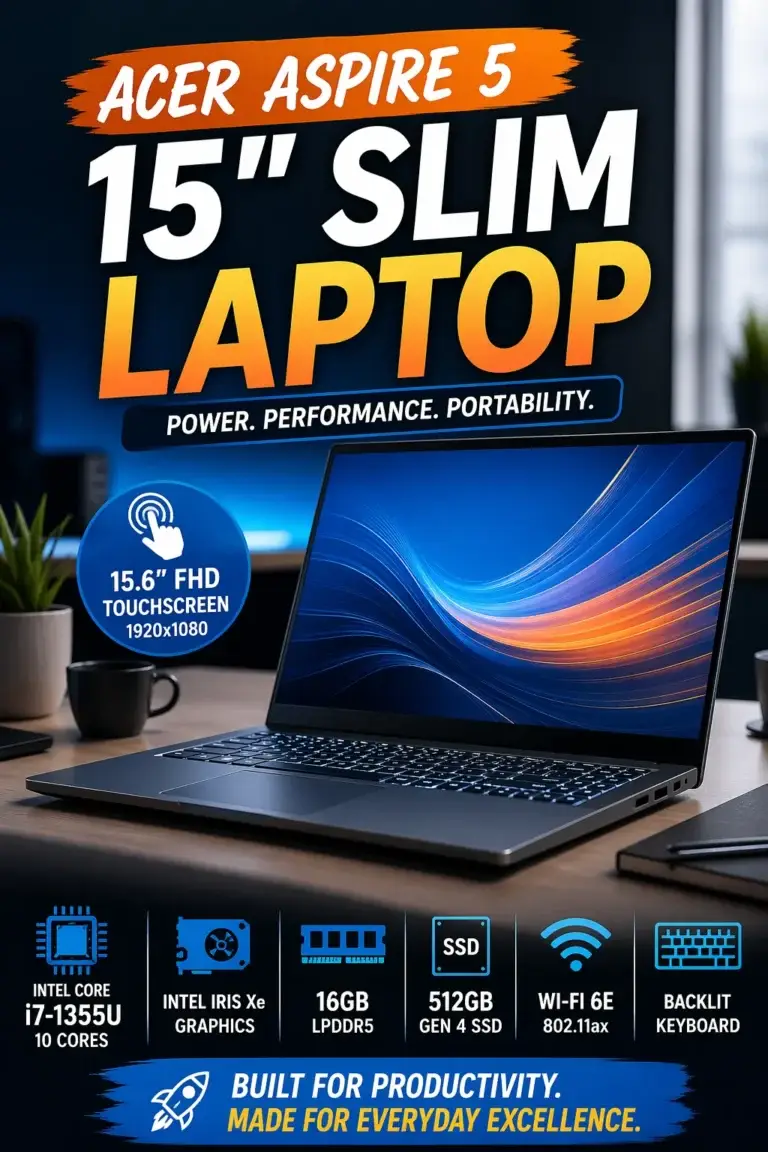
The Acer Aspire 5 A515-56-702V is our top recommendation for the best laptop under $1000 in 2026. Combining an Intel Core i7-1165G7 processor, 16GB of DDR4 memory, and a fast 512GB NVMe SSD, it delivers the performance most users actually need for work, college, productivity, and everyday multitasking without paying premium laptop prices. Whether you're managing large spreadsheets, attending online meetings, browsing with dozens of tabs, creating documents, streaming content, or working on school assignments, the Aspire 5 remains fast, responsive, and reliable throughout the day, making it one of the strongest value laptops available in its price range.
The Acer Aspire 5 earns our Best Overall Laptop Under $1000 recommendation because it successfully balances performance, memory capacity, storage, portability, battery life, and affordability. It delivers a dependable experience for the vast majority of users without forcing unnecessary compromises.
Compared with alternatives like the Lenovo IdeaPad 5 and ASUS Vivobook 15, the Acer Aspire 5 provides one of the strongest all-around experiences for buyers seeking a reliable laptop for work, school, multitasking, and everyday computing. For most people shopping below the $1000 mark, it remains the safest and most balanced recommendation in this guide.
Key Features
Lenovo IdeaPad 5
Best Budget Laptop for Multitasking, Productivity & Everyday Performance
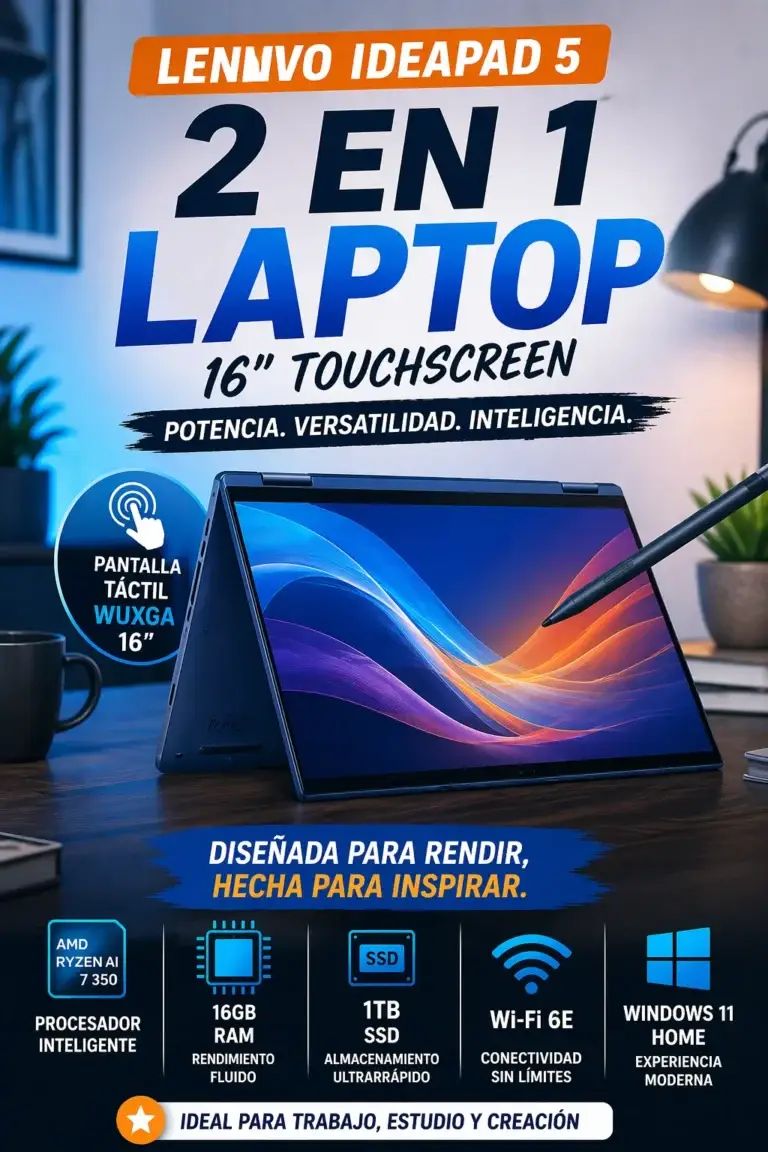
The Lenovo IdeaPad 5 is our recommendation for the best laptop for multitasking under $1000 in 2026. Powered by an efficient AMD Ryzen 7 processor, 16GB of RAM, and fast SSD storage, it delivers the responsiveness needed for users who constantly switch between multiple applications throughout the day. Whether you're managing dozens of browser tabs, working in Microsoft Office, attending Zoom meetings, editing documents, streaming media, or handling demanding productivity tasks, the IdeaPad 5 remains fast, smooth, and reliable without the premium price tag.
The Lenovo IdeaPad 5 earns our Best Laptop for Multitasking Under $1000 award because it delivers one of the best combinations of Ryzen processing power, memory capacity, responsiveness, battery life, and productivity performance available at this price point. It is built for people who expect their laptop to remain fast even when running multiple applications at once.
Compared with the Acer Aspire 5 A515-56-702V, which remains our Best Overall recommendation, the IdeaPad 5 is especially attractive for users who regularly work with larger multitasking workloads and rely on several applications throughout the day. If your priority is keeping dozens of browser tabs, office software, communication tools, and background programs running smoothly at the same time, the IdeaPad 5 is one of the smartest choices under $1000 in 2026.
Key Features
ASUS Vivobook 15
Best Budget Laptop for Work, Storage & Everyday Productivity
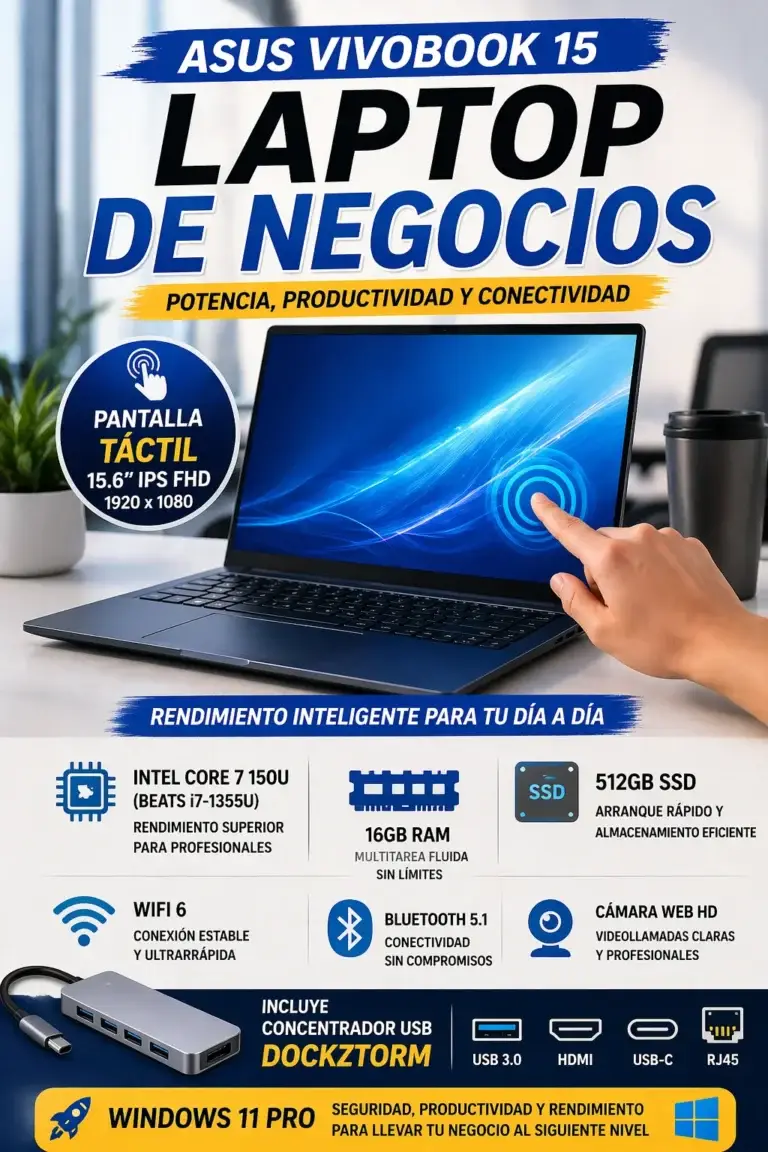
The ASUS Vivobook 15 is our recommendation for the best laptop for work and storage under $1000 in 2026. Combining a capable Intel Core i7 processor, 16GB of RAM, and a spacious 1TB SSD, it is built for users who manage large files, business documents, office software, and productivity projects every day. Whether you're working with spreadsheets, presentations, cloud storage, accounting software, research documents, or thousands of personal files, the Vivobook 15 delivers dependable performance while providing significantly more storage than many competing laptops in this price range.
The ASUS Vivobook 15 earns our Best Laptop for Work & Storage Under $1000 award because it offers one of the best combinations of everyday performance, multitasking capability, and large-capacity SSD storage available in this price category. For professionals and students who store large amounts of data, it delivers outstanding value without sacrificing responsiveness.
Compared with the Acer Aspire 5 A515-56-702V, which remains our Best Overall recommendation, and the Lenovo IdeaPad 5, which excels at heavy multitasking, the ASUS Vivobook 15 stands out for buyers who prioritize storage capacity, document management, business productivity, and long-term workspace flexibility. If keeping all your projects, files, and applications on one fast internal drive is a priority, the Vivobook 15 is one of the smartest laptops under $1000 in 2026.
Key Features
Best Laptops Under $1000 (2026)
Ranked by Performance, Multitasking, Battery Life, Storage & Long-Term Value
Finding the best laptop under $1000 in 2026 is not only about choosing the highest specifications. Many budget laptops look impressive on paper but sacrifice performance, battery life, storage, or build quality.We evaluated these laptops based on real-world everyday performance, multitasking, productivity, storage capacity, reliability, and value to help you choose the right laptop for work, school, remote jobs, and daily use.
| Laptop | CPU & Key Specs | Best For | Why It Wins | Editor's Verdict |
|---|---|---|---|---|
Best Overall
Acer Aspire 5 A515-56-702V
Check Price
| Intel Core i7-1165G7 16GB DDR4 RAM 512GB NVMe SSD 15.6" Full HD IPS Display | Students Professionals Remote Work Everyday Productivity | Excellent balance of performance, memory, storage, and reliability. It delivers smooth multitasking without unnecessary premium pricing. | Best Laptop Under $1000 Overall |
Best Multitasking Laptop
Lenovo IdeaPad 5
Check Price
| AMD Ryzen 7 Processor 16GB RAM Fast SSD Storage Long Battery Life | Heavy Multitasking Students Remote Workers Productivity Users | Designed for users who constantly switch between applications, browser tabs, video calls, documents, and productivity tools. | Best Laptop for Multitasking Under $1000 |
Best Storage Value
ASUS Vivobook 15
Check Price
| Intel Core i7 Processor 16GB RAM 1TB SSD Storage 15.6" Full HD Display | Business Users Office Work Large File Storage Productivity | Massive storage capacity combined with strong everyday performance makes it ideal for users who manage many files, projects, and applications. | Best Work & Storage Laptop Under $1000 |
Recommended Next Reads
Explore more expert laptop buying guides organized by budget, student needs, professional work, and real-world usage.
Whether you need a more affordable laptop, a powerful productivity machine, a college computer, or a professional workstation, our buying guides help you choose the right laptop with confidence.
Best Laptops Under $800 in 2026
Discover the best affordable laptops for students, work, and everyday use with strong performance, battery life, and long-term value.
Explore laptops under $800 →Best Laptops Under $700 in 2026
Find reliable budget laptops that deliver excellent value for students, office work, browsing, and everyday productivity.
Explore budget laptops → Premium UpgradeBest Laptops Under $1500 in 2026
Compare more powerful laptops with premium displays, faster processors, better build quality, and professional performance.
Explore premium laptops → Student GuideBest Laptops for Students in 2026
Explore laptops designed for college, online classes, research, note-taking, productivity, and long study sessions.
Explore student laptops → Business ProductivityBest Business Laptops Under $1000 in 2026
Discover affordable professional laptops built for productivity, meetings, remote work, and business tasks.
Explore business laptops → Everyday PerformanceBest Laptops for Work, Gaming & Everyday Use in 2026
Find versatile laptops capable of handling productivity, entertainment, gaming, and daily workloads.
Explore versatile laptops →EDITOR'S FINAL RECOMMENDATIONS
After comparing performance, multitasking ability, storage capacity, battery life, display quality, reliability, and real-world everyday use, these are the three laptops that offer the best value under $1000 in 2026.
Acer Aspire 5 A515-56-702V
The smartest all-around laptop under $1000 for most users. It delivers excellent everyday performance with Intel Core i7 power, 16GB RAM, fast SSD storage, and reliable performance for work, study, remote jobs, and multitasking.
- ✓ Intel Core i7-1165G7 Processor
- ✓ 16GB DDR4 RAM
- ✓ 512GB NVMe SSD
- ✓ 15.6-inch Full HD IPS Display
Lenovo IdeaPad 5
Designed for users who constantly switch between applications, browser tabs, meetings, documents, and productivity tools. The IdeaPad 5 focuses on smooth multitasking without frustrating slowdowns.
- ✓ AMD Ryzen 7 Performance
- ✓ 16GB Fast Memory
- ✓ Large SSD Storage
- ✓ Excellent Productivity Performance
ASUS Vivobook 15
The ideal option for professionals, students, and users who need extra storage capacity. With a large SSD, strong productivity performance, and a comfortable display, it is built for long-term daily work.
- ✓ Intel Core i7 Processor
- ✓ 16GB RAM
- ✓ 1TB SSD Storage
- ✓ 15.6-inch Full HD Display
Which laptop under $1000 should you buy?
Acer Aspire 5
Lenovo IdeaPad 5
ASUS Vivobook 15
- Choose the Acer Aspire 5 if you want the safest overall laptop under $1000 with excellent balance between performance, reliability, and value.
- Choose the Lenovo IdeaPad 5 if your priority is multitasking, productivity, multiple applications, and demanding daily workflows.
- Choose the ASUS Vivobook 15 if you need more storage space for documents, projects, files, and long-term productivity.
EDITOR'S FINAL VERDICT
After comparing performance, multitasking ability, storage capacity, battery life, display quality, reliability, and real-world everyday use, one conclusion stands out:The best laptop under $1000 is not simply the one with the highest specifications. It is the laptop that delivers the right balance of speed, reliability, comfort, and long-term value for the way you actually use it.
Most buyers make the mistake of choosing a laptop only by processor numbers or marketing claims. In reality, daily performance depends on having enough RAM, fast SSD storage, balanced hardware, good battery life, and a machine that can handle your workflow without frustration.
For most users in 2026, the ideal budget laptop should include at least 16GB RAM, SSD storage, a modern processor, reliable battery life, and enough performance to handle work, study, multitasking, and everyday productivity for years.- Choose the Acer Aspire 5 A515-56-702V if you want the safest overall choice with excellent balance between performance, reliability, price, and everyday usability.
- Choose the Lenovo IdeaPad 5 if you constantly multitask with many applications, browser tabs, meetings, and productivity tools running at the same time.
- Choose the ASUS Vivobook 15 if storage capacity is your priority and you need space for documents, projects, software, and large files.
Top Laptop Recommendations Under $1000 (2026)
Acer Aspire 5 A515-56-702V
Our Editor's Choice for most buyers because it delivers the best combination of speed, reliability, multitasking performance, and value without unnecessary compromises.
- ✓ Intel Core i7 Performance
- ✓ 16GB RAM
- ✓ 512GB NVMe SSD
- ✓ Best Overall Value
Lenovo IdeaPad 5
The ideal option for users who need smooth performance while switching between multiple apps, browser tabs, productivity tools, and demanding daily workflows.
- ✓ AMD Ryzen Performance
- ✓ 16GB Memory
- ✓ Fast SSD Storage
- ✓ Productivity Focused
ASUS Vivobook 15
A strong productivity laptop for users who need more storage space, reliable performance, and a comfortable experience for work, school, and professional tasks.
- ✓ Intel Core i7 Processor
- ✓ 16GB RAM
- ✓ 1TB SSD Storage
- ✓ Productivity Focused
- ✓ You want the safest overall option
- ✓ You need reliable everyday performance
- ✓ You want the best value under $1000
- ✓ You don't want to overthink your purchase
- ✓ You run many apps at once
- ✓ You work with multiple browser tabs
- ✓ Multitasking performance matters most
- ✓ You need smooth productivity workflows
- ✓ You need more storage space
- ✓ You manage large files and projects
- ✓ Work productivity is your priority
- ✓ You want long-term storage flexibility
A laptop is a tool you use every day for studying, working, creating, communicating, and managing your digital life. The best choice is not always the most expensive model — it is the one that delivers dependable performance where you actually need it.
Among all laptops tested in this guide, the Acer Aspire 5 A515-56-702V offers the strongest balance of performance, reliability, and value, making it our Editor's Choice for the best laptop under $1000 in 2026.
Compare current prices, available configurations, warranty options, and stock availability before choosing the laptop that best fits your needs and budget.
Check Latest DealsEDITOR'S FAQ
Buying a laptop under $1000 in 2026 requires more than comparing processor names and specifications.The best choice depends on real-world performance, multitasking ability, battery life, storage capacity, reliability, and how you plan to use your laptop every day.Below are the most common questions buyers ask before choosing the best laptop under $1000.
It delivers the best combination of performance, reliability, and value with an Intel Core i7 processor, 16GB RAM, and fast SSD storage.
It is an excellent choice for students, professionals, remote workers, and anyone looking for a dependable laptop that handles everyday tasks smoothly.
Modern laptops in this category can provide excellent performance for work, school, productivity, multitasking, and entertainment.
- 16GB RAM for smooth multitasking
- Fast SSD storage for quick loading times
- Modern Intel Core i7 or AMD Ryzen 7 processors
- Better battery life and build quality
Modern workloads often include multiple browser tabs, office applications, video calls, productivity software, and background processes running simultaneously.
- 8GB RAM → Basic everyday use
- 16GB RAM → Students, professionals, multitasking
- 32GB RAM → Heavy workloads and advanced users
For laptops under $1000, 16GB RAM provides the best balance between performance and long-term value.
The Acer Aspire 5 is the best option for most people because it offers balanced performance, reliability, and excellent everyday usability.
The Lenovo IdeaPad 5 is better for users who constantly multitask with many applications, browser tabs, and productivity workflows.
- Acer Aspire 5 → Best overall choice
- Lenovo IdeaPad 5 → Best for heavy multitasking
Its large storage capacity makes it ideal for professionals who manage documents, projects, business files, presentations, and productivity applications.
Users who need more storage space and reliable daily performance will benefit from its balanced design.
Students need a reliable laptop for online classes, research, assignments, presentations, browsing, and everyday multitasking.
- Fast and reliable performance
- Enough memory for school workloads
- Quick SSD storage
- Strong value for the price
The lifespan depends on choosing the right hardware, including RAM capacity, processor performance, SSD storage, battery quality, and build quality.
- 16GB RAM recommended
- SSD storage required
- Modern processor preferred
- Reliable construction
Integrated graphics can run esports titles and casual games, but demanding AAA games usually require a dedicated gaming laptop with a stronger GPU.
- Valorant → Good performance
- Minecraft → Good performance
- Fortnite → Possible depending on settings
- AAA gaming → Dedicated GPU recommended
- Best Overall: Acer Aspire 5 A515-56-702V
- Best Multitasking: Lenovo IdeaPad 5
- Best Storage & Work: ASUS Vivobook 15
For most buyers, the Acer Aspire 5 remains the safest recommendation because it provides the strongest balance between performance, reliability, and price.
BUYING GUIDE INSIGHTS
Buying a laptop under $1000 in 2026 does not mean choosing the cheapest option available. The biggest mistake most buyers make is focusing only on specifications while ignoring real-world performance, reliability, battery life, and long-term usability.A great budget laptop should provide smooth multitasking, fast storage, enough memory, reliable performance, and the right features for your daily workflow. Before spending your money, avoid these common mistakes and choose a laptop that will remain fast and useful for years.
Many buyers believe the processor name is the most important factor when choosing a laptop. However, the best laptops under $1000 combine balanced hardware: enough RAM, fast SSD storage, efficient processors, good battery life, comfortable keyboards, and reliable build quality.For most users in 2026, we recommend choosing at least 16GB of RAM, SSD storage, and a modern Intel Core, AMD Ryzen, or Apple Silicon processor for the best long-term experience.
Choosing only by brand name
- Popular brands do not always offer the best value.
- Some models prioritize marketing over real performance.
- Different laptop series can have completely different quality levels.
Better decision: Compare the actual hardware, performance, battery life, and user experience instead of choosing only by logo.
Buying a laptop with only 8GB RAM
- Modern browsers and applications consume more memory than before.
- Multitasking becomes slower with limited RAM.
- Future software updates may require more resources.
Better decision: Choose 16GB RAM whenever possible for smoother multitasking and better long-term value.
Ignoring SSD storage speed and capacity
- Slow storage affects boot times and application loading.
- Small drives fill quickly with files and applications.
- Traditional HDD storage creates a poor modern experience.
Better decision: Choose at least a 512GB SSD for fast performance and enough space for everyday use.
Overpaying for performance you don't need
- Many users buy powerful hardware they never use.
- Gaming laptops can add unnecessary weight and cost.
- Higher specifications do not always mean better value.
Better decision: Match the laptop specifications with your real needs: study, work, productivity, creativity, or gaming.
Ignoring battery life and portability
- A powerful laptop is less useful if it constantly needs charging.
- Students and professionals often need mobility.
- Battery performance affects the daily experience.
Better decision: Choose a laptop that balances performance, portability, and battery life for your lifestyle.
Buying without considering future needs
- Your workflow may become more demanding over time.
- Software requirements continue increasing.
- Replacing laptops every year becomes expensive.
Better decision: Choose hardware that gives you several years of comfortable everyday performance.
💡 Smart Buying Advice for Laptop Buyers in 2026
You need reliable performance for school, office work, browsing, streaming, productivity, and everyday multitasking.
You work with demanding applications, creative projects, programming, AI tools, gaming, or professional workloads.
Key takeaway: The best laptop under $1000 is not the one with the biggest numbers on paper. It is the one that delivers the right balance of speed, reliability, battery life, storage, and usability for your daily needs.
After comparing the best options in this guide, these are our Editor's top recommendations for 2026:
- Best Overall Laptop Under $1000: Acer Aspire 5 — the safest choice for most users with balanced performance, reliable hardware, and excellent everyday value.
- Best Multitasking Laptop: Lenovo IdeaPad 5 — ideal for users who work with many applications, browser tabs, and productivity workflows.
- Best Productivity Laptop: ASUS Vivobook 15 — a great choice for users who need additional storage and dependable performance.
- Best Upgrade Choice: Consider premium models above this category if you need professional workloads, advanced creative applications, or maximum future-proofing.
Need help choosing your laptop?
Not sure which option fits your workflow? Get a personalized recommendation based on your budget, performance needs, and usage.
Get personalized recommendation⚡ Usually responds within 24 hours