
Explore Our Budget Laptop Guides
Discover our complete collection of budget laptop recommendations, comparisons, and buying guides designed to help you find the best value for your budget.Best Laptops Under $800 in 2026: 7 Top Picks for Students, Work & Everyday Use
The best laptop under $800 in 2026 is not necessarily the most powerful or the most expensive. The right choice depends on your workload, budget, portability needs, battery life expectations, and how long you want the laptop to remain useful.
Today's affordable laptops can handle much more than basic web browsing. The right model can comfortably support productivity, remote work, online classes, research, multitasking, media consumption, and everyday computing without requiring a $1,000+ budget.
In this guide, we've selected the best laptops under $800 based on real-world performance, display quality, battery life, portability, memory, storage, upgrade potential, and overall value. The lineup includes options for students, professionals, remote workers, families, and buyers looking for better performance without overspending.
Lenovo IdeaPad Slim 3 (Ryzen 5 5625U)
Best Overall Laptop Under $800 for Students, Work & Everyday Use
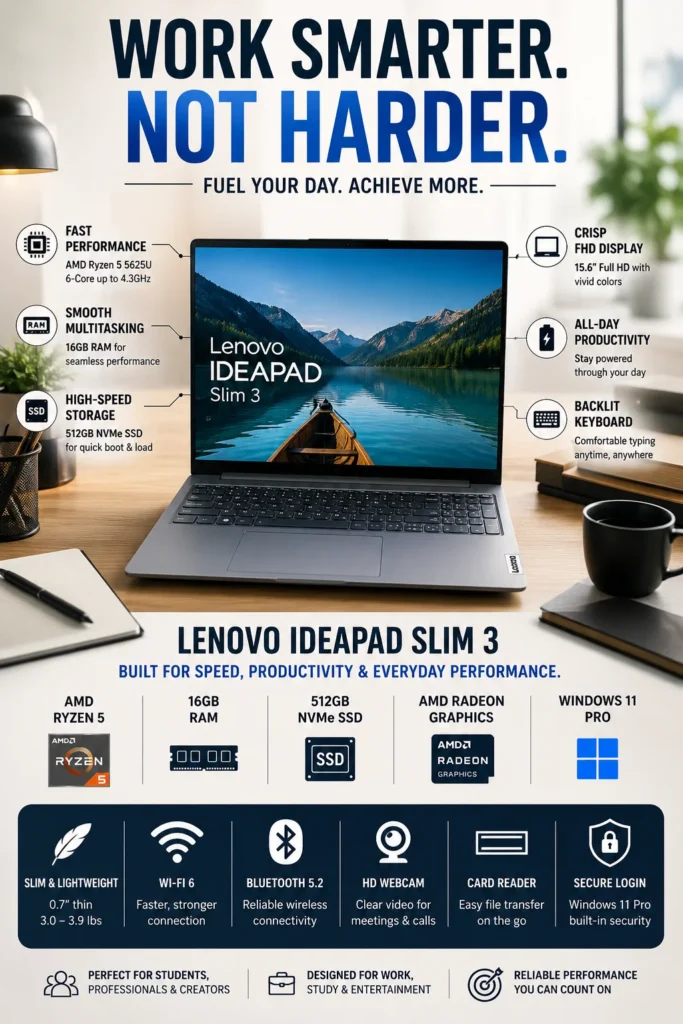
The Lenovo IdeaPad Slim 3 (Ryzen 5 5625U, 16GB RAM, 512GB SSD) is our top recommendation for the best laptop under $800 in 2026. It delivers one of the strongest combinations of performance, memory, storage, portability, and overall value in this price range. Whether you're attending online classes, writing papers, working remotely, managing spreadsheets, browsing the web, streaming media, or multitasking across multiple applications, the IdeaPad Slim 3 provides more than enough performance for everyday productivity while remaining affordable and easy to carry.
The Lenovo IdeaPad Slim 3 earns our Best Overall Laptop Under $800 award because it delivers the strongest balance of performance, memory, storage, portability, and value for the majority of buyers. It is powerful enough for demanding everyday multitasking while remaining affordable enough to make sense for students, professionals, and families. From attending online classes and writing assignments to managing spreadsheets, conducting research, joining video meetings, and running multiple applications, it provides a dependable everyday computing experience without unnecessary compromises.
Compared with many budget laptops that still rely on 8GB RAM and entry-level processors, this Ryzen 5 and 16GB configuration provides noticeably better multitasking performance and greater long-term usability. The combination of 16GB memory and a 512GB NVMe SSD also means buyers do not immediately need to compromise on storage or upgrade memory to achieve a comfortable everyday experience. For most people shopping below $800, the IdeaPad Slim 3 is one of the safest overall choices because it focuses on the areas that matter most: responsive performance, practical memory, fast storage, portability, and strong value.
Key Features
ASUS Vivobook Go 15 (Ryzen 5 7520U)
Best Value Laptop Under $800 for Students & Everyday Productivity
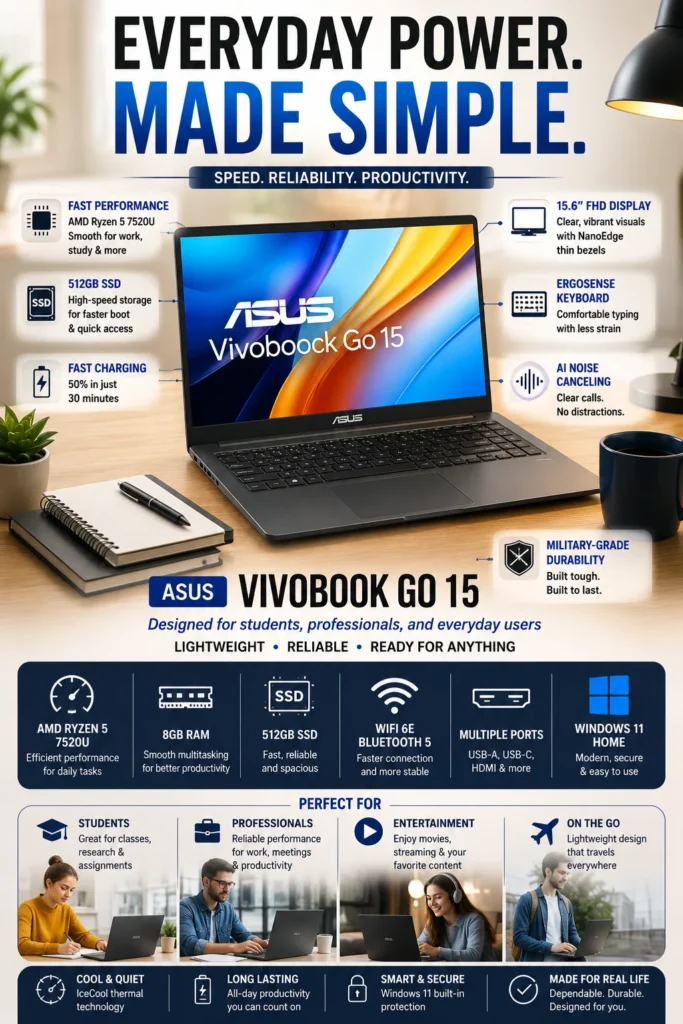
The ASUS Vivobook Go 15 (Ryzen 5 7520U) is our Best Value Laptop Under $800 in 2026 for students, remote workers, and everyday users who want a capable laptop without spending more than necessary. It combines responsive everyday performance, fast SSD storage, portability, fast charging, and durable construction in an affordable package that focuses on the features most buyers actually need.
The ASUS Vivobook Go 15 earns our Best Value Laptop Under $800 award because it focuses on delivering the features that matter most to everyday users without adding unnecessary cost. It provides enough performance for schoolwork, office applications, web browsing, communication, and entertainment while remaining lightweight and easy to carry. Fast charging and durable construction further increase its practicality for students and mobile users.
Compared with more expensive productivity laptops, the Vivobook Go 15 gives buyers a more affordable path to a modern everyday laptop while still providing fast SSD storage, useful connectivity, portability, and practical quality-of-life features. Its 8GB RAM configuration does mean it has less multitasking headroom than the 16GB Lenovo IdeaPad Slim 3, making the Lenovo the better choice for heavier multitasking and longer-term performance headroom. However, for buyers prioritizing value and everyday usability, the ASUS Vivobook Go 15 remains one of the strongest affordable options in this lineup.
Key Features
Acer Aspire 5 14 (Core i5-1335U)
Best Premium Productivity Laptop Under $800
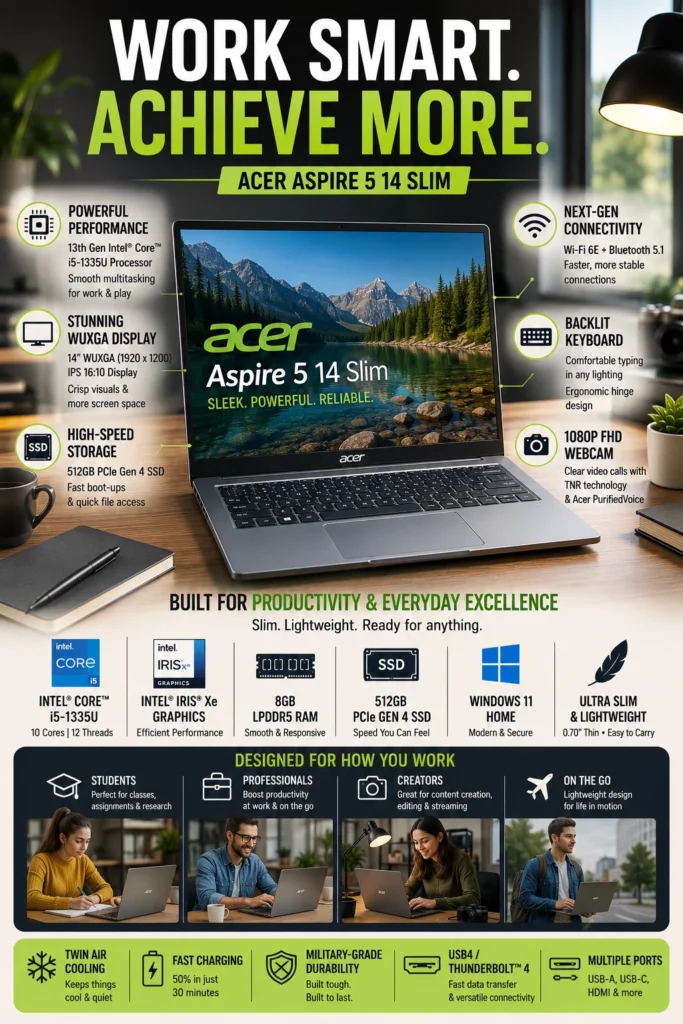
The Acer Aspire 5 14 (Core i5-1335U) is our productivity-focused recommendation for buyers who want a more premium experience under $800. It combines a capable Intel processor, a higher-resolution 16:10 display, fast SSD storage, modern connectivity, and a refined design to create a laptop that is particularly well suited to students, remote workers, office users, and professionals who spend significant time working with documents, spreadsheets, presentations, and multiple applications.
The Acer Aspire 5 14 earns its Best Productivity Laptop Under $800 position because it focuses on the features that matter most to people who use their laptop as a daily work or study tool. The combination of a strong Core i5 processor, 16:10 WUXGA display, fast SSD, and Thunderbolt 4 connectivity gives it a more premium productivity experience than many conventional budget laptops.
Compared with entry-level laptops built primarily around affordability, the Aspire 5 provides stronger connectivity and a more productivity-oriented design. Its 8GB RAM configuration, however, is an important limitation for buyers who regularly perform heavy multitasking or want maximum long-term memory headroom. Users who prioritize memory capacity should consider the 16GB Lenovo IdeaPad Slim 3 instead, while buyers who value display quality, Thunderbolt 4, and a more refined work experience will find the Aspire 5 particularly compelling.
Key Features
Dell Inspiron 15 (i5-1334U)
Best Touchscreen Laptop for Work, Students & Everyday Productivity
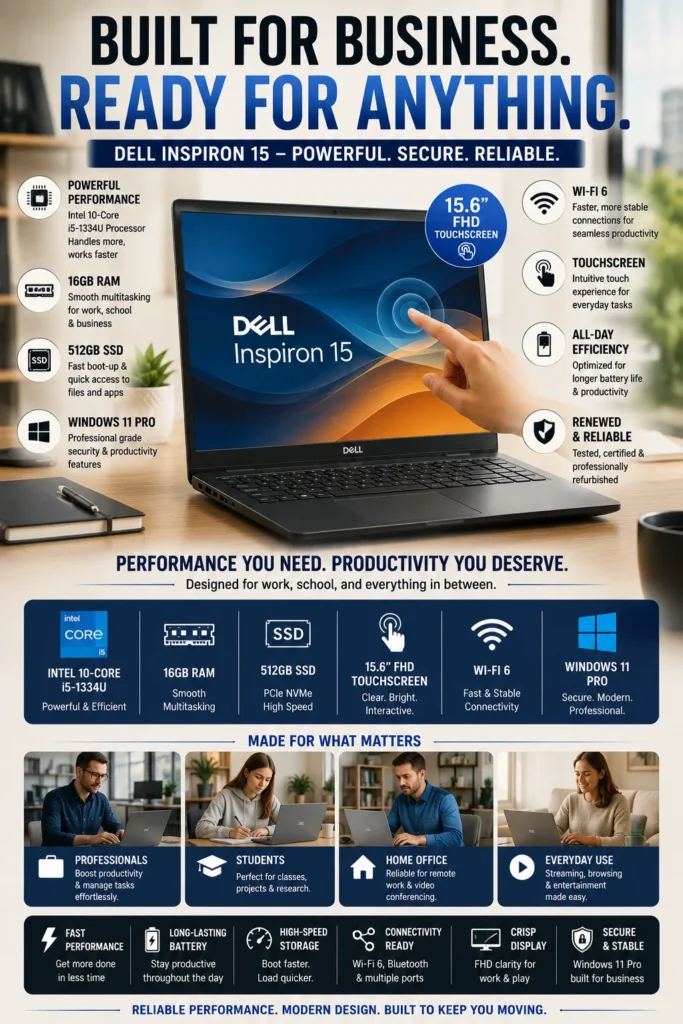
The Dell Inspiron 15 (Intel Core i5-1334U, 16GB RAM, 512GB SSD) is our business and productivity-focused recommendation for buyers who want a large touchscreen, strong multitasking performance, and a practical configuration for work and study. With 16GB of RAM, a 512GB SSD, a 15.6-inch Full HD touchscreen, and Windows 11 Pro, it provides a comfortable everyday experience for students, office users, remote workers, and professionals who value usability and productivity features.
The Dell Inspiron 15 earns its Best Business & Productivity Laptop Under $800 position because it combines strong multitasking hardware with a large touchscreen and business-oriented software in a practical everyday package. The 16GB RAM and 512GB SSD configuration is particularly well suited to users who regularly work with multiple applications, documents, browser tabs, and communication tools throughout the day.
Compared with many entry-level laptops equipped with 8GB RAM, this configuration provides considerably more multitasking headroom and a more comfortable experience for demanding everyday productivity. The touchscreen and Windows 11 Pro also give the Inspiron 15 a stronger business-oriented profile, although buyers should note that the configuration may be a renewed model. If purchasing a brand-new laptop is a priority, other options in this lineup may be more appropriate.
Key Features
Lenovo IdeaPad Slim 3X Copilot+
Best AI-Powered Laptop for Students & Productivity
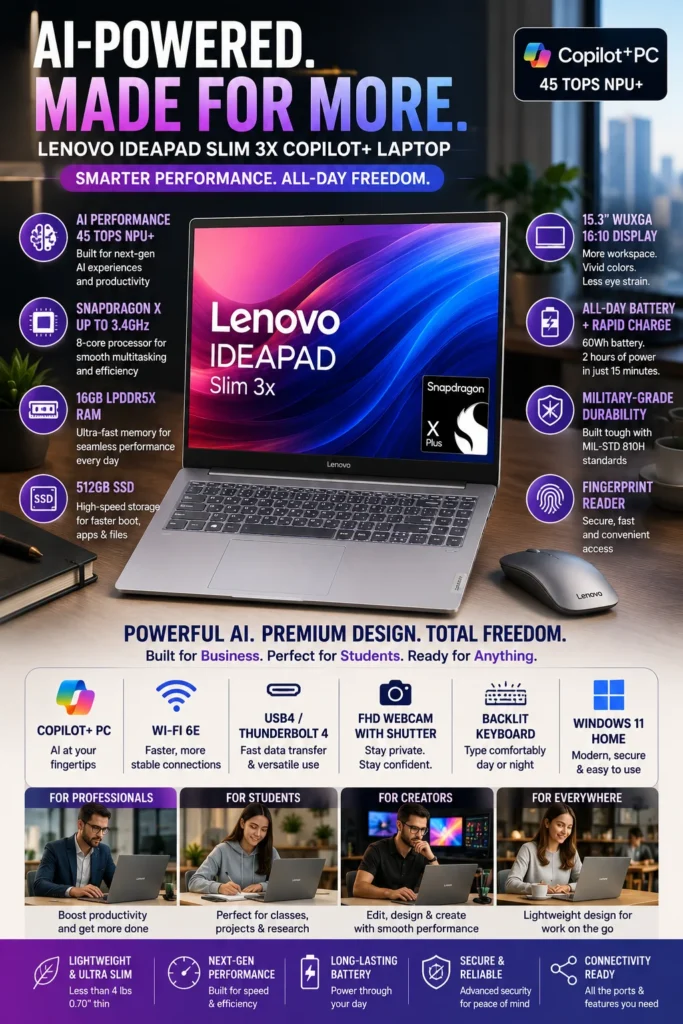
The Lenovo IdeaPad Slim 3X Copilot+ PC is our AI-focused recommendation for buyers who want a modern Windows laptop built around on-device AI, excellent battery efficiency, and next-generation connectivity. Powered by the Snapdragon X platform with a dedicated NPU, 16GB of LPDDR5X memory, a 15.3-inch WUXGA 16:10 display, and Wi-Fi 7, it offers a forward-looking combination of performance, mobility, and AI capabilities for students, remote workers, and everyday productivity users.
The Lenovo IdeaPad Slim 3X earns its Best AI Laptop Under $800 position because it brings the Copilot+ PC experience and dedicated on-device AI acceleration into a more affordable laptop category. Its combination of an NPU, 16GB memory, large 16:10 display, efficient Snapdragon X platform, and Wi-Fi 7 makes it particularly attractive to buyers who want newer Windows hardware rather than another conventional Intel or AMD configuration.
The main consideration is Windows on ARM compatibility. Most common productivity applications and many modern Windows applications can run through native ARM support or Microsoft's compatibility technology, but certain legacy applications, drivers, peripherals, games, or specialized professional software may still behave differently from their x86 counterparts. Buyers who rely on older or highly specialized Windows software should verify compatibility before choosing this model. For students and everyday productivity users who primarily work with modern applications, web services, Microsoft 365, and supported AI features, the IdeaPad Slim 3X is one of the most forward-looking options in this price range.
Key Features
Acer Aspire 3 (Intel Core i3-N305)
Best Affordable Laptop for Everyday Tasks & Students
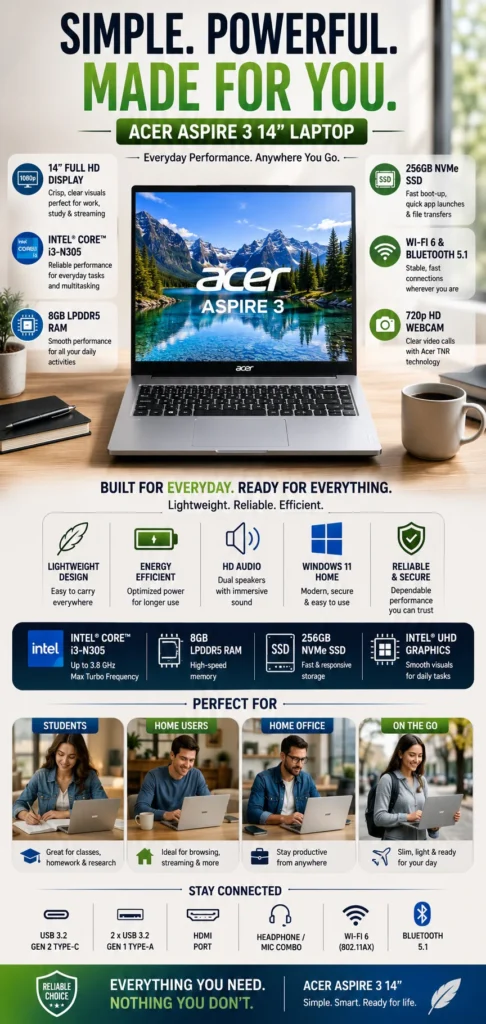
The Acer Aspire 3 (Intel Core i3-N305) is our budget-focused recommendation for buyers who want a dependable Windows laptop at a significantly lower price. It is designed for students, families, casual users, and anyone whose primary needs are web browsing, online classes, Microsoft Office, Google Workspace, video calls, streaming, and other everyday tasks. It does not compete with the more powerful laptops in this guide, but its low price makes it an attractive choice when affordability is the highest priority.
The Acer Aspire 3 earns its Best Budget Laptop Under $400 position by focusing on the essentials rather than expensive performance features. For students and casual users who primarily browse the web, write documents, attend online classes, manage email, watch videos, and use cloud-based applications, it provides a practical Windows experience at a much lower entry price.
The main limitation is performance headroom. The Aspire 3 is not the right choice for demanding multitasking, serious gaming, video editing, 3D applications, or other heavy workloads. Buyers who regularly run many applications simultaneously or want a laptop they can keep for demanding workloads over several years should consider stepping up to a 16GB model such as the Lenovo IdeaPad Slim 3. For basic schoolwork and everyday computing, however, the Aspire 3 can provide excellent value when keeping the purchase price low is the priority.
Key Features
HP Pavilion 15 AI-Ready
Best Affordable Laptop for Everyday Productivity and Home Use
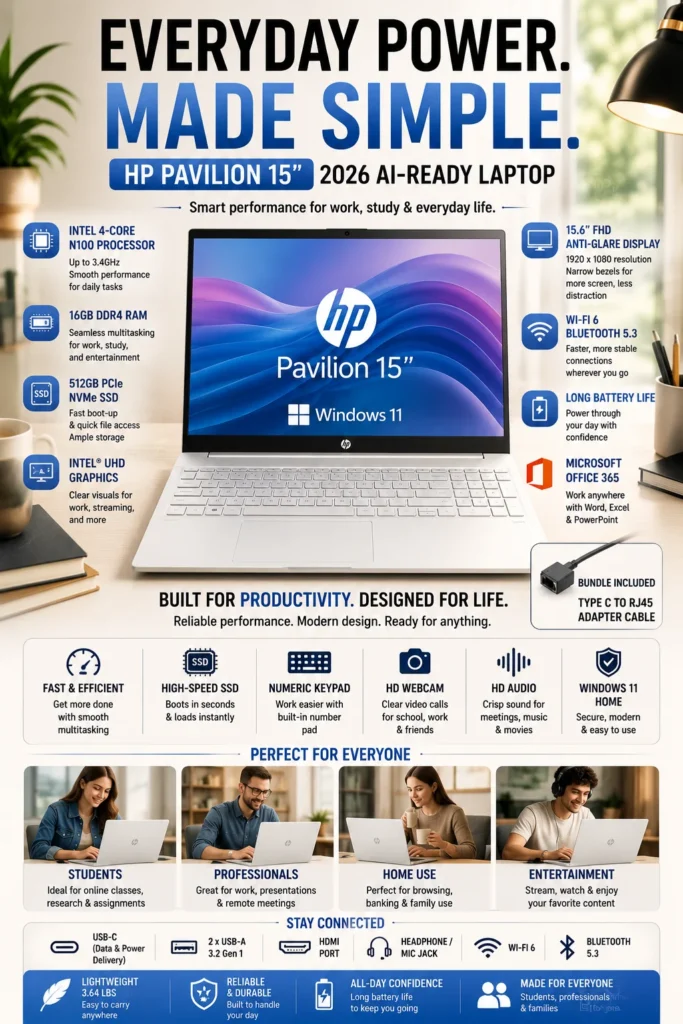
The HP Pavilion 15 AI-Ready is our everyday-use recommendation for buyers who want an affordable laptop with generous memory, fast SSD storage, and a large Full HD display. Its 16GB RAM and 512GB SSD configuration make it particularly well suited to students, families, home-office users, and anyone who regularly works with multiple browser tabs and everyday productivity applications without needing a high-performance processor.
The HP Pavilion 15 earns its Best Budget Laptop for Basic Everyday Tasks position by prioritizing the features that matter most to everyday users: memory, storage, screen size, and usability. The 16GB RAM and 512GB SSD configuration gives it considerably more breathing room than many entry-level laptops when working with browser tabs, documents, email, video calls, and common productivity applications.
The main limitation is the Intel N100 processor. Although it is well suited to everyday computing, it is not designed for demanding multitasking, modern gaming, professional video editing, 3D workloads, or intensive content creation. Buyers who need significantly more processing performance should move up to the Lenovo IdeaPad Slim 3 or another Core i5/Ryzen 5 option in this guide. For families, students, and home users who prioritize memory and storage at an affordable price, however, the Pavilion 15 remains a practical everyday choice.
Key Features
Best Laptops Under $800 in 2026
Ranked by Performance, Value, Battery Life, Portability, Display Quality & Everyday Usability
Choosing the best laptop under $800 depends on more than processor specifications. Students, professionals, remote workers, families, and everyday users can have very different priorities, from multitasking and portability to display quality, memory capacity, battery efficiency, and long-term value. We evaluated these laptops based on their real-world capabilities, hardware configuration, usability, productivity performance, portability, and overall value to help you choose the right laptop for your needs in 2026.
| Laptop | CPU & Key Specs | Best For | Why It Wins | Editor's Verdict |
|---|---|---|---|---|
Best Overall
Lenovo IdeaPad Slim 3
Check Price
| AMD Ryzen 5 5625U 16GB RAM 512GB SSD 15.6" Full HD | Students Professionals Multitasking Everyday Productivity | Offers the strongest overall combination of processing performance, 16GB memory, SSD storage, portability, and value. It handles demanding everyday multitasking better than most entry-level alternatives in this price range. | Best Laptop for Most Buyers Under $800 |
Best Value
ASUS Vivobook Go 15
Check Price
| AMD Ryzen 5 7520U 8GB LPDDR5 512GB SSD 15.6" Full HD | Students Remote Workers Everyday Productivity Travel | Combines dependable everyday performance, fast storage, portability, fast charging, and durable construction at an attractive price. The main limitation is the 8GB memory configuration, which provides less long-term headroom than 16GB alternatives. | Best Value Laptop for Students & Everyday Use |
Best Productivity
Acer Aspire 5 14
Check Price
| Intel Core i5-1335U 8GB RAM 512GB SSD 14" WUXGA | Office Users Remote Work Students Productivity | The 16:10 WUXGA display, Core i5 processor, premium aluminum design, and Thunderbolt 4 connectivity give it a more refined productivity experience than many budget-focused competitors. The 8GB RAM configuration is its main limitation. | Best Premium Productivity Laptop Under $800 |
Best Business
Dell Inspiron 15
Check Price
| Intel Core i5-1334U 16GB RAM 512GB SSD 15.6" Full HD Touchscreen | Business Users Remote Work Office Productivity Students | The large touchscreen, 16GB RAM, strong everyday performance, and business-oriented configuration make it particularly attractive for office and productivity workloads. Buyers should verify whether the specific listing is new or renewed before purchasing. | Best Touchscreen Laptop for Work & Productivity |
Best AI Laptop
Lenovo IdeaPad Slim 3X
Check Price
| Qualcomm Snapdragon X 16GB LPDDR5X 512GB SSD 15.3" WUXGA 45 TOPS NPU | AI Productivity Students Frequent Travelers Battery-Focused Users | Its Snapdragon X platform, dedicated 45 TOPS NPU, Wi-Fi 7, and highly efficient ARM architecture make it one of the most forward-looking laptops in this category. Compatibility with some legacy Windows applications remains an important consideration. | Best AI-Ready Laptop Under $800 |
Best Budget
Acer Aspire 3
Check Price
| Intel Core i3-N305 8GB LPDDR5 256GB SSD 14" Full HD | Budget Students Online Learning Web Browsing Basic Productivity | Provides a capable everyday computing experience at a lower price, with a Full HD display, modern memory, and SSD storage. Its 8GB RAM and entry-level processor make it better suited to basic workloads than demanding multitasking. | Best Entry-Level Laptop for Budget Buyers |
Best Everyday Use
HP Pavilion 15
Check Price
| Intel N100 16GB RAM 512GB SSD 15.6" Full HD | Families Students Home Office Everyday Productivity | The combination of 16GB RAM, 512GB SSD storage, and a large Full HD display makes it particularly practical for everyday users who prioritize memory, storage, and screen space. The Intel N100 limits its suitability for demanding workloads. | Best Affordable Laptop for Everyday Productivity |
Recommended Next Reads
Still deciding which laptop is right for you? Explore our expert laptop comparisons and buying guides for students, professionals, remote workers, and different budgets.
Whether you're comparing laptops for college, looking for a cheaper alternative under $700 or $500, choosing a business laptop, or trying to understand Intel vs. AMD performance, these guides can help you make a more confident purchase decision.
Best Laptops for Students in 2026: Top 7 Picks for Every Budget
Compare the best laptops for college and university students across different budgets, workloads, battery requirements, portability needs, and productivity tasks.
Explore the Best Student Laptops →Best Laptops Under $700 in 2026
Looking to spend less than $800? Explore seven budget-friendly laptops that deliver strong performance, portability, and everyday usability without unnecessary spending.
Explore Laptops Under $700 → Budget BuyersBest Laptops Under $500 in 2026
Find affordable laptops for students, browsing, Office work, online learning, streaming, and everyday productivity when keeping the budget as low as possible.
Explore Laptops Under $500 → Remote WorkBest Laptops for Remote Work in 2026
Discover laptops optimized for productivity, video calls, multitasking, battery life, portability, and the demands of working from home.
Explore Remote Work Laptops → Business & ProductivityBest Business Laptops in 2026
Compare business-focused laptops built for office productivity, professional applications, multitasking, reliability, and long-term everyday use.
Explore Business Laptops → Processor GuideIntel vs AMD Laptops in 2026
Not sure whether Intel or AMD is the better choice? Learn how the two platforms compare for performance, battery life, productivity, multitasking, and everyday computing.
Compare Intel vs AMD → Step Up in BudgetBest Laptops Under $1000 in 2026
If you're willing to spend a little more, explore laptops under $1,000 with stronger processors, better displays, improved graphics performance, and more premium features.
Explore Laptops Under $1000 →EDITOR'S FINAL RECOMMENDATIONS
After comparing processor performance, memory, storage, display quality, portability, connectivity, battery life, and real-world usability, these are our final recommendations for the best laptops under $800 in 2026.
There is no single laptop that is perfect for everyone. The best choice depends on whether you prioritize overall performance, portability, productivity, business features, AI capabilities, student-friendly pricing, or everyday home use.
Lenovo IdeaPad Slim 3
The strongest overall balance in this comparison. Its Ryzen 5 5625U processor, 16GB of RAM, and 512GB SSD provide a combination of performance, multitasking capability, and everyday usability that makes it an excellent choice for students, professionals, and general productivity.
- ✓ AMD Ryzen 5 5625U
- ✓ 16GB RAM
- ✓ 512GB SSD
- ✓ Excellent Everyday Multitasking
ASUS Vivobook Go 15
A particularly strong value option for students and everyday users. The Ryzen 5 7520U, fast SSD storage, lightweight design, fast charging, and durable construction create a well-rounded package without pushing into premium pricing.
- ✓ AMD Ryzen 5 7520U
- ✓ 512GB SSD
- ✓ Fast Charging
- ✓ Lightweight Design
Acer Aspire 5 14
The best choice for productivity-focused users who value a higher-resolution 16:10 display and advanced connectivity. Its Core i5 processor and Thunderbolt 4 support make it especially attractive for office work, multitasking, external displays, and professional workflows.
- ✓ Intel Core i5-1335U
- ✓ 14-inch WUXGA Display
- ✓ Thunderbolt 4 / USB4
- ✓ Premium Aluminum Design
Dell Inspiron 15
A strong option for users who prioritize a large touchscreen, 16GB memory, and business-oriented features. It is particularly well suited to office applications, remote work, research, video conferencing, and everyday professional productivity.
- ✓ Intel Core i5-1334U
- ✓ 16GB RAM
- ✓ 15.6-inch Touchscreen
- ✓ Windows 11 Pro
Lenovo IdeaPad Slim 3X Copilot+
The most forward-looking option in the lineup. Its Snapdragon X platform, dedicated 45 TOPS NPU, 16GB LPDDR5X memory, Wi-Fi 7, and efficient ARM architecture make it particularly interesting for buyers who want a modern Copilot+ PC and excellent battery efficiency.
- ✓ Snapdragon X Processor
- ✓ 45 TOPS NPU
- ✓ 16GB LPDDR5X
- ✓ Wi-Fi 7
Acer Aspire 3
The best choice when keeping the purchase price low is the priority. Its Core i3-N305 processor, 8GB LPDDR5 memory, 256GB NVMe SSD, and Full HD display provide a solid foundation for schoolwork, browsing, Office applications, streaming, and everyday computing.
- ✓ Intel Core i3-N305
- ✓ 8GB LPDDR5
- ✓ 256GB NVMe SSD
- ✓ Full HD Display
HP Pavilion 15 AI-Ready
A practical choice for families, students, and home-office users who want generous memory and storage at a budget-friendly price. The 16GB RAM and 512GB SSD are particularly useful for everyday multitasking, although the Intel N100 platform is intended for lighter workloads.
- ✓ Intel N100 Processor
- ✓ 16GB RAM
- ✓ 512GB PCIe SSD
- ✓ 15.6-inch Full HD Display
Which laptop should you buy under $800?
Lenovo IdeaPad Slim 3
ASUS Vivobook Go 15
Acer Aspire 5 14
Dell Inspiron 15
Lenovo IdeaPad Slim 3X
Acer Aspire 3
HP Pavilion 15
- Choose the Lenovo IdeaPad Slim 3 if you want the strongest overall combination of performance, memory, storage, and everyday usability.
- Choose the ASUS Vivobook Go 15 if value, portability, fast charging, and everyday reliability are more important than maximum multitasking headroom.
- Choose the Acer Aspire 5 14 if productivity, display quality, premium design, and Thunderbolt 4 connectivity are high priorities.
- Choose the Dell Inspiron 15 if you prefer a large touchscreen and need a laptop suited to business, office, remote-work, and professional productivity tasks.
- Choose the Lenovo IdeaPad Slim 3X if you specifically want a Copilot+ PC with a dedicated AI engine, modern connectivity, and excellent efficiency.
- Choose the Acer Aspire 3 if you want to spend as little as possible while still getting a capable laptop for schoolwork, browsing, Office applications, streaming, and everyday tasks.
- Choose the HP Pavilion 15 AI-Ready if you prioritize 16GB RAM, 512GB SSD storage, and a large display for home use, family computing, and light productivity.
EDITOR'S FINAL VERDICT
After comparing performance, memory, display quality, battery life, portability, connectivity, multitasking capability, and overall value, one conclusion stands out:The best laptop under $800 is not necessarily the one with the most impressive specification sheet. It is the laptop that provides the right balance of performance, usability, reliability, and long-term value for the way you actually work or study.
Laptops in this price range are no longer limited to basic web browsing and simple office work. The best models under $800 can handle university coursework, research, Microsoft Office, Google Workspace, remote work, video calls, multitasking, streaming, and demanding everyday productivity with a much more polished experience than older budget laptops.
For most buyers, 16GB of RAM, fast SSD storage, a quality Full HD or better display, modern connectivity, and a capable processor provide the strongest foundation for a laptop that should remain useful for several years.- Choose the Lenovo IdeaPad Slim 3 if you want the best overall combination of performance, 16GB memory, portability, and value for everyday work, study, and multitasking.
- Choose the Acer Aspire 5 14 if productivity is your priority and you want a stronger professional experience with a premium display, capable Intel processor, and excellent connectivity.
- Choose the ASUS Vivobook Go 15 if you want strong everyday value, portability, fast charging, and a durable design for school, travel, remote work, and general productivity.
- Choose the Dell Inspiron 15 if you specifically want a large touchscreen, 16GB RAM, and business-oriented features for office work, remote work, and professional productivity.
- Choose the Lenovo IdeaPad Slim 3X if AI capabilities, Copilot+ features, exceptional efficiency, and next-generation connectivity are more important to you than maximum compatibility with older Windows applications.
- Choose the Acer Aspire 3 if your priority is keeping the purchase price low while still getting a Full HD display, modern memory, SSD storage, and enough performance for everyday student and office tasks.
- Choose the HP Pavilion 15 if you need an affordable family or home-office laptop with generous memory and storage for browsing, online learning, video calls, documents, and everyday use.
Top 3 Best Laptops Under $800 in 2026
Lenovo IdeaPad Slim 3
Our Editor's Choice for most buyers under $800 because it delivers the strongest overall balance of processor performance, 16GB memory, SSD storage, portability, and everyday usability. It is powerful enough for students and professionals without unnecessarily increasing the cost.
- ✓ AMD Ryzen 5 Processor
- ✓ 16GB RAM
- ✓ 512GB SSD
- ✓ Excellent Everyday Performance
Acer Aspire 5 14
The best choice for productivity-focused users who want a more premium experience. Its capable Intel processor, WUXGA display, and Thunderbolt 4 connectivity make it particularly attractive for remote work, office productivity, and multitasking.
- ✓ Intel Core i5-1335U
- ✓ WUXGA Display
- ✓ Thunderbolt 4
- ✓ Premium Productivity Design
ASUS Vivobook Go 15
A strong value-oriented option for students and mobile users who want a lightweight laptop with fast charging, modern connectivity, and a durable design without spending close to the top of the $800 budget.
- ✓ AMD Ryzen 5 7520U
- ✓ Fast Charging
- ✓ Military-Grade Durability
- ✓ Portable Design
- ✓ You want the best overall laptop under $800
- ✓ You need 16GB RAM for smoother multitasking
- ✓ You want strong performance for school, work, and everyday use
- ✓ You want the strongest balance of performance and value
- ✓ Productivity and professional use are your priorities
- ✓ You want a better display and premium experience
- ✓ Thunderbolt 4 connectivity is useful for your workflow
- ✓ You regularly connect external displays or accessories
- ✓ Prefer 16GB RAM when possible for long-term multitasking
- ✓ Choose a fast SSD rather than slower storage configurations
- ✓ Prioritize display quality if you spend hours studying or working
- ✓ Consider battery life and portability if you travel frequently
- ✓ Avoid paying for performance you will never use
A laptop under $800 should not be judged by processor specifications alone. The best purchase is the one that combines enough performance with sufficient memory, a good display, fast storage, reliable connectivity, and a design that fits your daily routine.
Among the models evaluated in this guide, the Lenovo IdeaPad Slim 3 delivers the strongest overall combination of performance, memory, portability, and value. That makes it our Editor's Choice for the best laptop under $800 in 2026 and the safest recommendation for most students, professionals, and everyday users.
Check the current price, available configuration, memory, storage, warranty coverage, and availability before purchasing. Prices can change frequently, especially on popular laptop configurations.
Check Latest DealEDITOR'S FAQ
Choosing the best budget laptop in 2026 requires more than comparing processor names and advertised specifications. Students, remote workers, professionals, and everyday users need to consider real-world performance, memory, battery life, display quality, storage, portability, and long-term value.Below are the most common questions buyers ask before purchasing a budget laptop, including how much RAM they need, how much they should spend, which models are best for students and work, and whether newer AI-ready laptops are worth considering.
It offers one of the strongest combinations of everyday performance, memory, storage, display quality, and value in this comparison. Its Ryzen 5 processor and 16GB of RAM make it particularly well suited to students, remote workers, home users, and anyone who regularly multitasks.
- AMD Ryzen 5 processor
- 16GB RAM for smoother multitasking
- 512GB SSD storage
- Full HD display
- Strong balance of performance and value
For most buyers, it provides enough performance for web browsing, Microsoft Office, online classes, streaming, productivity applications, and everyday multitasking without moving into a much more expensive price category.
Check PriceStudents generally do not need an expensive gaming or workstation-class laptop for web research, documents, presentations, online classes, streaming, and school assignments. A reliable processor, SSD storage, a good display, and reasonable portability are usually more important.
- Suitable for online classes and school assignments
- Fast SSD storage
- Full HD display
- Portable everyday design
- Good value for students on a tighter budget
It is particularly attractive for high school students, college students, and families looking for an affordable everyday computer without paying for performance they may never use.
View Student DealWhile 8GB can still handle basic tasks such as web browsing, documents, streaming, and online classes, modern applications and browser-based workflows can quickly consume available memory.
- 8GB → Basic browsing, documents, streaming, and light academic work.
- 16GB → Recommended for multitasking, productivity, work, and long-term use.
- 32GB → Better for advanced development, AI workloads, professional applications, and heavier multitasking.
If two otherwise similar laptops are available at a reasonable price difference, choosing the 16GB configuration is usually the better long-term investment.
It is designed for users who need more than basic home computing. Its combination of memory, processor performance, touchscreen functionality, and Windows 11 Pro makes it particularly suitable for office work, remote work, business applications, and professional multitasking.
- 16GB RAM
- Touchscreen display
- Windows 11 Pro
- Strong everyday processor performance
- Suitable for office and professional workloads
If your laptop will primarily be used for spreadsheets, documents, video calls, business applications, email, and multitasking, the Dell Inspiron 15 is a strong option to consider.
Check Current PriceThe main advantage is not simply having an AI label on the laptop. Newer AI PCs include dedicated neural processing hardware designed to handle certain AI workloads more efficiently while reducing the amount of work performed by the CPU.
Our leading AI-focused option in this comparison is the Lenovo IdeaPad Slim 3X Copilot+, which combines a Snapdragon X processor with a dedicated NPU designed for AI acceleration.
- Dedicated 45 TOPS NPU
- Snapdragon X platform
- Strong power efficiency
- Copilot+ PC capabilities
- Designed for emerging AI workloads
However, buyers should still prioritize overall performance, software compatibility, memory, battery life, and value rather than purchasing a laptop solely because it is marketed as an AI PC.
See Current OfferIts 14-inch WUXGA display uses a 16:10 aspect ratio, providing additional vertical workspace compared with a traditional 16:9 Full HD panel.
- 14-inch WUXGA resolution
- 1920 × 1200 resolution
- 16:10 aspect ratio
- IPS panel
- More vertical workspace for productivity
The additional vertical space can make a noticeable difference when reading documents, browsing websites, working with spreadsheets, writing, or keeping multiple windows visible.
Check Current PriceBattery life depends heavily on the processor, display brightness, workload, software configuration, and usage patterns, so advertised battery estimates should not be treated as guaranteed real-world results.
Among the models in this guide, the strongest battery-focused choices are:
- Lenovo IdeaPad Slim 3X Copilot+ → Strongest efficiency-focused option.
- Lenovo IdeaPad Slim 3 → Strong balance of performance and everyday efficiency.
- ASUS Vivobook Go 15 → Good combination of portability, charging convenience, and everyday performance.
For students and remote workers who frequently use their laptop away from a desk, battery efficiency can be more valuable than maximum processor performance.
- Under $400 → Basic browsing, documents, streaming, and light computing.
- $400–$600 → Strong value for students and everyday users.
- $600–$800 → Better processors, displays, memory, and multitasking capability.
- $800+ → Consider whether a higher-performance laptop or specialized device provides enough additional value for your workload.
For many buyers, spending around $450–$700 can provide a much better balance of performance and long-term usability than choosing the cheapest laptop available.
The key is to prioritize the configuration rather than the price alone. A slightly more expensive laptop with 16GB RAM and a better processor can provide substantially better long-term value.
- Best Overall → Lenovo IdeaPad Slim 3
- Best Value → ASUS Vivobook Go 15
- Best Productivity → Acer Aspire 5 14 Slim
- Best Business Laptop → Dell Inspiron 15
- Best AI-Ready Laptop → Lenovo IdeaPad Slim 3X Copilot+
- Best Student Laptop → Acer Aspire 3
- Best Home & Family Laptop → HP Pavilion 15
For most buyers, the Lenovo IdeaPad Slim 3 remains our top recommendation because it provides the strongest overall combination of performance, memory, storage, display quality, and value.
Check Best Overall DealBUDGET LAPTOP BUYING GUIDE
Choosing a budget laptop is not simply about finding the lowest price. Students, remote workers, professionals, families, and everyday users all have different workloads, and choosing the wrong hardware can lead to slow performance, poor multitasking, limited battery life, uncomfortable displays, and a laptop that feels outdated sooner than expected.The best budget laptop should provide enough performance, memory, storage, battery life, and portability to support your actual workload for several years. Before buying, avoid these common mistakes and focus on the features that have the greatest impact on everyday usability.
The biggest mistake budget laptop buyers make is focusing too heavily on price or individual specifications instead of evaluating the complete user experience.For most buyers in 2026, we recommend prioritizing a modern processor, 16GB of RAM when available, fast SSD storage, a comfortable Full HD or better display, reliable battery life, and a design that matches how the laptop will actually be used.A slightly more expensive laptop with better memory, storage, display quality, and long-term performance can provide substantially better value than the cheapest model available.
Buying the Cheapest Laptop Available
- Very inexpensive laptops often use entry-level processors that can struggle with modern multitasking.
- Limited RAM can make browser-heavy workflows and productivity applications feel sluggish.
- Small storage capacities can become restrictive as applications, files, and projects accumulate.
Better decision: Focus on overall value rather than simply choosing the lowest-priced laptop. A stronger processor, 16GB of RAM, and a 512GB SSD can make a meaningful difference in long-term usability.
Choosing 8GB of RAM for a Heavy Multitasking Workflow
- Modern browsers can consume significant memory when many tabs are open.
- Microsoft Office, Google Workspace, video meetings, messaging applications, and other programs often run simultaneously.
- Future software updates can gradually increase memory requirements.
Better decision: Choose 16GB of RAM whenever your budget allows. It provides a much more comfortable multitasking experience and better long-term flexibility.
Ignoring Battery Life and Portability
- Students and mobile professionals may spend several hours away from a power outlet.
- A powerful laptop is less useful if it requires frequent charging during the day.
- Large and heavy laptops can become inconvenient when carried between classes, meetings, home, and work.
Better decision: Choose a laptop that matches your mobility requirements. Thin-and-light models with efficient processors can provide a better experience for students, commuters, and remote workers.
Buying a Gaming Laptop for Basic Productivity
- Gaming laptops are often heavier than productivity-focused laptops.
- Dedicated graphics hardware can increase heat, weight, power consumption, and cost.
- Users who only browse the web, work with documents, attend online classes, and stream media may never benefit from the additional GPU performance.
Better decision: Choose a dedicated GPU only when your workload actually requires it. For everyday productivity, a modern integrated GPU is usually sufficient.
Overlooking Display Quality
- You may spend several hours every day reading documents, browsing websites, watching lectures, or working with spreadsheets.
- Low-resolution displays provide less workspace and can make text and interface elements less comfortable.
- Poor brightness and viewing angles can reduce usability in different environments.
Better decision: Look for at least a Full HD display, while higher-resolution or 16:10 panels can provide additional workspace and improved comfort for productivity.
Ignoring Storage Capacity
- Applications, documents, photos, videos, school projects, and downloaded media can consume storage surprisingly quickly.
- Small SSDs can become restrictive once the operating system and applications occupy part of the available capacity.
- Replacing or expanding storage is not always possible on modern thin laptops.
Better decision: 512GB SSD storage is a strong target for most users in 2026. A 1TB SSD makes more sense for users who store large projects, media libraries, or professional files locally.
Buying for Specifications Instead of Your Actual Workload
- A more expensive processor does not automatically provide a better experience for every user.
- Extra GPU performance may be unnecessary for web browsing, documents, streaming, and basic productivity.
- Spending more on hardware you never use can reduce the overall value of the purchase.
Better decision: Start with your workload. Then choose the processor, memory, storage, display, and graphics hardware that actually support the way you use your laptop.
Ignoring Long-Term Value
- A laptop that barely meets today's requirements may become frustrating much sooner than expected.
- Replacing a laptop early can cost more than spending slightly more on a better configuration initially.
- Build quality, battery efficiency, memory, storage, and processor capability all affect useful lifespan.
Better decision: Choose a configuration that gives you enough performance and memory headroom to remain comfortable throughout several years of normal use.
Smart Buying Advice for Budget Laptop Buyers
You want the strongest overall balance of performance, memory, display quality, and value for school, work, browsing, productivity, and everyday multitasking.
You prioritize productivity, display quality, connectivity, and a more premium overall experience for demanding multitasking and professional use.
You want strong value while keeping the purchase price under control, with enough performance for everyday productivity, school, entertainment, and remote work.
You want an efficient AI-ready laptop with excellent battery efficiency and Copilot+ capabilities, particularly if portability and long battery life are important.
Key takeaway: The best budget laptop is not necessarily the cheapest model or the one with the most impressive specification sheet. It is the laptop that provides enough performance, memory, storage, battery life, display quality, and portability to make your everyday workload comfortable and reliable.
After evaluating the laptops featured throughout this guide, these are our Editor's top recommendations for different types of buyers in 2026:
- Best Overall Budget Laptop: Lenovo IdeaPad Slim 3 — the strongest overall combination of performance, 16GB memory, display quality, and everyday value.
- Best Productivity Laptop: Acer Aspire 5 14 Slim — an excellent choice for multitasking, professional productivity, connectivity, and users who value display quality.
- Best Value Laptop: ASUS Vivobook Go 15 — a strong option for buyers who want useful performance and modern features without spending unnecessarily.
- Best AI-Ready Laptop: Lenovo IdeaPad Slim 3X Copilot+ — an efficient option for buyers interested in Copilot+ capabilities, AI acceleration, and long battery life.
- Best Business-Focused Laptop: Dell Inspiron 15 — a practical choice for office work, remote work, professional applications, and users who value Windows 11 Pro and a touchscreen.
- Best Student Laptop: Acer Aspire 3 — a straightforward option for classes, browsing, documents, streaming, online learning, and everyday schoolwork.
- Best Home and Family Laptop: HP Pavilion 15 — a versatile option for home offices, online learning, family use, browsing, entertainment, and general productivity.
Need help choosing your laptop?
Not sure which option fits your workflow? Get a personalized recommendation based on your budget, performance needs, and usage.
Get personalized recommendation⚡ Usually responds within 24 hours