
Explore Our Best Student Laptop Guides
Discover our complete collection of student laptop recommendations, performance comparisons, and expert buying guides designed to help you choose the perfect laptop for school, university, online classes, research, and everyday productivity.Best Laptops for Students in 2026: 7 Top Picks for Every Budget & Need
Most students do not need the most powerful laptop available. The right choice depends on your budget, field of study, daily workload, portability needs, and how long you expect your laptop to last. Choosing the wrong model can mean overspending on performance you will never use or buying a budget laptop that becomes slow and limiting within a few years.
After comparing today's top student laptops, we selected the best options for college, high school, engineering, business, note-taking, everyday productivity, and lighter schoolwork. This lineup covers everything from affordable everyday laptops to premium MacBooks and powerful Windows machines for demanding workloads, helping you choose the right laptop based on your budget, major, and daily workflow.
Apple MacBook Air M5
Best Student Laptop for Performance, Battery Life & Long-Term Value
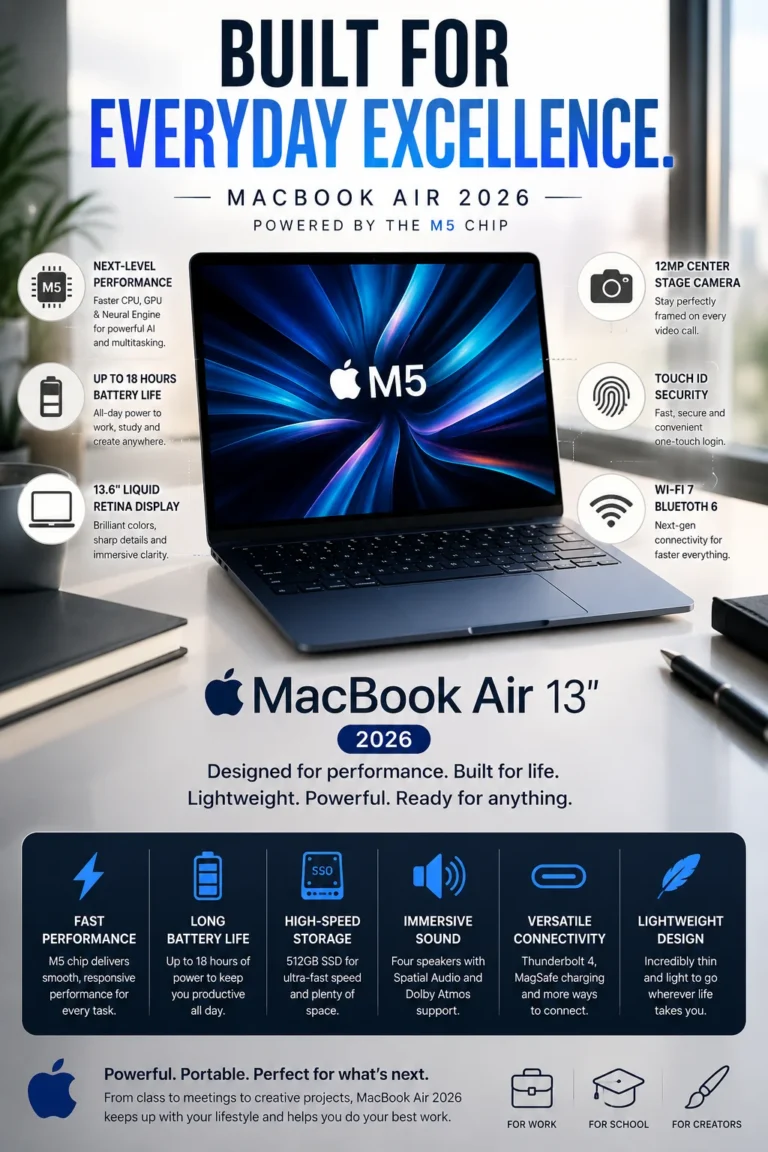
The Apple MacBook Air M5 is our top recommendation for the best overall student laptop in 2026. It combines strong everyday performance, excellent battery life, a compact and premium design, and enough memory and storage for the demands of modern school and college work. For students who want one laptop that can handle classes, research, writing, multitasking, creative applications, and everyday productivity without unnecessary complexity, the MacBook Air M5 offers one of the most balanced overall packages in this lineup.
The MacBook Air M5 earns our Best Overall Student Laptop award because it balances the factors that matter most during a typical academic week. Students can move from lectures and note-taking to research, writing, presentations, multitasking, and more demanding applications without needing to compromise heavily on portability or battery life. That balance is what makes it more versatile than choosing a laptop based solely on processor performance or price.
Compared with many Windows laptops in the same general category, the MacBook Air M5 places particular emphasis on efficiency, portability, battery life, and the overall user experience. It is not the right choice for every student, especially those who depend on Windows-only software or specialized applications that require a dedicated Windows environment. However, for students whose coursework is compatible with macOS, it offers an exceptionally well-rounded combination of performance, mobility, display quality, and long-term usability.
Best for: College students, business majors, creators, medical students, writers, researchers, and anyone looking for a premium laptop that can comfortably support an entire academic journey.
Key Features
ASUS VivoBook 16
Best Student Laptop for Budget Buyers, Large-Screen Productivity & Everyday Schoolwork
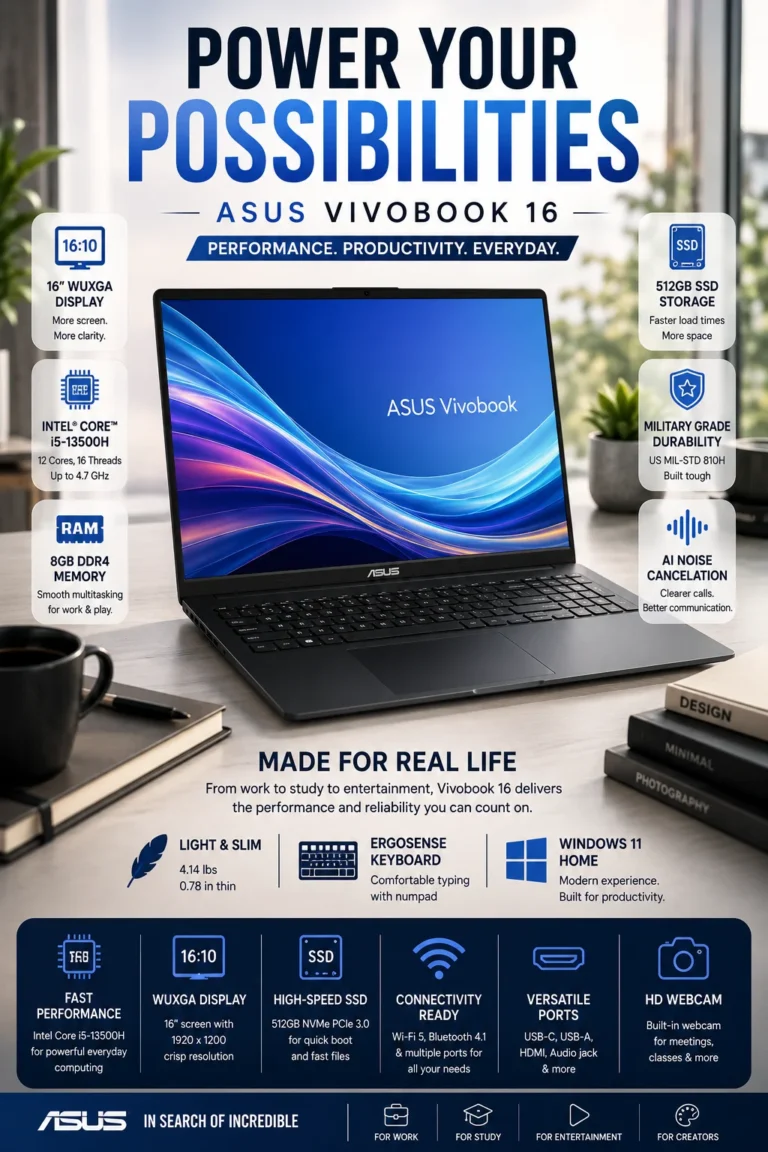
The ASUS VivoBook 16 is our top recommendation for the best budget student laptop in 2026. Its combination of a large 16-inch display, capable everyday performance, 512GB of SSD storage, and practical design makes it particularly appealing to students who want a more spacious workspace without moving into a higher-priced laptop category. For schoolwork, research, documents, presentations, web browsing, and everyday multitasking, it offers a strong balance between capability and price.
The ASUS VivoBook 16 earns our Best Budget Student Laptop award because it focuses on one of the most important requirements for students shopping on a limited budget: getting a genuinely useful computer rather than simply choosing the cheapest available model. Its larger display and capable hardware create a more comfortable environment for studying, multitasking, and everyday productivity.
Compared with smaller budget laptops, the VivoBook 16 provides a more spacious workspace that can make a noticeable difference when working with documents, research materials, spreadsheets, and multiple applications. The trade-off is that its 16-inch format is less compact than a 13- or 14-inch laptop, so students who prioritize carrying their computer throughout campus may prefer a lighter model such as the MacBook Air M5 or ASUS Zenbook-class alternative. For buyers who prioritize screen space and value, however, the VivoBook 16 is one of the strongest choices in this lineup.
Best for: Budget-conscious students, business majors, online learners, high school students, and anyone who wants a larger screen and dependable everyday performance without spending on premium features.
Key Features
Lenovo IdeaPad Slim 3X
Best AI Laptop for Students Seeking Modern Windows Features, Efficiency & Long-Term Value
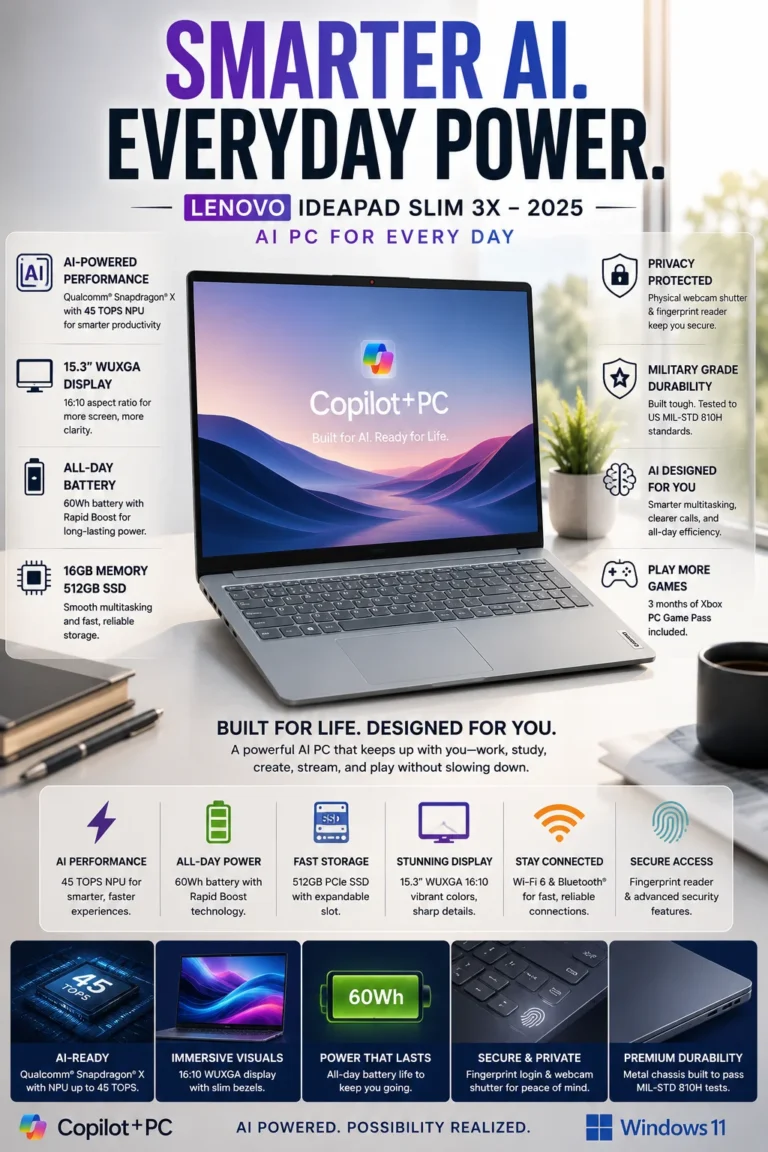
The Lenovo IdeaPad Slim 3X is our top recommendation for the best AI laptop for students in 2026. Its combination of Snapdragon X performance, 16GB of memory, Copilot+ PC capabilities, long battery life, and a spacious 15.3-inch display makes it particularly interesting for students who want a modern Windows laptop built around the latest generation of AI-enabled features. It provides a practical balance of efficiency, productivity, and everyday usability without moving into a premium price category.
The Lenovo IdeaPad Slim 3X earns our Best AI Student Laptop award because its value is not based on a single AI feature. The combination of Copilot+ capabilities, efficient Snapdragon X hardware, 16GB of memory, strong battery life, and a large display creates a laptop that is well aligned with the direction of modern Windows computing while remaining practical for everyday academic work.
Compared with traditional budget Windows laptops, the IdeaPad Slim 3X offers a more modern platform with a stronger emphasis on efficiency and AI-enabled features. However, Snapdragon-based Windows laptops can have compatibility considerations with certain legacy applications, drivers, peripherals, or specialized academic software. Students who depend on engineering, scientific, or other Windows applications should verify software compatibility before choosing an ARM-based laptop.
Best for: Tech-focused students, business majors, online learners, productivity users, and anyone interested in a modern Windows laptop with Copilot+ capabilities and strong battery efficiency.
Key Features
Dell XPS 13
Best Premium Windows Laptop for Students Who Prioritize Design, Portability & Performance
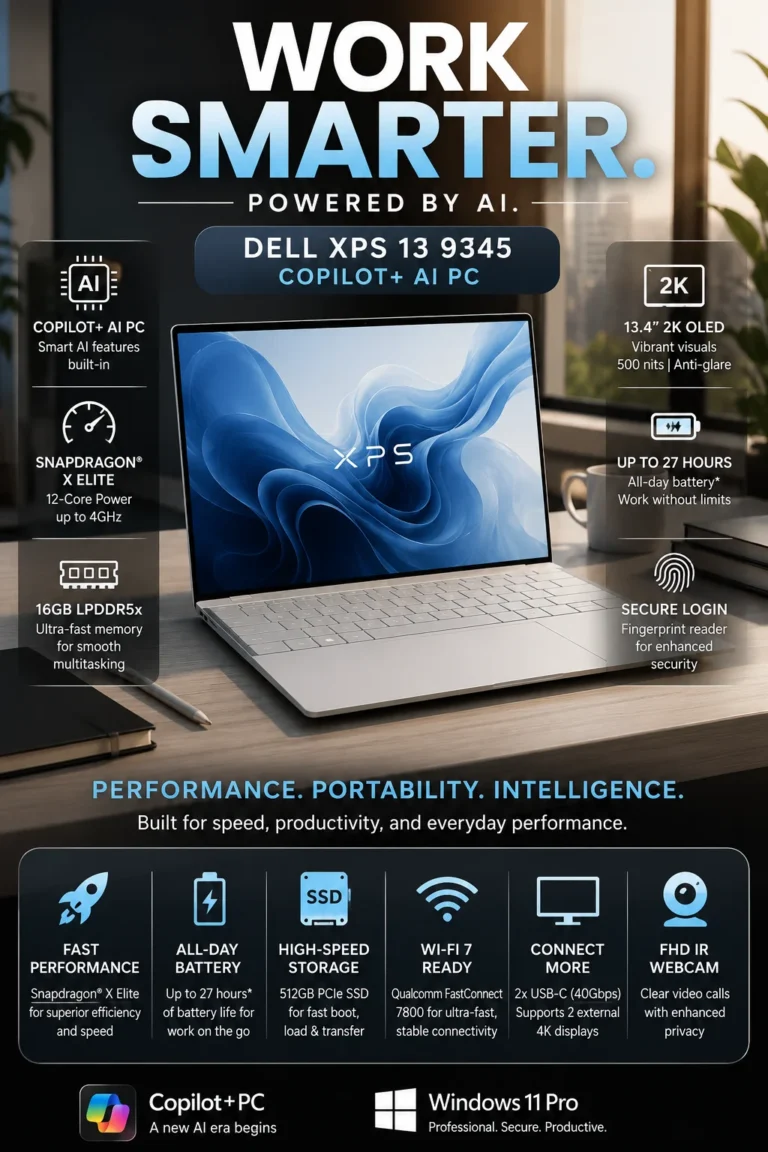
The Dell XPS 13 is our top recommendation for the best premium Windows laptop for students in 2026. It combines a refined, compact design with Snapdragon X Elite performance, 16GB of memory, a high-resolution display, and strong battery efficiency. For students who want a premium Windows experience and are willing to pay more for portability, materials, display quality, and overall refinement, the XPS 13 offers a distinctly higher-end alternative to conventional student laptops.
The Dell XPS 13 earns our Best Premium Student Laptop award because it focuses on the aspects that distinguish a premium ultrabook from a conventional student laptop. Its compact design, high-resolution display, efficient Snapdragon X Elite platform, 16GB memory configuration, and refined construction create a more sophisticated everyday experience for students who value mobility and build quality.
Compared with more affordable laptops in this guide, the XPS 13 asks students to pay more for its premium design, compact form factor, display quality, and overall refinement rather than simply providing more raw hardware. Its Snapdragon-based Windows platform also means that students who depend on specialized or older Windows applications should verify ARM compatibility before purchasing. For users whose software requirements are compatible, however, it provides one of the strongest premium Windows experiences in this lineup.
Best for: Business students, graduate students, professionals, frequent travelers, and anyone who wants a compact premium Windows laptop with strong performance, battery efficiency, and refined design.
Key Features
Microsoft Surface Laptop 7
Best for Note-Taking, Multitasking, Writing & Everyday Study Workflows
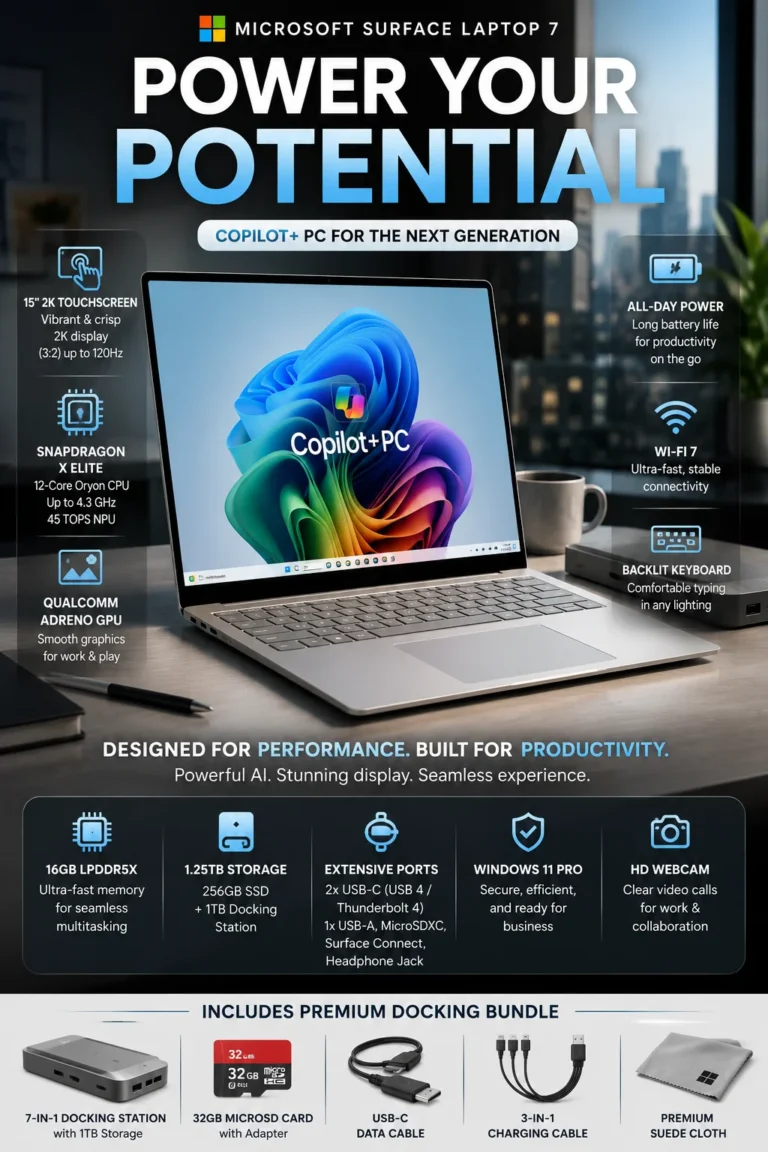
The Microsoft Surface Laptop 7 is our top recommendation for the best student laptop for productivity and note-taking in 2026. Its combination of a spacious 15-inch touchscreen, comfortable keyboard, Snapdragon X Elite performance, 16GB of memory, and strong battery efficiency makes it particularly well suited to students who spend much of their day writing, researching, attending online classes, organizing information, and working across multiple applications.
The Microsoft Surface Laptop 7 earns our Best Student Laptop for Productivity award because it is designed around the way many students actually work: reading, writing, researching, organizing information, attending classes, and moving between multiple applications throughout the day. Its larger display and comfortable keyboard make extended productivity sessions particularly natural, while the touchscreen adds another way to interact with supported software.
Compared with smaller laptops, the Surface Laptop 7 provides more workspace for documents, research, and multitasking without moving into the size and weight of a traditional 16-inch productivity machine. Students who prioritize maximum portability may prefer the MacBook Air M5, while those who need dedicated graphics performance for engineering or demanding creative workloads should consider the ASUS ROG Zephyrus G14. As with other Snapdragon-based Windows laptops in this guide, students using specialized applications should also verify ARM compatibility before purchasing.
Best for: College students, writers, business majors, online learners, researchers, note-takers, and productivity-focused users who spend several hours each day working with documents and multiple applications.
Key Features
ASUS ROG Zephyrus G14
Best for Engineering, Gaming & Demanding Workloads
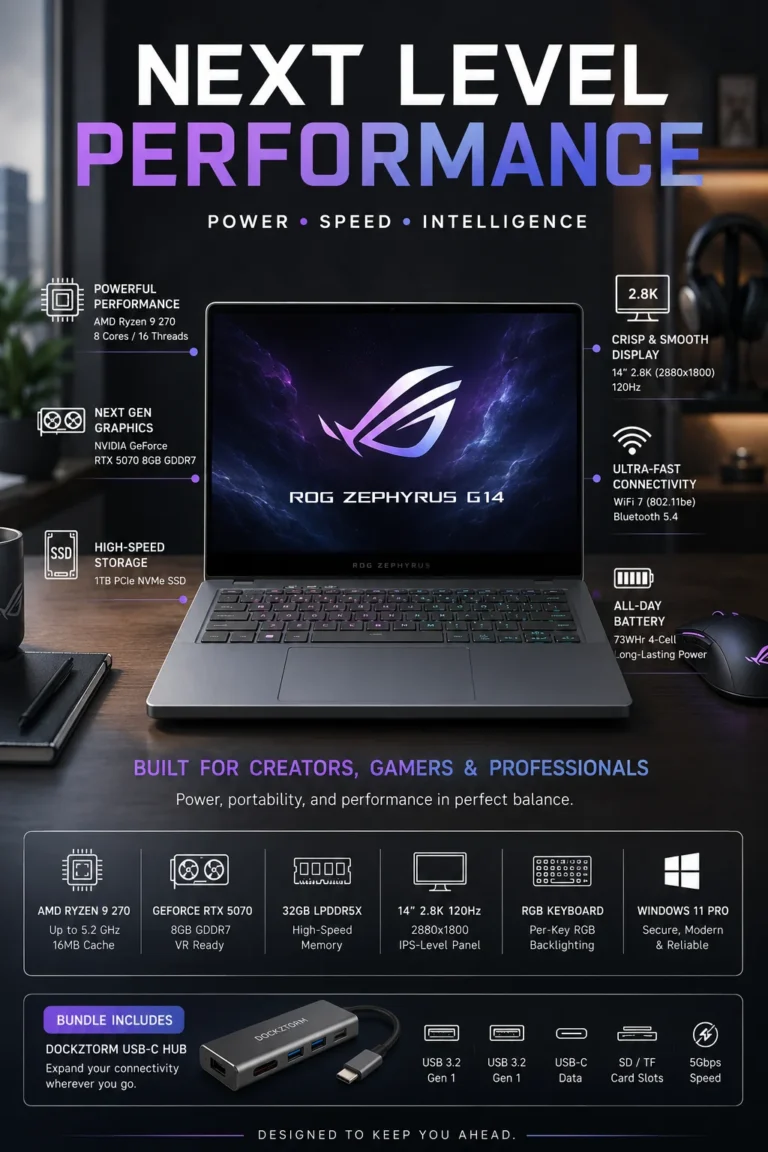
The ASUS ROG Zephyrus G14 is our top recommendation for the best high-performance student laptop for engineering and gaming in 2026. Its combination of a powerful AMD Ryzen 9 processor, dedicated NVIDIA GeForce RTX 5070 graphics, 32GB of memory, fast SSD storage, and a high-resolution 14-inch display makes it particularly well suited to students whose coursework or hobbies demand significantly more graphics and processing power than a typical productivity laptop can provide.
The ASUS ROG Zephyrus G14 earns our Best Engineering & Gaming Student Laptop award because it addresses a need that the other laptops in this guide are not designed to handle as effectively: sustained GPU-intensive workloads. Students working with CAD, 3D modeling, rendering, simulation, engineering software, video production, or demanding games can benefit significantly from its dedicated RTX graphics and high-end processor.
Compared with productivity-focused laptops such as the MacBook Air M5 or Microsoft Surface Laptop 7, the G14 provides substantially more graphics capability and performance headroom for demanding workloads. The trade-off is that a high-performance gaming laptop is generally less focused on maximum battery efficiency, silent operation, and lightweight everyday portability. Students who primarily write papers, browse the web, attend classes, and use office applications should therefore consider a lighter productivity laptop instead of paying for hardware they may rarely use.
Best for: Engineering students, computer science students, architecture majors, programmers, 3D creators, video editors, and gamers who genuinely need dedicated graphics and high-performance hardware.
Key Features
Lenovo Chromebook Plus 2-in-1
Best for Basic Schoolwork, Google Apps, Portability & Affordable 2-in-1 Flexibility
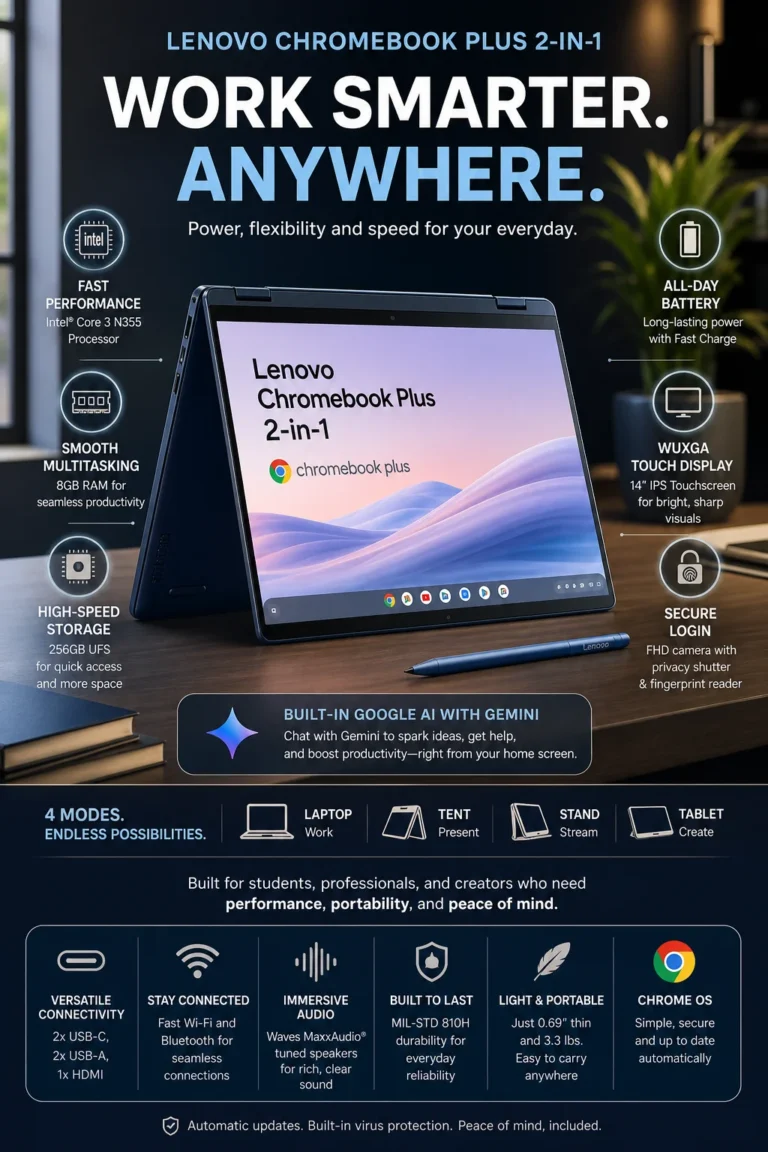
The Lenovo Chromebook Plus 2-in-1 is our top recommendation for the best budget 2-in-1 Chromebook for students in 2026. Its combination of a convertible design, touchscreen display, ChromeOS simplicity, Google AI features, practical battery life, and affordable positioning makes it particularly well suited to students whose schoolwork is centered around web applications, Google Workspace, online learning, research, and everyday productivity.
The Lenovo Chromebook Plus 2-in-1 earns our Best Budget 2-in-1 Chromebook award because it focuses on simplicity rather than competing with higher-performance laptops on raw processing power. For students whose daily workflow revolves around browser applications, Google Workspace, online classes, research, documents, and cloud-based services, ChromeOS can provide everything they actually need without the additional complexity of a traditional Windows system.
Compared with inexpensive Windows laptops, the Chromebook Plus 2-in-1 can offer a simpler and more streamlined experience for web-based schoolwork, while its convertible design adds flexibility that traditional budget laptops may not provide. The trade-off is software compatibility: ChromeOS is not the right platform for students who depend on specialized Windows or macOS applications, demanding engineering software, professional creative applications, or other programs that require a traditional desktop operating system.
Best for: Younger students, high school students, online learners, Google Workspace users, families on a budget, and anyone whose academic workflow is primarily browser-based.
Key Features
Best Student Laptops in 2026
Ranked by Performance, Battery Life, Portability, Display Quality, Student Value & Long-Term Usability
Choosing the best student laptop in 2026 depends on more than processor speed or price. Students need a combination of dependable performance, battery life, portability, display quality, storage, software compatibility, and long-term value. We evaluated these laptops according to the different workloads students actually face, from everyday coursework and research to productivity, AI-assisted workflows, engineering software, creative applications, and gaming, so you can quickly identify the model that best matches your needs and budget.
| Laptop | Key Specs | Best For | Why It Wins | Editor's Verdict |
|---|---|---|---|---|
Best Overall
Apple MacBook Air M5
Check Price
|
Apple M5 16GB Unified Memory 512GB SSD 13.6" Liquid Retina |
Most Students College Students Everyday Productivity | The MacBook Air M5 delivers the strongest overall combination of performance, battery life, portability, display quality, build quality, and long-term usability in this lineup. It is powerful enough for demanding student workloads while remaining exceptionally easy to carry between classes, study sessions, and home. | Best Student Laptop for Most Users |
Best Budget
ASUS VivoBook 16
Check Price
|
Intel Core i5 16" WUXGA Display 512GB SSD Large Productivity Workspace |
Budget Students Online Learners Large-Screen Users | The VivoBook 16 stands out by giving budget-conscious students a much larger 16-inch workspace without moving into a premium price category. Its combination of everyday performance, storage, and screen size makes it particularly useful for documents, research, split-screen work, and general productivity. | Best Budget Student Laptop for Screen Size & Value |
Best AI Laptop
Lenovo IdeaPad Slim 3X
Check Price
|
Snapdragon X 16GB LPDDR5 Copilot+ PC 15.3" WUXGA |
AI-Focused Students Business Students Future-Focused Users | The IdeaPad Slim 3X combines Snapdragon X efficiency, 16GB memory, a large display, and Copilot+ capabilities in a student-focused configuration. It is particularly appealing to buyers who want a modern Windows laptop designed around the growing role of AI-assisted productivity. | Best AI-Ready Student Laptop |
Best Premium
Dell XPS 13
Check Price
|
Snapdragon X Elite 16GB LPDDR5X 2K-Class Display Premium Ultrabook Design |
Graduate Students Professionals Premium Buyers | The Dell XPS 13 provides a premium Windows experience built around portability, refined construction, strong performance, and long battery life. It is an excellent fit for students and professionals who are willing to pay more for a compact, polished, high-end Windows laptop. | Best Premium Windows Laptop for Students |
Best for Productivity
Microsoft Surface Laptop 7
Check Price
|
Snapdragon X Elite 16GB LPDDR5X 15" Touchscreen Premium Keyboard |
Writers Note-Takers Productivity Users | The Surface Laptop 7 is particularly strong for students who spend hours writing, researching, taking notes, and multitasking. Its large touchscreen, comfortable keyboard, strong battery life, and responsive performance create a highly productive everyday study environment. | Best Student Laptop for Productivity & Note-Taking |
Best for Engineering & Gaming
ASUS ROG Zephyrus G14
Check Price
|
AMD Ryzen 9 RTX 5070 32GB RAM 1TB SSD |
Engineering Students Architecture Students Gamers & Creators | The Zephyrus G14 delivers the highest level of CPU and GPU performance in this guide. Its Ryzen 9 processor, RTX 5070 graphics, 32GB memory, and high-resolution 120Hz display make it the strongest choice for CAD, 3D work, rendering, demanding development workloads, and gaming. | Best High-Performance Student Laptop |
Best Budget 2-in-1 Chromebook
Lenovo Chromebook Plus 2-in-1
Check Price
|
2-in-1 Convertible 8GB RAM Gemini AI 14" WUXGA Touchscreen |
High School Students Online Learners Google Workspace Users | The Chromebook Plus 2-in-1 focuses on simplicity, flexibility, and value. Its convertible design, touchscreen, ChromeOS environment, Google AI features, and practical battery life make it particularly well suited to students whose schoolwork is primarily browser-based and centered around Google Workspace. | Best Budget Chromebook for Web-Based Student Work |
Recommended Next Reads
Still deciding which laptop is right for school? Explore our expert buying guides for college students, engineering majors, programmers, and students shopping at different budgets.
The right student laptop depends on your major, software requirements, budget, portability needs, and how long you plan to keep it. These guides help you compare more specialized options before making your final decision.
Best MacBook for College Students in 2026
Compare the best MacBook options for college students across different budgets, majors, workloads, battery requirements, and everyday campus use.
Explore MacBooks for College →Best Laptops Under $700 in 2026
Find affordable laptops for students who want reliable performance, good battery life, and enough power for schoolwork without overspending.
Explore Laptops Under $700 → Value GuideBest Laptops Under $1000 in 2026
Compare stronger laptops for students who need more performance, better displays, improved multitasking, and longer-term value.
Explore Laptops Under $1000 → Engineering StudentsBest Laptops for Engineering Students in 2026
Find laptops capable of handling CAD, SolidWorks, programming, engineering software, simulations, and demanding technical workloads.
Explore Engineering Laptops → Programming StudentsBest Programming Laptops for Students in 2026
Compare laptops for coding, development environments, AI tools, multitasking, and demanding computer science coursework.
Explore Programming Laptops → Medical StudentsBest Laptops for Medical Students in 2026
Explore lightweight laptops with long battery life, comfortable displays, and enough performance for demanding academic schedules.
Explore Medical Student Laptops → Computer ScienceBest Laptops for Computer Science Students in 2026
Compare laptops designed for programming, development tools, AI workloads, multitasking, and computer science coursework.
Explore Computer Science Laptops →EDITOR'S FINAL RECOMMENDATIONS
After comparing student laptops across performance, battery life, portability, display quality, multitasking capability, price, and long-term value, these are our final recommendations for students in 2026. Whether you are starting college, attending high school, studying engineering, working remotely, or simply need a reliable everyday laptop, each option is designed around a different type of student and budget.
Apple MacBook Air M5
The best overall student laptop for most buyers. The MacBook Air M5 combines excellent performance, 16GB of unified memory, exceptional battery life, premium construction, silent operation, and outstanding portability in a package that can comfortably handle years of college coursework.
- ✓ Apple M5 Chip
- ✓ 16GB Unified Memory
- ✓ Up to 18 Hours Battery Life
- ✓ Premium Lightweight Design
ASUS VivoBook 16
The value-focused choice for students who want more screen space without spending heavily. Its 16-inch WUXGA display, Core i5 processor, and 512GB SSD provide a strong combination for schoolwork, multitasking, research, and everyday productivity.
- ✓ Intel Core i5-13500H
- ✓ 16-inch WUXGA Display
- ✓ 512GB SSD
- ✓ Excellent Price-to-Performance
Lenovo IdeaPad Slim 3X
A strong choice for students who want a modern Windows laptop built around AI capabilities. Its Snapdragon X platform, 16GB memory, long battery life, and large display make it particularly appealing for students interested in Copilot+ features and efficient everyday computing.
- ✓ Snapdragon X Platform
- ✓ 16GB LPDDR5 Memory
- ✓ Copilot+ PC
- ✓ Up to 15 Hours Battery Life
Dell XPS 13
The premium Windows choice for students who want a more refined laptop experience. The XPS 13 combines Snapdragon X Elite performance, 16GB memory, a high-resolution 13.4-inch display, exceptional portability, and a premium build designed for students who do not want to compromise on quality.
- ✓ Snapdragon X Elite
- ✓ 16GB LPDDR5X Memory
- ✓ 13.4-inch 2K Display
- ✓ Premium Ultraportable Design
Microsoft Surface Laptop 7
An excellent choice for students whose daily work revolves around writing, research, note-taking, documents, and multitasking. Its large touchscreen, Snapdragon X Elite processor, 16GB memory, premium keyboard, and long battery life make it particularly well suited to productivity-focused students.
- ✓ Snapdragon X Elite
- ✓ 16GB LPDDR5X Memory
- ✓ 15-inch 2K Touchscreen
- ✓ Premium Productivity Keyboard
ASUS ROG Zephyrus G14
The performance specialist for students who need serious computing power. With a Ryzen 9 processor, RTX 5070 graphics, 32GB memory, and a high-resolution 120Hz display, it is built for engineering software, programming, 3D work, creative applications, and demanding gaming.
- ✓ AMD Ryzen 9
- ✓ NVIDIA GeForce RTX 5070
- ✓ 32GB LPDDR5X Memory
- ✓ 14-inch 2.8K 120Hz Display
Lenovo Chromebook Plus 2-in-1
The affordable choice for students who primarily work in Chrome, Google Docs, web applications, and cloud-based services. Its 2-in-1 design, touchscreen, Google AI tools, long battery life, and lightweight form factor make it particularly practical for school and everyday use.
- ✓ 2-in-1 Convertible Design
- ✓ Google Gemini AI Tools
- ✓ 14-inch WUXGA Touchscreen
- ✓ Up to 11 Hours Battery Life
Which student laptop should you buy?
MacBook Air M5
ASUS VivoBook 16
Lenovo IdeaPad Slim 3X
Dell XPS 13
Surface Laptop 7
ROG Zephyrus G14
Lenovo Chromebook Plus
- Choose the MacBook Air M5 if you want the strongest overall combination of performance, battery life, portability, build quality, and long-term value.
- Choose the ASUS VivoBook 16 if you want a larger display and strong everyday performance while keeping your budget under control.
- Choose the Lenovo IdeaPad Slim 3X if you want an affordable Windows laptop with modern AI capabilities, efficient performance, and strong battery life.
- Choose the Dell XPS 13 if you want a premium Windows experience with excellent portability, display quality, and build quality.
- Choose the Surface Laptop 7 if your daily workflow centers on writing, research, note-taking, touchscreen productivity, and long study sessions.
- Choose the ASUS ROG Zephyrus G14 if your major or hobbies require serious performance for engineering software, programming, creative workloads, or gaming.
- Choose the Lenovo Chromebook Plus 2-in-1 if you mainly use Chrome, Google Workspace, web applications, and cloud-based school tools and want to spend as little as possible.
EDITOR'S FINAL VERDICT
After comparing student laptops across performance, battery life, portability, display quality, multitasking capability, comfort, operating system, and long-term value, one conclusion stands out:The best student laptop is not necessarily the most powerful or the most expensive model. It is the laptop that provides the right balance of performance, portability, battery life, reliability, and value for the way you actually study and work.
Students use their laptops for much more than writing papers. A typical school day can involve research, dozens of browser tabs, Microsoft Office or Google Workspace, video conferencing, presentations, online classes, note-taking, programming, creative applications, and entertainment.
For most students in 2026, 16GB of memory, fast SSD storage, strong battery life, a comfortable keyboard, and a portable design provide a much better long-term experience than simply buying the laptop with the highest specifications.- Choose the Apple MacBook Air M5 if you want the best overall combination of performance, battery life, portability, build quality, and long-term value for college and everyday student use.
- Choose the ASUS Vivobook 16 if keeping the purchase price under control is important while still wanting a large display, solid performance, and enough capability for everyday schoolwork.
- Choose the Lenovo IdeaPad Slim 3X if you want an affordable Windows laptop with Copilot+ capabilities, strong battery efficiency, 16GB of memory, and a practical design for everyday student workloads.
- Choose the ASUS ROG Zephyrus G14 if your studies involve engineering, programming, 3D work, creative applications, or other demanding workloads and you also want serious gaming performance.
Top Student Laptop Recommendations in 2026
Apple MacBook Air M5
Our Editor's Choice for most students because it delivers an exceptional combination of performance, battery life, portability, premium construction, and long-term usability. It is an especially strong choice for students who want a laptop that can comfortably last throughout college.
- ✓ Apple M5 Chip
- ✓ 16GB Memory
- ✓ Exceptional Battery Life
- ✓ Lightweight Premium Design
ASUS Vivobook 16
A strong choice for students who want to maximize value. Its large display and capable Intel processor make it particularly practical for research, documents, online classes, multitasking, and everyday schoolwork without paying for performance most students do not need.
- ✓ Intel Core i5 Performance
- ✓ Large 16-inch Display
- ✓ 512GB SSD
- ✓ Excellent Price-to-Performance Value
Lenovo IdeaPad Slim 3X
The strongest Windows value for students who want modern AI capabilities, efficient performance, long battery life, and 16GB of memory. It offers an excellent balance for everyday campus productivity and future-focused Windows use.
- ✓ Snapdragon X Platform
- ✓ 16GB Memory
- ✓ Copilot+ PC
- ✓ Long Battery Life
- ✓ You want the best overall student laptop
- ✓ Battery life and portability are top priorities
- ✓ You want a premium laptop that can last through college
- ✓ You prefer macOS and the Apple ecosystem
- ✓ You prefer Windows
- ✓ You want strong value and long battery life
- ✓ You are interested in Copilot+ AI features
- ✓ You need 16GB of memory for long-term multitasking
- ✓ Prefer 16GB of memory for long-term use
- ✓ Look for fast SSD storage rather than slower traditional storage
- ✓ Prioritize battery life and portability for daily campus use
- ✓ Choose hardware based on your actual major and software requirements
A student laptop is a device you may use for thousands of hours throughout college. Processor specifications matter, but battery life, keyboard comfort, portability, display quality, reliability, and long-term value can have an even greater impact on your everyday academic experience.
Among the models evaluated in this guide, the Apple MacBook Air M5 delivers the strongest overall combination of performance, battery life, portability, build quality, and long-term value, making it our Editor's Choice for the best student laptop in 2026.
Compare current prices, configurations, memory, storage, warranty coverage, and availability before choosing the student laptop that best matches your classes, major, budget, and daily workflow.
Check Latest DealsEDITOR'S FAQ
Choosing the best laptop for college or school requires more than comparing processor specifications. Students need to consider performance, memory, storage, battery life, portability, display quality, software compatibility, and how their academic workload may change over several years.These frequently asked questions address the most important student laptop buying decisions, from choosing the right performance level and amount of RAM to deciding between Windows, macOS, gaming laptops, and Chromebooks.
The MacBook Air M5 offers an excellent combination of performance, battery efficiency, portability, build quality, and long-term usability. For most students, it provides more than enough performance for research, writing, presentations, browser multitasking, video calls, streaming, productivity applications, and everyday academic workloads.
- Excellent performance for everyday academic workloads.
- Long battery life for classes, libraries, and study sessions.
- Lightweight design makes it easy to carry around campus.
- Strong long-term value for students who want one laptop throughout college.
- Premium display and build quality without the size of a traditional workstation.
Unless your major requires specialized Windows software or substantially higher graphics performance, the MacBook Air M5 is one of the safest all-around choices for students who prioritize portability, battery life, and long-term reliability.
Check PriceA budget student laptop still needs enough performance to handle browser multitasking, documents, presentations, online classes, research, and everyday productivity. The ASUS Vivobook 16 combines a large display with capable Intel Core i5 performance and SSD storage, making it a practical choice for students working within a tighter budget.
- Strong everyday performance for school and college work.
- Large 16-inch display provides more workspace for multitasking.
- Fast SSD storage improves everyday responsiveness.
- Good balance between price and performance.
- Suitable for documents, research, video calls, and general productivity.
For students who do not need a premium MacBook or a dedicated gaming machine, the Vivobook 16 can provide a much better balance of cost and everyday usability.
Check PriceModern student workloads often involve dozens of browser tabs, Microsoft Office, Google Workspace, video conferencing, research databases, messaging applications, cloud services, and other programs running simultaneously.
- 8GB → Acceptable for basic browsing, documents, streaming, and light academic work.
- 16GB → Recommended for most students and everyday multitasking.
- 24GB or more → Better for programming, engineering, creative applications, AI workloads, and heavier multitasking.
Students should think about how the laptop will be used several years from now rather than choosing the minimum configuration simply to reduce the initial purchase price. For most students, 16GB provides a much safer balance between current performance and long-term usability.
Most college workloads do not require a high-end workstation. Research, writing, presentations, spreadsheets, web applications, video meetings, programming, streaming, and everyday multitasking can all be handled comfortably by a modern MacBook Air.
- Excellent portability for students moving between classes.
- Strong battery efficiency for long days away from an outlet.
- Fast performance for everyday academic applications.
- Silent fanless operation is useful in classrooms and libraries.
- Premium construction designed for long-term everyday use.
The main consideration is software compatibility. Students in engineering, architecture, specialized sciences, or other technical programs should verify that their required applications work properly on macOS before purchasing.
Check Student DealWindows remains the safest platform for students who need broad software compatibility. The IdeaPad Slim 3X combines a portable design with Snapdragon X performance, 16GB memory, Copilot+ PC capabilities, and strong battery efficiency.
- Windows compatibility for a wide range of academic software.
- 16GB memory for modern multitasking.
- Copilot+ PC features for AI-focused workflows.
- Strong battery efficiency for students on the move.
- Portable design suitable for everyday campus use.
Students who know they will need Windows-specific applications may prefer this type of system over a MacBook, particularly when compatibility with university software is more important than ecosystem integration.
Check PriceEngineering workloads can include CAD applications, SolidWorks, MATLAB, simulation software, programming environments, technical analysis tools, and other demanding applications. Because software requirements vary significantly between engineering programs, students should check their university's recommended hardware and operating system requirements before purchasing.
- 16GB RAM should be considered the practical starting point.
- 512GB SSD provides a better long-term storage balance.
- Dedicated graphics can be valuable for demanding CAD and 3D workloads.
- Strong cooling becomes important during sustained workloads.
- Windows compatibility may be essential for certain engineering applications.
For engineering students, the most important question is not simply which laptop is fastest. It is whether the laptop can reliably run the specific applications required by the degree program.
View Engineering Laptop GuideA gaming laptop can make sense for students who want one machine capable of handling both academic workloads and demanding games. The ROG Zephyrus G14 provides substantially more graphics performance than a typical student ultrabook, making it particularly attractive to gamers, creators, engineering students, and users running GPU-intensive applications.
- High-performance processor for demanding workloads.
- Dedicated RTX graphics for gaming and GPU-accelerated applications.
- 32GB RAM provides substantial multitasking headroom.
- High-resolution high-refresh-rate display.
- More capable than a typical student laptop for demanding graphics workloads.
The trade-off is size, weight, battery efficiency, and price. Students who primarily write papers, browse the web, and attend online classes will generally get better portability and battery life from a conventional student laptop.
Check PriceChromebooks are particularly useful for students who rely on Google Workspace, web applications, online research, streaming, email, and cloud storage. They are usually simple to use and can provide an attractive combination of affordability, portability, and battery life.
- Excellent for Google Docs, Sheets, Slides, and browser-based applications.
- Simple ChromeOS environment with low maintenance requirements.
- Suitable for online classes and everyday schoolwork.
- Often lighter and more affordable than traditional Windows laptops.
- Useful for students whose files and applications are primarily cloud-based.
However, students should avoid Chromebooks if their degree requires specialized Windows or macOS software that cannot run through their institution's supported environment.
Check PriceStorage requirements depend on the student's major, applications, media collection, and reliance on cloud storage. Students who primarily work with documents and browser applications can manage with less, while engineering, programming, creative, and gaming workloads can consume storage much faster.
- 256GB → Acceptable for basic academic work when most files are stored in the cloud.
- 512GB → Recommended for most students.
- 1TB → Better for gaming, programming, engineering, video editing, design, and large local projects.
Students should also consider whether the laptop allows storage expansion. If the SSD cannot be upgraded later, choosing an adequate capacity at purchase time becomes even more important.
There is no single laptop that is perfect for every student. The safest choice depends on how the computer will actually be used throughout the academic year.
- Best Overall → Apple MacBook Air M5
- Best Value → ASUS Vivobook 16
- Best Windows Student Laptop → Lenovo IdeaPad Slim 3X
- Best Premium Windows → Dell XPS 13
- Best Productivity → Microsoft Surface Laptop 7
- Best Gaming → ASUS ROG Zephyrus G14
- Best Chromebook → Lenovo Chromebook Plus
For most students who want the safest all-around recommendation, the MacBook Air M5 is the strongest choice. However, students who require Windows-only software, dedicated graphics, a lower purchase price, or ChromeOS may be better served by another option in this guide.
Check Best Student DealSTUDENT LAPTOP BUYING GUIDE
Choosing a student laptop in 2026 is not simply about finding the cheapest model or buying the laptop with the fastest processor. Students need a machine that fits their academic workload, daily mobility, software requirements, battery expectations, and budget while remaining useful throughout several years of school or college.The wrong choice can become frustrating through insufficient memory, poor battery life, excessive weight, limited software compatibility, inadequate storage, or paying for performance that never gets used. Avoid these common mistakes before buying your next student laptop.
The best student laptop is rarely the one with the most impressive specification sheet. For everyday academic use, portability, battery efficiency, memory capacity, keyboard comfort, display quality, storage, software compatibility, and long-term value can have a greater impact on your experience than small differences in processor performance.For most students in 2026, 16GB of RAM is a strong long-term target, while fast SSD storage should be considered essential. Students in demanding majors such as engineering, computer science, architecture, video production, or advanced creative fields should also verify software requirements before choosing an operating system or laptop platform.
Choosing Only 8GB of RAM
- Modern browsers, productivity applications, video calls, and research tools can consume significant memory during multitasking.
- Students frequently work with documents, browser tabs, cloud applications, messaging tools, presentations, and other programs simultaneously.
- A laptop with insufficient memory can become less comfortable to use as academic workloads increase over several years.
Better decision: Choose 16GB of RAM when possible for a new student laptop in 2026. Consider 24GB or 32GB if your major involves programming, engineering software, creative applications, virtual machines, AI workloads, or heavier multitasking.
Ignoring Battery Life
- Students can spend long periods moving between classrooms, libraries, study areas, dorms, and other locations.
- Access to power outlets is not always convenient during a full day on campus.
- Frequent charging can become a daily inconvenience when battery efficiency is poor.
Better decision: Prioritize efficient hardware and strong real-world battery performance, especially if you regularly carry your laptop around campus or study away from a desk.
Buying a Laptop That Is Too Heavy
- Students may carry their laptop, charger, books, and other equipment throughout the day.
- A heavier laptop can become uncomfortable during commuting and long campus days.
- Gaming and workstation-class laptops can provide excellent performance but may sacrifice portability and battery efficiency.
Better decision: Choose a lightweight design when portability is important. Students who rarely move their laptop may reasonably prioritize a larger display or higher performance instead.
Choosing the Wrong Operating System
- Some university programs rely on Windows-only applications or specialized academic software.
- macOS is excellent for many workloads but may not support every engineering, CAD, simulation, or specialized application.
- Chromebooks can be excellent for cloud-based education but have greater limitations for demanding desktop applications.
Better decision: Check your school's software requirements before buying. Match Windows, macOS, or ChromeOS to the applications required by your major rather than choosing an operating system based only on personal preference.
Buying More Performance Than You Need
- Most students do not need a high-end gaming processor or dedicated GPU for documents, research, presentations, browsing, and video calls.
- Excess performance can increase the purchase price, weight, heat, and power consumption.
- Money spent on unnecessary processing power could sometimes provide greater value through additional memory, storage, battery efficiency, or display quality.
Better decision: Match performance to your actual academic workload. Students studying engineering, computer science, architecture, content creation, or other demanding disciplines should spend more when their software genuinely requires it.
Overlooking Display Quality and Workspace
- Students can spend several hours each day reading documents, researching online, writing papers, coding, or reviewing presentations.
- Low resolution, limited brightness, or poor viewing angles can make extended study sessions less comfortable.
- Students who frequently use split-screen workflows may benefit significantly from a larger display.
Better decision: Choose a display that matches your environment and workload. A quality 1080p-class or higher-resolution panel is preferable for modern laptops, while students who multitask heavily may benefit from a 15- or 16-inch screen.
Smart Buying Advice for Students
You prioritize battery efficiency, portability, silent operation, premium construction, and long-term everyday performance. The MacBook Air M5 is particularly attractive for students whose required software is compatible with macOS and who want a premium all-around academic laptop.
Your major requires Windows-specific software, broader hardware compatibility, specialized engineering applications, gaming, or greater configuration flexibility. Models such as the ASUS Vivobook 16, Dell XPS 13, and Lenovo IdeaPad Slim 3X cover very different student needs and budgets.
Key takeaway: The best student laptop is not necessarily the fastest or most expensive machine. It is the laptop that provides the right balance of performance, memory, battery life, portability, display quality, software compatibility, storage, and value for your actual academic workflow.
After evaluating the laptops featured in this guide, these are our Editor's top recommendations for students in 2026:
- Best Overall Student Laptop: Apple MacBook Air M5 — the strongest overall combination of performance, battery efficiency, portability, premium construction, and long-term value for most students.
- Best Value Student Laptop: ASUS Vivobook 16 — a strong choice for students who want a larger display, solid everyday performance, and useful specifications without moving into premium pricing.
- Best for Most Students: Lenovo IdeaPad Slim 3X — an attractive everyday option for students who prioritize battery life, portability, modern AI-oriented features, and practical performance.
- Best Premium Windows Laptop: Dell XPS 13 — a premium Windows option for students who prioritize portability, display quality, build quality, and a more refined productivity experience.
- Best Gaming Laptop for Students: ASUS ROG Zephyrus G14 — the strongest choice for students who need serious gaming performance alongside demanding creative, engineering, or technical workloads.
Need help choosing your laptop?
Not sure which option fits your workflow? Get a personalized recommendation based on your budget, performance needs, and usage.
Get personalized recommendation⚡ Usually responds within 24 hours