
BUDGET LAPTOPS HUB

Explore Our Budget Laptop Guides

Discover our complete collection of budget laptop recommendations, comparisons, and buying guides designed to help you find the best value for your budget.
Browse Budget Laptops
2026 Budget Laptop Guide • Expert Picks for Students, Work, Home Use & Everyday Productivity
Expert Reviewed • Performance, Battery Life, Display Quality, Portability & Overall Value

Best Laptops Under $500 in 2026: 5 Top Picks for Students, Work & Everyday Use

The best laptop under $500 in 2026 is not simply the cheapest model you can find. At this price point, the processor, RAM, storage, display, battery life, portability, and overall configuration can make a major difference in how the laptop performs over time.Whether you need a laptop for school, office work, multitasking, web browsing, entertainment, or everyday productivity, choosing the right configuration can help you avoid a system that feels slow or limited after only a few months.

In this guide, we've selected the best laptops under $500 based on performance, hardware configuration, display quality, portability, storage capacity, everyday usability, and overall value. Each model is designed for a different type of buyer, from students and families to productivity users and shoppers looking for the strongest performance possible within a strict budget.The Acer Aspire 5 stands out as the best overall choice thanks to its combination of processing power, display quality, and long-term usability. The HP Pavilion 15 offers an excellent balance of Ryzen performance, DDR5 memory, and value, while the Dell Inspiron 15 provides the most premium configuration in this price range with 12GB of RAM and a 120Hz touchscreen.Students who prioritize portability should consider the ASUS VivoBook 14, while the Lenovo IdeaPad 1 is particularly appealing to buyers who want more storage and included accessories without exceeding the $500 budget.

Best Overall
Best Value
Best Premium Pick
Best for Students
Best Storage Value
Best for Multitasking
Best for Portability
Best Display Under $500
Editor's Verdict:For most buyers, the Acer Aspire 5 is the strongest overall laptop under $500 in 2026. Its combination of an Intel Core i5 H-Series processor, 8GB of RAM, 512GB SSD storage, and a balanced overall configuration makes it the most versatile option in this lineup for students, work, multitasking, and everyday productivity.The HP Pavilion 15 is the best alternative for shoppers focused on value. Its Ryzen 5 processor, DDR5 memory, and touchscreen provide a strong combination of modern hardware and everyday usability, making it particularly attractive for students and home users.If you want the most premium configuration possible within this budget, the Dell Inspiron 15 is the standout choice. Its 13th-generation Intel Core i5 processor, 12GB of RAM, and 120Hz touchscreen give it an advantage for productivity and users who want a smoother display experience.The ASUS VivoBook 14 is the best choice for students and frequent travelers who prioritize a smaller, more portable design, while the Lenovo IdeaPad 1 is the strongest option for buyers who value storage capacity and additional accessories.Overall, these five laptops cover the most important buying priorities under $500, allowing you to choose based on performance, value, portability, display quality, or storage rather than simply choosing the cheapest available model.
Scroll Down to Compare the 5 Best Laptops Under $500 in 2026
#1 Best Overall Laptop Under $500 • 2026 Editor's Choice

Acer Aspire 5

Best Budget Laptop for Performance, Productivity & Everyday Use
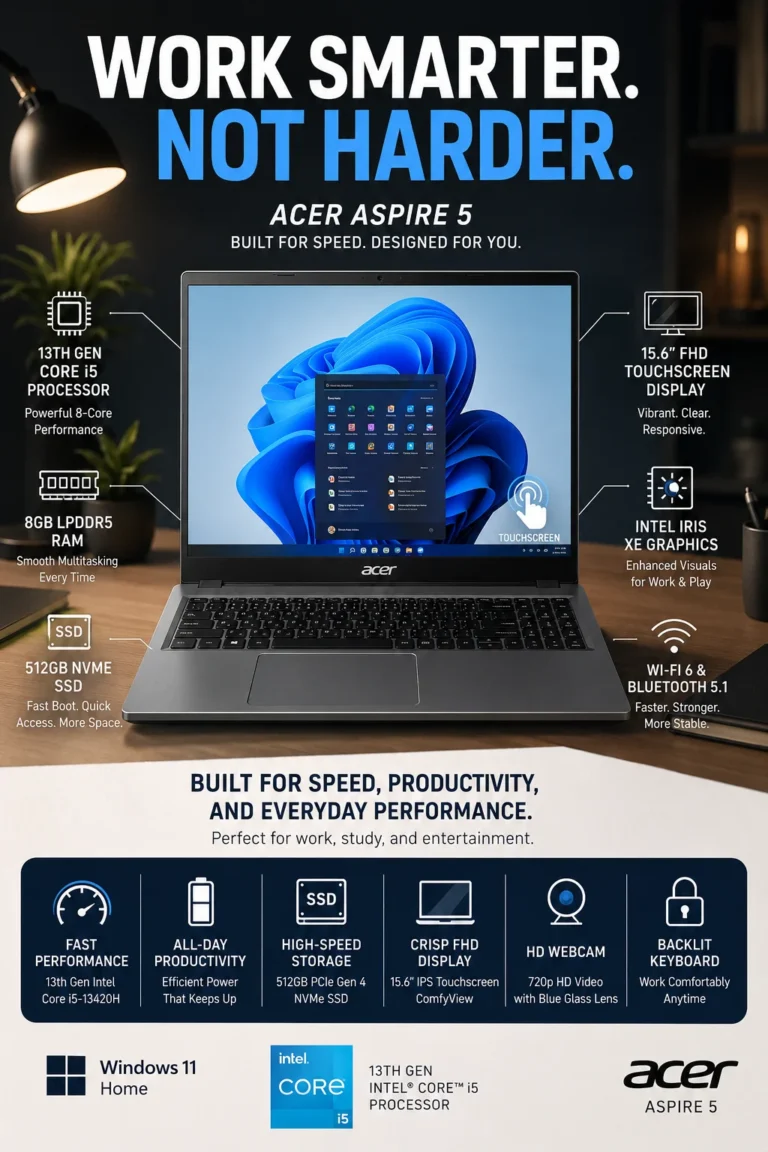
The Acer Aspire 5 is our top recommendation for the best laptop under $500 in 2026. It offers one of the strongest overall combinations of processing performance, memory, storage, display quality, and everyday usability in this price range. For students, office users, remote workers, and households that need a dependable everyday computer, the Aspire 5 provides enough performance for demanding daily tasks without moving into a significantly higher price category.

• Excellent choice for students, office professionals, remote workers, multitaskers, and everyday users who want a balanced laptop without exceeding a $500 budget
• The 13th Gen Intel Core i5 processor provides responsive performance for office applications, web browsing, document creation, video calls, streaming, schoolwork, and everyday multitasking
• 8GB of memory provides a practical amount of capacity for everyday productivity, multiple browser tabs, documents, communication applications, and typical school or office workloads
• The 512GB SSD provides fast system startup, quick application launches, responsive file access, and substantially more usable storage than many entry-level budget laptops
• The 15.6-inch Full HD display provides a larger workspace for documents, spreadsheets, browsing, and media compared with smaller budget laptops
• A touchscreen adds convenient interaction for browsing, presentations, navigation, and everyday Windows use without requiring a separate premium-class device
• Modern wireless connectivity and a backlit keyboard improve everyday usability, particularly for users who work or study in different environments
• Its combination of processing power, storage capacity, display size, and overall configuration gives the Aspire 5 strong long-term value for a budget-focused laptop

The Acer Aspire 5 earns our Best Overall Laptop Under $500 award because it gets the fundamentals right. Instead of focusing on a single standout specification, it combines a capable Core i5 processor, 8GB of memory, a 512GB SSD, and a large Full HD display into a configuration that works well across school, office, home, and general productivity tasks.

Compared with lower-end laptops built around entry-level processors and smaller storage configurations, the Acer Aspire 5 offers a more capable foundation for multitasking and everyday productivity. It may not be the lightest or most premium laptop in this category, but its balanced hardware configuration makes it one of the most practical choices for buyers who want strong everyday performance without spending more than $500.

• Intel Core i5-13420H processor• 13th Gen Intel Core architecture• Strong performance for office and productivity workloads• Suitable for multitasking and demanding everyday applications• Integrated Intel graphics• Good performance foundation for a sub-$500 laptopThe Intel Core i5-13420H gives the Acer Aspire 5 a significant performance advantage over many entry-level laptops built around lower-tier processors. Its combination of CPU cores, higher performance potential, and modern Intel architecture makes it well suited to everyday workloads that include Microsoft Office, web applications, document creation, spreadsheets, video conferencing, streaming, and general multitasking.For students and professionals, this means the laptop can handle multiple browser tabs, productivity applications, communication tools, and documents without being limited to the basic workloads typically associated with entry-level budget systems.The Aspire 5 is not intended to replace a workstation or gaming laptop, but its processor provides a strong performance foundation for a laptop in this price category.
• 8GB memory configuration• Suitable for everyday productivity• Supports multiple browser tabs and applications• Practical configuration for school and office workloads• Balanced memory capacity for a budget laptopThe 8GB memory configuration provides a practical starting point for everyday computing. It is sufficient for common workloads such as web browsing, documents, spreadsheets, online classes, email, video conferencing, streaming, and general productivity.Users can comfortably work with multiple browser tabs and applications open simultaneously, although extremely demanding multitasking workloads may benefit from a laptop with more memory.For students, home users, and office professionals who primarily work with standard productivity applications, 8GB remains a reasonable configuration at this price point. The combination of 8GB memory and the Core i5 processor also gives the Aspire 5 a more balanced configuration than many budget laptops that pair entry-level processors with limited memory.
• 15.6-inch display• Full HD resolution• Touchscreen functionality• Large workspace for documents and applications• Well suited to school, office, and everyday useThe 15.6-inch Full HD display gives the Aspire 5 a useful advantage for productivity. The larger panel provides more workspace for documents, spreadsheets, browser windows, presentations, and other applications than smaller 13- or 14-inch budget laptops.The Full HD resolution also provides a sharper and more practical desktop experience than the lower-resolution displays found on some entry-level laptops.Touchscreen functionality adds another layer of convenience for Windows navigation, presentations, browsing, and applications that benefit from direct interaction. It is not essential for every buyer, but it is a useful feature to have at this price.For users who spend several hours working with documents or multitasking across multiple windows, the combination of a 15.6-inch screen and Full HD resolution makes the Aspire 5 particularly practical.
• 512GB SSD• PCIe Gen 4 storage• Fast system startup• Quick application launches• Responsive file access• Practical capacity for school, office, and personal filesThe 512GB SSD provides both the speed and capacity expected from a modern everyday laptop. Compared with older mechanical hard drives, solid-state storage allows the system to start faster, applications to open more quickly, and files to load with less waiting.A 512GB capacity also gives users considerably more room for documents, school projects, applications, photos, downloads, and other everyday files than the smaller storage configurations commonly found on entry-level laptops.For most students and productivity users, 512GB provides a sensible balance between usable capacity and performance. Users who regularly store large video libraries, extensive photo collections, or other large datasets may eventually benefit from external or cloud storage.
• Backlit keyboard• Touchscreen functionality• 15.6-inch productivity-oriented design• Practical everyday configuration• Designed for home, school, and office environmentsThe Aspire 5 focuses on practical features rather than trying to compete with premium laptops on materials or ultra-thin design. Its larger display, backlit keyboard, touchscreen, and modern hardware configuration make it well suited to users who spend significant time typing, studying, browsing, or working with productivity applications.The backlit keyboard is particularly useful when working in dim environments, while the touchscreen provides an additional way to interact with Windows.This combination helps the Aspire 5 feel more versatile than many basic budget laptops without pushing the purchase into a significantly higher price category.
• Wi-Fi 6 connectivity• Bluetooth 5.1• Modern wireless connectivity• Backlit keyboard• Suitable for external peripherals and everyday accessoriesThe Aspire 5 includes modern wireless connectivity that fits well into contemporary home, school, and office environments. Wi-Fi 6 provides a strong foundation for web browsing, cloud applications, streaming, video conferencing, and other internet-dependent workloads when paired with a compatible network.Bluetooth connectivity also makes it convenient to use wireless mice, keyboards, headphones, speakers, and other compatible peripherals.Combined with its large display, capable processor, SSD storage, and practical keyboard, the connectivity package contributes to the Aspire 5's overall versatility as an everyday computer.
Ideal for:• Students• Office and productivity users• Remote workers• Home users• Web browsing and everyday computing• Multitasking across standard applications• Buyers looking for strong value under $500The Acer Aspire 5 is our Best Overall Laptop Under $500 because it does not depend on a single specification to justify its position. Instead, it combines a capable 13th Gen Intel Core i5 processor, 8GB of memory, 512GB SSD storage, and a large Full HD touchscreen into a well-rounded configuration.It is particularly appealing to buyers who want one laptop capable of handling schoolwork, office applications, remote work, web browsing, entertainment, and everyday multitasking without moving into a more expensive price category.The Aspire 5 is not necessarily the best choice for every individual buyer. Students who prioritize portability may prefer the ASUS VivoBook 14, while buyers looking for the most premium configuration under $500 may prefer the Dell Inspiron 15. However, for buyers who want the strongest overall balance of performance, storage, display size, and everyday usability, the Acer Aspire 5 remains the most complete choice in this lineup.
#2 Best Premium Laptop Under $500 • 2026 Editor's Choice

Dell Inspiron 15

Best Premium Budget Laptop for Productivity, Display Quality & Everyday Performance
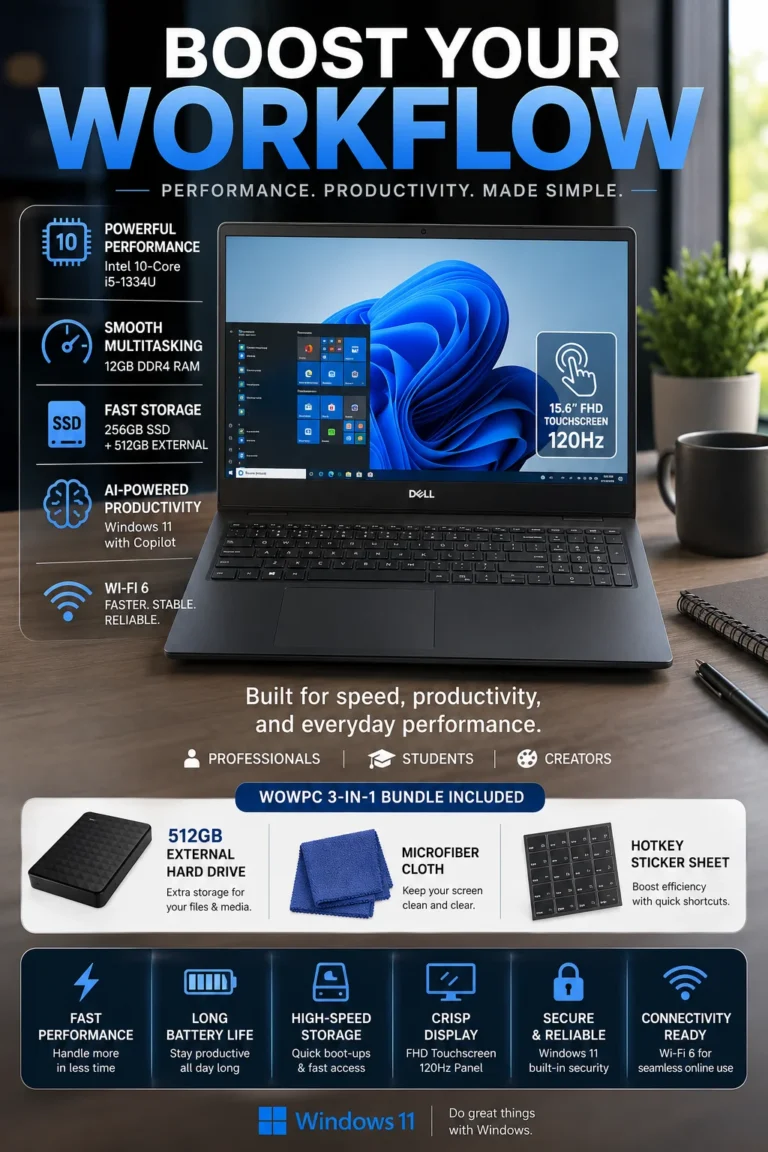
The Dell Inspiron 15 is our Best Premium Laptop Under $500 in 2026 for buyers who want a more complete configuration without moving into a higher price category. Its combination of a 13th Gen Intel Core i5 processor, 12GB of memory, a 15.6-inch Full HD 120Hz touchscreen, and additional storage makes it particularly appealing to professionals, students, multitaskers, and everyday users who want more than the basic budget-laptop experience.

• Excellent choice for professionals, students, multitaskers, and everyday users who prioritize a more feature-rich configuration under a $500 budget
• The 13th Gen Intel Core i5 processor provides responsive performance for office applications, web browsing, documents, video conferencing, schoolwork, and everyday multitasking
• 12GB of RAM provides additional multitasking headroom compared with the 8GB configurations found on many budget laptops, making it more comfortable for users who regularly keep multiple applications and browser tabs open
• The 15.6-inch Full HD touchscreen provides a large workspace while adding convenient touch interaction for Windows, browsing, presentations, and everyday applications
• The 120Hz display refresh rate provides smoother scrolling and motion than a conventional 60Hz panel, giving everyday Windows interaction a more fluid feel
• The larger 15.6-inch display is particularly useful for documents, spreadsheets, presentations, multitasking, and users who prefer a more spacious workspace
• The included additional storage provides extra capacity for files, backups, media, and other data without requiring the user to immediately purchase another storage device
• Its combination of processing performance, higher memory capacity, touchscreen functionality, high-refresh-rate display, and additional storage gives the Inspiron 15 a more feature-rich configuration than many entry-level laptops in this price range

The Dell Inspiron 15 earns our Best Premium Laptop Under $500 award because it focuses on the features that noticeably improve the everyday computing experience. The 12GB memory configuration provides additional multitasking headroom, while the 120Hz touchscreen makes navigation, scrolling, and general interaction feel smoother than on many conventional budget displays.

Compared with the Acer Aspire 5, which wins our Best Overall award because of its balanced performance and 512GB SSD configuration, the Dell Inspiron 15 is more focused on providing a richer feature set and a more premium everyday experience. It is particularly attractive to buyers who value additional memory, a high-refresh-rate touchscreen, and a larger productivity workspace over simply choosing the most balanced configuration available under $500.

• Intel Core i5-1334U processor• 13th Gen Intel Core architecture• Designed for everyday productivity workloads• Suitable for office applications and multitasking• Integrated Intel graphics• Efficient performance for school, work, and everyday computingThe Intel Core i5-1334U provides the Dell Inspiron 15 with responsive performance for the workloads most students and productivity users encounter every day. It is well suited to Microsoft Office, spreadsheets, web applications, document creation, email, video conferencing, streaming, and general multitasking.The processor is designed around efficiency as well as everyday responsiveness, making it a practical choice for users who spend much of their time working with browsers, documents, communication applications, and other productivity software.It is not intended to compete with high-performance gaming or workstation processors, but it provides a solid foundation for a versatile everyday laptop in this price range.
• 12GB memory configuration• More capacity than standard 8GB budget configurations• Better headroom for multiple applications• Suitable for browser-heavy workflows• Useful for video meetings and productivity applicationsThe 12GB memory configuration is one of the Dell Inspiron 15's clearest advantages. Many budget laptops in this price range are configured with 8GB, while the additional memory gives users more headroom when several applications, browser tabs, documents, and communication tools are running simultaneously.This is particularly useful for professionals, students, and multitaskers who regularly move between spreadsheets, browser tabs, email, video meetings, documents, and cloud applications.The extra memory does not transform the Inspiron into a workstation, but it provides a more comfortable configuration for users who frequently multitask and want additional capacity without immediately moving to a more expensive laptop.
• 15.6-inch Full HD display• 1920 × 1080 resolution• 120Hz refresh rate• Touchscreen functionality• Large workspace for productivity• Smoother scrolling and motionThe 15.6-inch Full HD touchscreen gives the Inspiron 15 a spacious workspace for documents, spreadsheets, presentations, browsing, and everyday applications.Its 120Hz refresh rate is particularly useful for general Windows interaction. Scrolling through web pages, moving between windows, and navigating supported content can appear noticeably smoother than on a conventional 60Hz display.The touchscreen also provides another way to interact with Windows, which can be useful for browsing, presentations, navigation, and compatible applications.The display is one of the main reasons this Inspiron feels more feature-rich than a typical entry-level laptop. Buyers should still evaluate brightness, color coverage, and viewing conditions according to their specific needs, particularly if display quality is critical for professional creative work.
• 256GB internal SSD• Fast solid-state system storage• Additional 512GB external drive included• Extra space for files and media• Useful for backups and secondary storageThe Dell Inspiron 15 combines a 256GB internal SSD with an included 512GB external drive. The internal SSD is responsible for the operating system, applications, and normal system responsiveness, while the additional external storage provides extra capacity for documents, photos, videos, backups, and other large files.This distinction is important: the laptop does not have 768GB of internal SSD storage. Instead, buyers receive the internal 256GB SSD plus a separate 512GB storage device.For users who need additional file capacity without immediately purchasing another storage solution, the bundled external drive can be useful. Buyers who regularly work with large applications or want all of their data stored internally may prefer a laptop with a larger internal SSD.
• 15.6-inch productivity-oriented design• Numeric keypad• Touchscreen functionality• Anti-glare display• Practical keyboard layout• Designed for home, school, and office useThe Inspiron 15 is designed around everyday productivity rather than extreme portability. Its larger chassis provides room for a spacious keyboard and numeric keypad, which can be particularly useful for spreadsheet work, accounting, data entry, and office applications.The touchscreen and anti-glare display add useful flexibility for everyday Windows interaction, while the larger 15.6-inch format provides a comfortable workspace for users who prefer a traditional desktop-style laptop experience.It is not the ideal choice for frequent travelers who prioritize minimum weight and size. For those users, a smaller 14-inch laptop such as the ASUS VivoBook 14 may be a better fit.
• Wi-Fi 6 connectivity• Modern wireless connectivity• Bluetooth support• Windows productivity ecosystem• Suitable for external peripherals and accessoriesWi-Fi 6 provides the Inspiron 15 with modern wireless connectivity for web browsing, cloud applications, streaming, video conferencing, and everyday online workloads when paired with a compatible router.The laptop can also be paired with common wireless and wired peripherals, making it suitable for home offices, classrooms, and general productivity environments.Modern Windows features and compatibility with current productivity applications further reinforce its role as an everyday work and study machine rather than a specialized system.
Ideal for:• Office professionals• Students• Remote and hybrid workers• Spreadsheet and productivity users• Heavy browser users• Multitaskers• Buyers who prioritize display smoothness and additional memoryThe Dell Inspiron 15 is our Best Premium Laptop Under $500 because it provides several features that are uncommon together in this price range: 12GB of memory, a 15.6-inch Full HD touchscreen, a 120Hz refresh rate, and additional storage included with the system.It is particularly well suited to buyers who want a more feature-rich everyday laptop rather than simply choosing the model with the strongest processor.The Acer Aspire 5 remains our Best Overall choice because of its stronger overall balance of processor performance and internal SSD capacity. However, buyers who value additional RAM, a smoother 120Hz touchscreen, a numeric keypad, and bundled external storage may find the Dell Inspiron 15 more appealing.For users who want a larger productivity workspace and a more complete feature set while staying under $500, the Inspiron 15 is one of the strongest alternatives in this lineup.
#3 Best Value Laptop Under $500 • 2026 Editor's Choice

HP Pavilion 15

Best Value Laptop for Performance, Students & Everyday Productivity
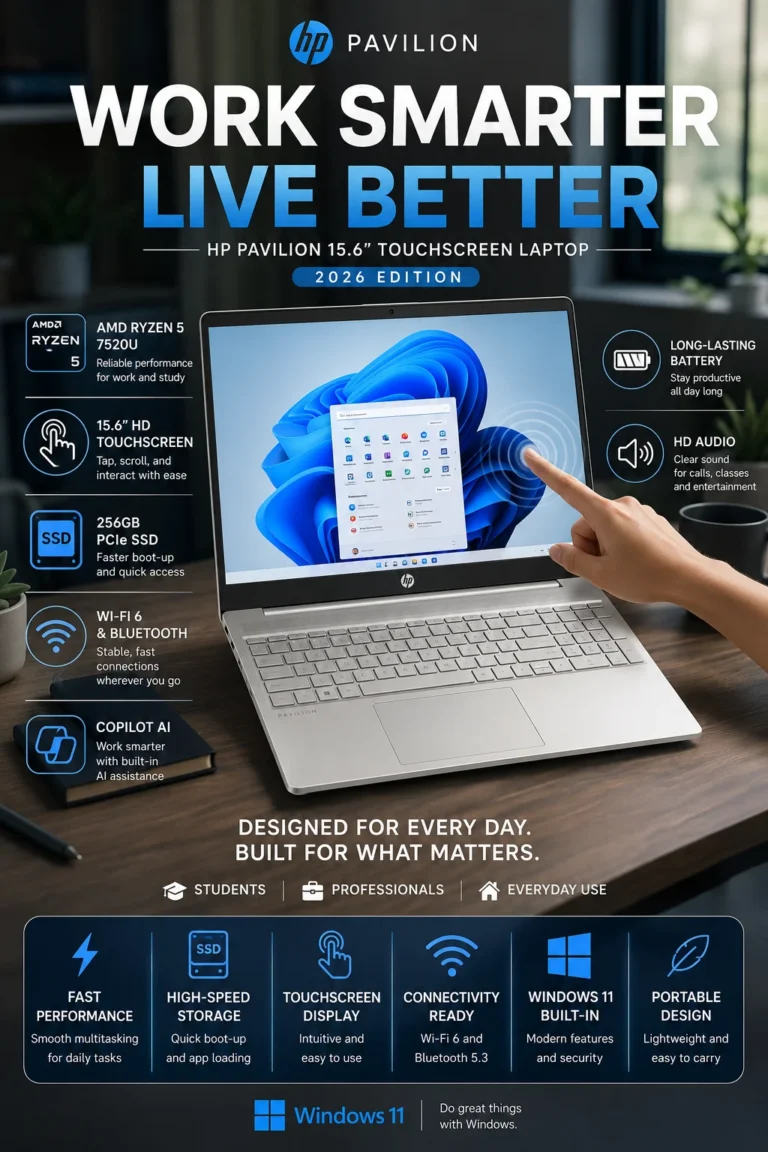
The HP Pavilion 15 is our Best Value Laptop Under $500 in 2026 because it combines capable AMD Ryzen 5 performance, modern DDR5 memory, touchscreen functionality, and a practical 15.6-inch design at a budget-friendly price. It is particularly appealing to students, home users, remote workers, and families who want a capable everyday laptop without paying for features they may not need.

• Excellent choice for students, families, home users, remote workers, and budget-conscious buyers who prioritize a strong balance between price and everyday performance
• The AMD Ryzen 5 processor provides responsive performance for schoolwork, office applications, web browsing, streaming, video conferencing, and everyday multitasking
• 8GB of DDR5 memory provides a modern memory platform for everyday workloads and supports comfortable multitasking across browser tabs, documents, communication applications, and productivity software
• The 256GB SSD provides fast system startup, quick application launches, and responsive access to everyday documents and files
• The 15.6-inch touchscreen provides a spacious workspace while adding convenient touch interaction for Windows navigation, browsing, presentations, and compatible applications
• The larger display is well suited to documents, spreadsheets, online classes, entertainment, and everyday productivity where additional screen space is useful
• Modern wireless connectivity makes the Pavilion 15 practical for home offices, classrooms, remote work, streaming, and other connected everyday environments
• Its combination of Ryzen performance, DDR5 memory, touchscreen functionality, and a practical 15.6-inch design makes it one of the strongest value-oriented configurations in this lineup

The HP Pavilion 15 earns our Best Value Laptop Under $500 award because it delivers the features that matter most to everyday users without trying to compete with more expensive laptops on premium materials or specialized performance. Its Ryzen 5 processor, DDR5 memory, touchscreen, and large display create a well-balanced configuration for school, home, and productivity workloads.

Compared with entry-level laptops built around lower-performance processors, the HP Pavilion 15 provides a more capable foundation for multitasking and everyday applications. It does not have the same overall performance and internal storage balance as the Acer Aspire 5, nor the higher-memory and 120Hz display configuration of the Dell Inspiron 15. Instead, its strength is delivering a practical combination of modern hardware and useful features at a price that makes sense for budget-conscious buyers.

• AMD Ryzen 5 7520U processor• Efficient everyday performance• Suitable for school and office workloads• Designed for browsing, documents, streaming, and multitasking• Integrated Radeon graphics• Practical performance for a value-focused laptopThe AMD Ryzen 5 7520U provides the HP Pavilion 15 with enough performance for the workloads most students, home users, and productivity-focused buyers encounter every day.It is well suited to web browsing, Microsoft Office, online classes, document creation, spreadsheets, email, video conferencing, streaming, and general multitasking.The processor is designed with efficiency in mind rather than high-end performance. That makes the Pavilion 15 a sensible choice for buyers whose workloads focus primarily on everyday productivity rather than demanding gaming, professional video editing, 3D rendering, or other heavily threaded applications.For its intended audience, the Ryzen 5 7520U provides a practical balance between responsiveness and power efficiency.
• 8GB DDR5 memory• Modern memory technology• Suitable for browser-heavy everyday workloads• Supports productivity applications and video calls• Balanced configuration for budget buyersThe 8GB DDR5 configuration provides a modern memory platform for everyday computing. It is suitable for browsing with multiple tabs, documents, spreadsheets, online classes, email, video meetings, and standard productivity applications.DDR5 technology provides a newer memory architecture than the DDR4 configurations found in many older budget systems. However, memory capacity remains important, and 8GB is best suited to typical everyday workloads rather than unusually demanding multitasking.Students and home users who primarily work with browsers, documents, streaming services, and productivity applications should find this configuration practical. Buyers who routinely run many demanding applications simultaneously may benefit from moving to a laptop with 16GB of memory.
• 15.6-inch display• Touchscreen functionality• Large workspace for productivity• Convenient touch interaction• Useful for browsing and online learningThe 15.6-inch touchscreen gives the HP Pavilion 15 a spacious workspace for schoolwork, documents, spreadsheets, browsing, presentations, and entertainment.Touch interaction can make everyday Windows navigation more convenient, particularly for browsing, scrolling, presentations, and compatible applications. It can also be useful for students who frequently move between online learning platforms and traditional productivity applications.The larger screen is especially valuable for users who prefer more workspace than a compact 13- or 14-inch laptop can provide. It also makes the Pavilion 15 better suited to home and desk-based productivity than extremely portable budget notebooks.
• 256GB SSD• Fast system startup• Quick application launches• Responsive file access• Suitable for everyday documents and applicationsThe 256GB SSD provides the fast system responsiveness expected from a modern laptop. Solid-state storage allows Windows to start quickly, applications to launch with less waiting, and everyday files to be accessed more responsively than with traditional mechanical hard drives.The main limitation is capacity rather than speed. A 256GB drive is sufficient for Windows, productivity applications, documents, schoolwork, and everyday files, but users who store large photo libraries, videos, games, or extensive media collections may eventually need external or cloud storage.For a value-focused laptop, the combination of SSD speed and a reasonable starting capacity keeps the Pavilion 15 responsive while helping maintain an affordable overall configuration.
• 15.6-inch productivity-oriented chassis• Numeric keypad• Touchscreen functionality• Multiple connectivity options• Wi-Fi 6 wireless connectivity• Designed for home, school, and office environmentsThe Pavilion 15 is built around a traditional 15.6-inch productivity format. Its larger chassis provides space for a full-size keyboard layout with a numeric keypad, which can be particularly useful for spreadsheets, accounting, data entry, and office applications.Wi-Fi 6 provides modern wireless connectivity for web browsing, cloud applications, video conferencing, streaming, and other internet-dependent workloads when paired with a compatible network.The overall design makes the Pavilion 15 particularly practical for users who spend most of their time working at a desk, studying at home, or moving between home and school rather than carrying a laptop constantly throughout the day.
• Efficient Ryzen mobile processor• Designed for everyday mobile computing• Suitable for school and home use• Practical balance between screen size and portability• Modern wireless connectivityThe Pavilion 15 is designed to provide practical mobility without sacrificing the larger workspace of a 15.6-inch laptop. Its efficient mobile processor helps support everyday use while allowing the system to remain suitable for classrooms, home offices, and general productivity.Actual battery life varies depending on display brightness, applications, wireless activity, video playback, and workload, so buyers should not expect a single battery figure to represent every real-world scenario.For students and home users who need to move between rooms, classrooms, or study areas but still prefer a larger screen, the Pavilion 15 offers a sensible compromise between portability and workspace.
Ideal for:• Students• Home users• Families• Remote workers• Office and productivity users• Web browsing and streaming• Buyers focused on price-to-performance valueThe HP Pavilion 15 is our Best Value Laptop Under $500 because it focuses on delivering a practical combination of modern hardware and useful everyday features at an accessible price.Its Ryzen 5 processor, 8GB DDR5 memory, touchscreen, 15.6-inch display, and SSD storage provide a well-rounded foundation for schoolwork, home computing, office applications, browsing, and entertainment.The Acer Aspire 5 remains the stronger overall choice for buyers who prioritize higher CPU performance and a larger internal SSD, while the Dell Inspiron 15 is more attractive for users who want 12GB of memory and a 120Hz touchscreen.The Pavilion 15 occupies the middle ground: it is not the most powerful or most feature-rich laptop in the lineup, but it offers a strong combination of useful features and everyday performance for buyers who want to spend their budget carefully.
#4 Best Laptop for Students Under $500 • 2026 Editor's Choice

ASUS VivoBook 14

Best Student Laptop for Portability, Schoolwork & Everyday Productivity
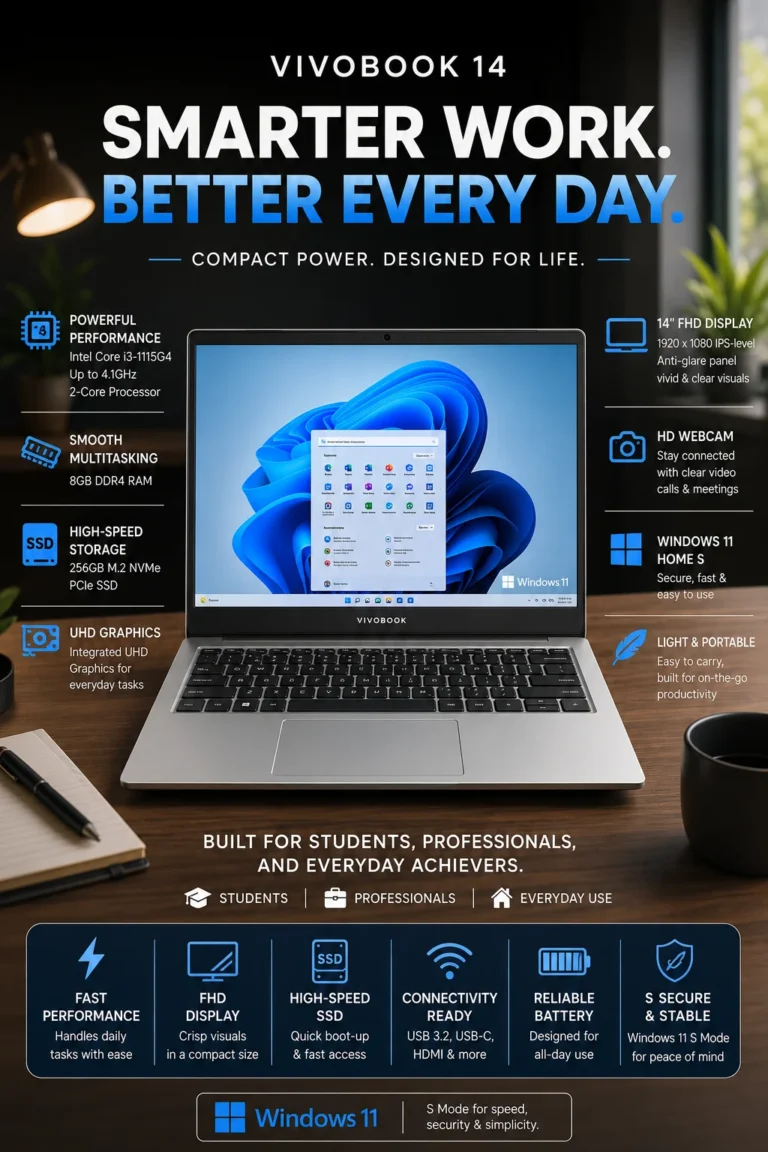
The ASUS VivoBook 14 is our Best Laptop for Students Under $500 in 2026 for buyers who prioritize portability without giving up the essentials for school and everyday productivity. Its compact 14-inch design, Full HD display, Intel Core i3 processor, 8GB of memory, and SSD storage provide a practical configuration for online classes, research, documents, presentations, web browsing, and everyday student workloads.

• Excellent choice for high school and college students, remote learners, commuters, and buyers who regularly carry their laptop between classes, home, and study spaces
• The Intel Core i3 processor provides enough performance for web browsing, documents, presentations, online learning platforms, video calls, and standard productivity applications
• 8GB of memory provides a practical configuration for browser tabs, documents, communication applications, online classes, and everyday multitasking
• The 256GB SSD provides fast system startup, quick application launches, and responsive access to school documents and everyday files
• The 14-inch Full HD display provides a useful balance between screen space and portability for studying, browsing, documents, and presentations
• The smaller chassis is easier to carry than traditional 15.6-inch budget laptops, making it particularly practical for students who commute or move between classrooms and study areas
• Its compact format makes it easier to use in smaller desks, classrooms, libraries, coffee shops, and other study environments
• The combination of portability, Full HD resolution, everyday performance, and SSD storage makes the VivoBook 14 a well-balanced student-focused configuration under $500

The ASUS VivoBook 14 earns our Best Laptop for Students Under $500 award because it prioritizes the features that matter most when a laptop needs to move with you every day. Its 14-inch format is easier to carry than larger 15.6-inch alternatives, while the Full HD display and capable everyday hardware provide enough workspace and performance for typical academic tasks.

Compared with the Acer Aspire 5 and Dell Inspiron 15, the VivoBook 14 is not designed to win on raw processing performance or larger-screen productivity. Its advantage is portability. Students who regularly carry their laptop between classes, home, libraries, and study spaces may find the smaller 14-inch design more practical than a larger budget notebook. For buyers whose priority is mobility rather than maximum performance, the VivoBook 14 is one of the most sensible choices in this lineup.

• Intel Core i3 processor• Designed for everyday productivity• Suitable for school and college workloads• Supports web browsing, documents, presentations, and online classes• Integrated graphics for everyday computingThe Intel Core i3 processor provides the level of performance most students need for everyday academic work. It is well suited to web browsing, Microsoft Office, document creation, presentations, online learning platforms, email, video conferencing, streaming, and general productivity.Students can comfortably work with research tabs, documents, notes, and communication applications during typical study sessions. The processor is not intended for demanding professional workloads, advanced video editing, or high-end gaming, but those are outside the primary purpose of this laptop.For students whose daily computing needs revolve around coursework, research, communication, and productivity applications, the VivoBook 14 provides a practical performance level without requiring a more expensive system.
• 8GB memory configuration• Suitable for browser tabs and productivity applications• Supports online classes and video meetings• Practical configuration for schoolwork• Balanced for everyday student workloadsThe 8GB memory configuration provides enough capacity for typical student multitasking. Students can work with multiple browser tabs, documents, presentations, email, online learning platforms, and communication applications without needing to constantly close programs.This configuration is best suited to normal academic workloads rather than unusually demanding multitasking. Students working with specialized engineering software, large datasets, professional creative applications, or virtual machines may benefit from a laptop with more memory.For general school and college use, however, 8GB provides a sensible balance between capability and cost.
• 14-inch display• Full HD resolution• 1920 × 1080 resolution• Compact productivity workspace• Suitable for documents, browsing, and presentationsThe 14-inch Full HD display gives the VivoBook 14 a useful balance between screen space and portability. Full HD resolution provides sharper text and interface elements than lower-resolution HD panels commonly found on entry-level laptops.The 14-inch format is also practical for students because it provides enough workspace for documents, web research, presentations, and online classes without making the laptop unnecessarily large.Students who regularly work with large spreadsheets or multiple windows side by side may prefer a 15.6-inch laptop such as the Acer Aspire 5 or Dell Inspiron 15. For users who value mobility, however, the VivoBook's smaller display is an advantage rather than a limitation.
• 256GB SSD• Fast system startup• Quick application launches• Responsive file access• Suitable for documents and school projectsThe 256GB SSD provides the fast system responsiveness expected from a modern laptop. Windows can start quickly, applications can launch with less waiting, and everyday school files can be accessed more responsively than with traditional mechanical storage.The main consideration is capacity. A 256GB drive is sufficient for Windows, productivity applications, documents, presentations, PDFs, and typical school files, but students who store large video libraries, games, or extensive media collections may eventually need external or cloud storage.For academic workloads, the combination of SSD speed and the compact 14-inch design keeps the VivoBook 14 practical and easy to use throughout the school day.
• Compact 14-inch format• Easier to carry than larger 15.6-inch laptops• Suitable for classrooms and libraries• Practical for commuting between home and school• Designed for mobile everyday computingPortability is the main reason the ASUS VivoBook 14 stands out in this lineup. Its 14-inch format provides a useful amount of screen space while remaining easier to carry than traditional 15.6-inch budget laptops.For students who move between classrooms, libraries, study areas, home, and transportation throughout the day, the smaller format can make a meaningful difference.The compact design also works well on smaller desks and classroom tables where larger laptops may feel cumbersome. This makes the VivoBook 14 particularly well suited to students who value mobility as much as raw specifications.
• Modern wireless connectivity• Suitable for online learning platforms• Supports video conferencing• Compatible with common wireless peripherals• Practical for home, school, and study environmentsThe VivoBook 14 provides the connectivity needed for modern student workflows, including web research, cloud applications, online classes, video meetings, and everyday communication.Wireless connectivity makes it practical to work across home, school, libraries, and other study environments, while compatibility with common peripherals allows students to connect accessories such as wireless mice, headphones, and external devices.For students who rely heavily on cloud-based learning platforms and online communication, dependable connectivity is just as important as raw processing performance.
Ideal for:• High school students• College and university students• Remote learners• Students who commute• Online classes• Research and web browsing• Microsoft Office and productivity applications• Buyers who prioritize portabilityThe ASUS VivoBook 14 is our Best Laptop for Students Under $500 because it focuses on one of the most important practical considerations for academic users: portability.Its compact 14-inch format is easier to carry than larger alternatives, while the Intel Core i3 processor, 8GB of memory, Full HD display, and 256GB SSD provide enough capability for typical school and college workloads.The Acer Aspire 5 is the better choice for students who prioritize processing performance and a larger screen, while the HP Pavilion 15 provides a stronger value-oriented 15.6-inch configuration. The VivoBook 14 wins for students who regularly carry their laptop throughout the day and want a more compact study companion.For buyers who value portability, practical performance, and an affordable price more than maximum specifications, the VivoBook 14 is the most appropriate student-focused choice in this lineup.
#5 Best Storage Laptop Under $500 • 2026 Editor's Choice

Lenovo IdeaPad 1

Best Budget Laptop for Storage, Families & Everyday Computing
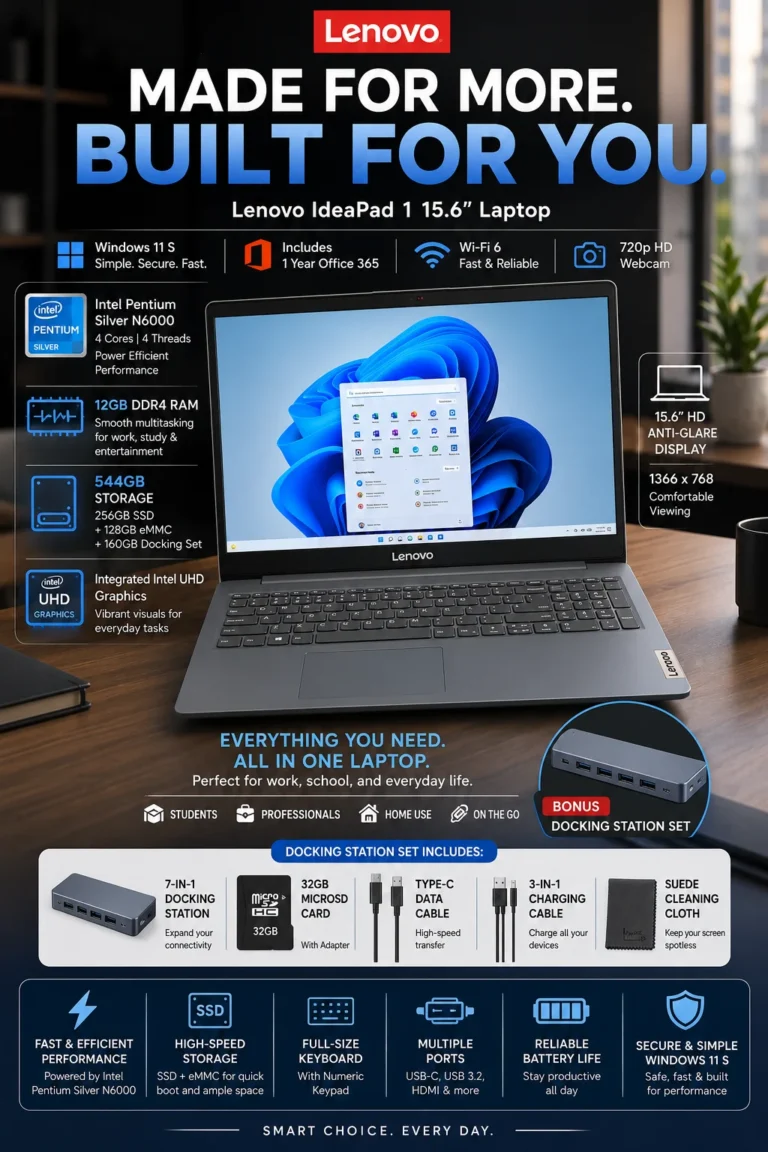
The Lenovo IdeaPad 1 is our Best Storage Laptop Under $500 in 2026 for buyers who prioritize memory capacity, file storage, and included extras over maximum processing performance. Its 12GB memory configuration, expanded storage setup, 15.6-inch display, and bundled accessories make it particularly appealing to students, families, home users, and anyone who needs additional space for documents, photos, videos, downloads, and everyday files.

• Excellent choice for students, families, home users, and budget-conscious buyers who prioritize storage capacity and additional included accessories
• 12GB of RAM provides more multitasking headroom than the standard 8GB configurations found on many budget laptops, making it useful for browser-heavy workflows and everyday productivity
• The expanded storage setup provides additional capacity for documents, photos, videos, downloads, backups, and other personal files without immediately requiring another storage purchase
• The 15.6-inch anti-glare display provides a larger workspace for documents, browsing, schoolwork, entertainment, and everyday computing
• Included accessories such as the docking station, MicroSD card, cables, and Microsoft 365 add practical value for buyers who need additional peripherals and storage options
• The full-size keyboard provides a familiar layout for documents, schoolwork, email, and everyday productivity
• Wi-Fi 6 provides modern wireless connectivity for browsing, cloud applications, streaming, online classes, and everyday internet use
• Its combination of 12GB memory, expanded storage, large display, and bundled accessories makes the IdeaPad 1 particularly attractive to buyers who value capacity and included value over maximum processing performance

The Lenovo IdeaPad 1 earns our Best Storage Laptop Under $500 award because it focuses on a different priority from the other laptops in this guide. Instead of competing directly on processor performance or premium display features, it gives buyers more memory, additional storage capacity, a large 15.6-inch workspace, and useful accessories in one budget-oriented package.

Compared with the Acer Aspire 5, Dell Inspiron 15, and HP Pavilion 15, the IdeaPad 1 is better suited to buyers who place a higher priority on storage and included extras than raw processing performance. The Acer remains the stronger overall performer, the Dell offers the more feature-rich display and memory configuration, and the HP provides a stronger price-to-performance balance. The Lenovo's advantage is its focus on capacity and practical extras for users who simply need more room for their files.

• 12GB RAM configuration• More memory capacity than standard 8GB budget configurations• Suitable for browser-heavy workflows• Supports Office applications and everyday productivity• Useful for students, families, and home usersThe 12GB memory configuration is one of the Lenovo IdeaPad 1's strongest advantages for everyday multitasking. It provides additional headroom for users who regularly keep multiple browser tabs, documents, email, streaming services, and productivity applications open at the same time.Compared with basic 8GB budget configurations, the additional memory can provide a more comfortable experience when several applications are running simultaneously.It is important to keep expectations realistic, however. The IdeaPad 1 is still designed primarily for everyday computing rather than demanding professional workloads. Users working with advanced video editing, 3D applications, large datasets, or other memory-intensive software should consider a more powerful laptop with a stronger processor and potentially 16GB or more of RAM.
• Expanded storage configuration• Up to 544GB of combined storage capacity depending on configuration and included storage• Suitable for documents, photos, videos, downloads, and backups• Additional storage flexibility through included accessories• Practical for users who prioritize capacityThe Lenovo IdeaPad 1 stands out because of its expanded storage package. The advertised 544GB figure represents the combined storage capacity associated with the configuration and included storage components rather than a single 544GB high-speed internal SSD.This distinction matters because different storage components can provide different levels of performance. The internal SSD or primary storage handles the operating system and applications, while additional storage can be useful for personal files, photos, videos, downloads, and backups.For buyers who frequently run out of space on entry-level laptops, this configuration provides considerably more flexibility than a basic low-capacity system.
• 15.6-inch display• Anti-glare surface• Large workspace for productivity• Suitable for documents and browsing• Comfortable format for home and school useThe 15.6-inch display gives the IdeaPad 1 a spacious workspace that is particularly useful for documents, web browsing, schoolwork, spreadsheets, video calls, and entertainment.The anti-glare surface can help reduce distracting reflections in brighter environments, making the display more practical for everyday indoor use.The larger format is especially useful for home users and students who spend considerable time working with documents or browsing the web. Buyers who prioritize portability, however, may prefer the 14-inch ASUS VivoBook 14.
• Docking station• MicroSD card• Additional cables and accessories• Microsoft 365 or Office-related software depending on the specific bundle• Additional storage and connectivity flexibilityOne of the IdeaPad 1's differentiating features is the collection of accessories included with the specific bundle.A docking station can provide additional connectivity for peripherals and external displays, while a MicroSD card can provide convenient additional storage for photos, documents, and other files.The included software and accessories can add meaningful value for buyers who would otherwise need to purchase these items separately. Because bundled accessories can vary between retailers and configurations, buyers should verify the exact contents of the package before purchasing.This makes the IdeaPad 1 particularly interesting for families, students, and home users who want a more complete setup without adding several separate purchases.
• Full-size keyboard• Numeric keypad depending on configuration• Wi-Fi 6 wireless connectivity• Designed for everyday productivity• Suitable for home and school environmentsThe IdeaPad 1's larger chassis provides space for a practical keyboard layout that works well for documents, email, school assignments, spreadsheets, and everyday productivity.Wi-Fi 6 provides modern wireless connectivity for browsing, streaming, cloud applications, online classes, video calls, and other internet-dependent tasks when paired with a compatible router.The combination of a larger screen, practical keyboard, and modern wireless connectivity makes the IdeaPad 1 particularly well suited to users who primarily work from home, study, or use their laptop in a fixed workspace.
Ideal for:• Students• Families• Home users• Budget-conscious buyers• Users with many photos and documents• Buyers who need additional storage• Everyday browsing and productivity• Users who value bundled accessoriesThe Lenovo IdeaPad 1 is our Best Storage Laptop Under $500 because it targets buyers who prioritize capacity and included value over maximum processing performance.Its 12GB memory configuration, expanded storage setup, 15.6-inch display, and bundled accessories make it a practical choice for everyday computing, schoolwork, home use, documents, photos, downloads, and personal files.The Acer Aspire 5 remains the better choice for buyers who want stronger overall performance and faster primary storage, while the Dell Inspiron 15 offers a more premium display and higher-end everyday feature set. The HP Pavilion 15 provides a stronger performance-per-dollar balance, and the ASUS VivoBook 14 is the better option for students who prioritize portability.The IdeaPad 1 therefore makes the most sense when storage capacity, memory, included accessories, and affordability matter more than raw processing performance.

Best Laptops Under $500 in 2026

Ranked by Performance, Value, Display Quality, Portability, Storage & Real-World Usability

Choosing the best laptop under $500 requires more than comparing processor specifications. Budget buyers need a practical combination of performance, memory, storage, display quality, portability, everyday usability, and overall value. We evaluated these five laptops based on the workloads most buyers actually perform, including schoolwork, office applications, web browsing, multitasking, remote work, online learning, entertainment, and everyday productivity to help you choose the right budget laptop in 2026.

LaptopCPU & Key SpecsBest ForWhy It WinsEditor's VerdictBuy
Best Overall
Acer Aspire 5
13th Gen Intel Core i5 H-Series
8GB RAM
512GB SSD
15.6" Full HD Touchscreen
Students
Office Users
Multitaskers
Everyday Productivity
The Acer Aspire 5 provides the strongest overall balance of processing performance, storage, display quality, and everyday usability in this lineup. Its Core i5 H-Series processor and 512GB SSD give it a particularly strong foundation for multitasking, schoolwork, office applications, browsing, and general productivity.Best Laptop Under $500 for Most UsersCheck Price
Best Value
HP Pavilion 15
AMD Ryzen 5 7520U
8GB DDR5
256GB SSD
15.6" Touchscreen
Students
Home Users
Remote Workers
Value Seekers
The HP Pavilion 15 focuses on delivering useful modern features without pushing the price unnecessarily high. Its Ryzen 5 processor, DDR5 memory, touchscreen, and 15.6-inch display create a practical configuration for schoolwork, home computing, office applications, browsing, and everyday productivity.Best Value Laptop Under $500Check Price
Best Premium
Dell Inspiron 15
13th Gen Intel Core i5
12GB RAM
256GB SSD
15.6" FHD 120Hz Touchscreen
Professionals
Power Users
Multitaskers
Productivity
The Dell Inspiron 15 stands out with its 12GB memory configuration and 120Hz Full HD touchscreen. It provides a more feature-rich everyday experience for buyers who want smoother display performance and additional multitasking capacity without exceeding the $500 budget.Best Premium-Feature Laptop Under $500Check Price
Best for Students
ASUS VivoBook 14
Intel Core i3
8GB RAM
256GB SSD
14" Full HD Display
Students
College Users
Remote Learners
Frequent Commuters
The ASUS VivoBook 14 prioritizes portability while retaining enough performance for typical academic workloads. Its compact 14-inch format is easier to carry between classrooms, home, libraries, and study spaces, making it particularly practical for students who value mobility.Best Student Laptop Under $500Check Price
Best Storage
Lenovo IdeaPad 1
12GB RAM
Expanded Storage Configuration
Up to 544GB Combined Capacity*
15.6" Anti-Glare Display
Families
Students
Home Users
Storage-Focused Buyers
The Lenovo IdeaPad 1 focuses on capacity and included value rather than maximum processing performance. Its 12GB memory configuration, expanded storage setup, large display, and bundled accessories make it particularly useful for buyers who need additional space for documents, photos, videos, downloads, and personal files.Best Storage-Focused Laptop Under $500Check Price

*Storage capacity and included accessories can vary depending on the specific Lenovo IdeaPad 1 configuration and retailer bundle. Verify the exact configuration before purchasing.

Keep Exploring

Recommended Next Reads

Found a laptop you like but still comparing your options? Explore our expert laptop buying guides for students, remote workers, professionals, and different budgets.

Whether you're looking for a more powerful laptop, a better model for school or remote work, or simply want to compare what you get at the next price level, these guides can help you make a more informed purchase decision.

01

EDITOR'S FINAL RECOMMENDATIONS

Our Final Laptop Recommendations Under $500 in 2026

After comparing these laptops across everyday performance, multitasking, storage, display quality, portability, productivity features, and overall value, these are our final recommendations for buyers in 2026. Each laptop serves a different type of user, so the best choice ultimately depends on how you plan to use it.

BEST VALUE

HP Pavilion 15

A strong value-focused option for buyers who want modern hardware without stretching the budget. Its Ryzen 5 processor, DDR5 memory, touchscreen display, and practical productivity features make it especially appealing to students, families, remote workers, and everyday users.

  • ✓ AMD Ryzen 5 7520U
  • ✓ 8GB DDR5 Memory
  • ✓ Fast SSD Storage
  • ✓ 15.6-inch Touchscreen
Best price-to-performance value under $500
BEST PREMIUM FEEL

Dell Inspiron 15

The premium-feeling choice for buyers who want more memory and a smoother display experience without moving beyond the $500 price range. Its 12GB RAM and 120Hz touchscreen make it particularly attractive for multitasking, productivity, browsing, and everyday entertainment.

  • ✓ 13th Gen Intel Core i5
  • ✓ 12GB Memory
  • ✓ 15.6-inch 120Hz Touchscreen
  • ✓ Wi-Fi 6 Connectivity
Best premium-feeling laptop under $500
BEST FOR STUDENTS

ASUS VivoBook 14

The most student-focused option in this lineup. Its compact 14-inch design makes it easier to carry between home, classrooms, libraries, and campus, while the Full HD display and SSD storage provide a practical experience for everyday schoolwork.

  • ✓ Intel Core i3 Processor
  • ✓ 8GB RAM
  • ✓ 256GB SSD
  • ✓ 14-inch Full HD Display
Best laptop under $500 for students and portability
BEST STORAGE VALUE

Lenovo IdeaPad 1

The right choice for buyers who care more about storage capacity and included extras than maximum processing performance. With 12GB RAM, expanded storage, and bundled accessories, it offers an unusually flexible package for students, families, and home users managing large numbers of files.

  • ✓ 12GB RAM
  • ✓ 544GB Total Storage
  • ✓ Bonus Accessories
  • ✓ 15.6-inch Anti-Glare Display
Best laptop under $500 for storage-focused buyers
QUICK DECISION

Which laptop under $500 should you buy?

Best Overall

Acer Aspire 5

Best Value

HP Pavilion 15

Best Premium Feel

Dell Inspiron 15

Best for Students

ASUS VivoBook 14

Best Storage Value

Lenovo IdeaPad 1

Laptop prices, configurations, storage options, and availability can change frequently. Before purchasing, check Amazon for the latest price, available configurations, warranty information, and current promotions.

EDITOR'S FINAL VERDICT

Final Verdict: Best Laptops Under $500 in 2026

After comparing performance, multitasking capability, memory, storage, display quality, portability, everyday usability, and overall value, one conclusion stands out:The best laptop under $500 is not necessarily the one with the most impressive specifications. It is the model that provides the right balance of performance, usability, features, and value for the way you actually plan to use it.

Budget laptops have improved significantly, but choosing the right model still requires looking beyond processor names and storage numbers. Students, professionals, families, and everyday users can have very different priorities when it comes to portability, multitasking, display quality, storage, and long-term usability.

For most buyers in 2026, we recommend prioritizing at least 8GB of RAM, fast SSD storage, a modern processor, a comfortable display, and a configuration that matches your actual daily workload.
Best Overall Acer Aspire 5
Best Value HP Pavilion 15
Best Premium Experience Dell Inspiron 15
Best for Students ASUS VivoBook 14
The simple answer:
  • Choose the Acer Aspire 5 if you want the strongest overall combination of performance, multitasking, display quality, and everyday reliability under $500.
  • Choose the HP Pavilion 15 if your priority is maximizing performance-per-dollar while still getting modern DDR5 memory and a touchscreen.
  • Choose the Dell Inspiron 15 if you want the most premium everyday experience, with 12GB of RAM and a smoother 120Hz touchscreen display.
  • Choose the ASUS VivoBook 14 if you are a student or frequent traveler who values portability, a compact design, and reliable everyday performance.
  • Choose the Lenovo IdeaPad 1 if storage capacity and bundled extras are more important to you than maximum processing performance.

Top Laptop Recommendations Under $500 (2026)

BEST OVERALL

Acer Aspire 5

Our Editor's Choice for most buyers because it provides the strongest overall balance of performance, multitasking capability, display quality, storage, and everyday usability at this price point.

  • ✓ Strong Intel Core i5 Performance
  • ✓ 8GB RAM
  • ✓ 512GB SSD
  • ✓ Excellent Everyday Productivity
BEST VALUE

HP Pavilion 15

A strong value-focused choice for students, families, and everyday users who want a modern Ryzen 5 processor, DDR5 memory, touchscreen convenience, and solid productivity performance without overspending.

  • ✓ AMD Ryzen 5 7520U
  • ✓ 8GB DDR5 Memory
  • ✓ 256GB SSD
  • ✓ Touchscreen Display
BEST PREMIUM EXPERIENCE

Dell Inspiron 15

The premium-feeling option in this lineup. Its 12GB of RAM, 120Hz touchscreen, strong Core i5 processor, and additional storage make it particularly attractive to multitaskers and productivity-focused buyers.

  • ✓ 13th Gen Intel Core i5
  • ✓ 12GB RAM
  • ✓ 120Hz Touchscreen
  • ✓ Expanded Storage
Choose the Acer Aspire 5 if:
  • ✓ You want the best overall laptop under $500
  • ✓ You regularly multitask between applications and browser tabs
  • ✓ Performance and long-term usability are important
  • ✓ You want a strong all-around productivity laptop
Choose the ASUS VivoBook 14 if:
  • ✓ You are a student or college user
  • ✓ Portability is one of your highest priorities
  • ✓ You regularly carry your laptop between locations
  • ✓ You mainly need it for school, browsing, documents, and video calls
Before Buying Any Laptop Under $500:
  • ✓ Prefer at least 8GB of RAM for modern multitasking
  • ✓ Choose SSD storage instead of older mechanical hard drives
  • ✓ Consider display quality and size, not just processor specifications
  • ✓ Match the laptop to your actual workload instead of paying for specifications you will not use
Editor's Final Recommendation:

A laptop under $500 should not be judged solely by its processor or the amount of storage listed on the box. The experience you get every day depends on how well the complete configuration works together, including memory, storage speed, display quality, keyboard, portability, and overall responsiveness.

Among the five models evaluated in this guide, the Acer Aspire 5 offers the strongest overall balance for the widest range of buyers. The HP Pavilion 15 is the better value-focused alternative, while the Dell Inspiron 15 is the strongest choice for buyers who want a more premium experience. Students should prioritize the portability of the ASUS VivoBook 14, while storage-focused users may find the Lenovo IdeaPad 1 more practical.

Editor's Choice See Today's Best Laptop Deals Under $500

Prices and configurations can change frequently. Compare the latest price, available memory and storage, included accessories, warranty coverage, and current availability before making your final decision.

Check Latest Deals

EDITOR'S FAQ

Frequently Asked Questions About the Best Laptops Under $500 in 2026

Choosing a laptop under $500 requires more than comparing processor names and RAM specifications. At this price point, buyers need to balance performance, memory, SSD storage, display quality, battery life, portability, build quality, and long-term usability.These frequently asked questions address the most important buying decisions for students, professionals, remote workers, and everyday users looking for a reliable laptop without exceeding a $500 budget.

The Acer Aspire 5 is our top overall recommendation for the best laptop under $500 in 2026.

It provides one of the strongest combinations of everyday performance, multitasking capability, display quality, storage, and upgrade potential at this price point. It is particularly well suited to students, office workers, remote professionals, and everyday users who want a versatile Windows laptop without spending significantly more.

  • Strong everyday performance for work, school, and browsing.
  • Fast SSD storage for responsive boot times and application loading.
  • Large 15.6-inch display suitable for productivity and multitasking.
  • Good balance between performance and long-term value.

The Acer Aspire 5 is our safest all-around recommendation when you want one laptop that can handle a wide range of everyday workloads without exceeding the $500 budget.

Check Current Price
The HP Pavilion 15 is our best-value recommendation for buyers who want strong everyday performance without paying more than necessary.

Its Ryzen-based platform provides enough performance for browsing, Microsoft Office, streaming, video calls, schoolwork, and everyday multitasking. It is particularly attractive for students and home users who prioritize price-to-performance value.

  • Strong Ryzen performance for everyday workloads.
  • Suitable for multitasking, productivity, and schoolwork.
  • Modern memory and connectivity features.
  • Strong price-to-performance balance.

If your priority is getting the most practical performance possible for your money, the HP Pavilion 15 is one of the strongest alternatives to the Acer Aspire 5.

Check Current Price
The Dell Inspiron 15 is the strongest productivity-focused choice in this lineup.

Its combination of memory capacity, display size, and multitasking capability makes it particularly useful for office applications, spreadsheets, browser-heavy workflows, remote work, and everyday professional tasks.

  • Higher memory capacity helps with multitasking.
  • Large display provides more workspace for productivity applications.
  • Touchscreen functionality adds flexibility for everyday use.
  • Well suited to office work, browsing, and video meetings.

For buyers who spend most of their time working with documents, spreadsheets, browser tabs, meetings, and productivity applications, the Dell Inspiron 15 is an attractive choice under $500.

Check Current Price
The ASUS VivoBook 14 is our preferred student-focused option under $500.

Students often prioritize portability just as much as raw performance. The VivoBook 14 combines a compact form factor with enough performance for research, documents, online classes, presentations, browsing, streaming, and everyday academic work.

  • Compact 14-inch form factor.
  • Easy to carry between classes, libraries, and home.
  • Suitable for documents, research, presentations, and online classes.
  • Good balance between portability and everyday performance.

If you are a student who carries your laptop throughout the day and does not need a large workstation-class machine, the VivoBook 14 is one of the more practical choices in this price range.

Check Student Price
The Lenovo IdeaPad 1 is the storage-focused choice in our lineup.

It is particularly appealing to buyers who store a large number of documents, photos, downloaded files, media, or other content locally and want additional storage value without moving into a higher price category.

  • 12GB RAM configuration provides useful multitasking capacity.
  • Large storage capacity can be useful for file-heavy users.
  • Suitable for everyday productivity and home use.
  • Additional bundled accessories can increase overall package value.

However, buyers should always check the exact storage configuration before purchasing because budget laptop configurations can vary between retailers and promotions.

Check Current Configuration
8GB of RAM can still be sufficient for basic use, but 12GB or more is preferable when available within your budget.

An 8GB laptop can handle common workloads such as web browsing, documents, email, streaming, online classes, and basic office applications. Problems become more noticeable when you keep many browser tabs and applications open simultaneously.

  • 8GB → Suitable for basic browsing, documents, streaming, and light productivity.
  • 12GB → Better for multitasking and everyday productivity.
  • 16GB → Ideal when available at a reasonable price.

For a laptop you expect to keep for several years, choosing more memory can provide additional breathing room as applications and operating systems become more demanding.

Yes. A well-chosen laptop under $500 can be more than adequate for many college students.

Most students do not need a high-end processor or dedicated graphics card for everyday academic workloads. Research, Microsoft Office, Google Workspace, presentations, online classes, browser multitasking, video calls, and streaming can all be handled by a capable budget laptop.

  • Research and web browsing.
  • Microsoft Office and Google Workspace.
  • Online classes and video conferencing.
  • Presentations, documents, and spreadsheets.
  • Streaming and everyday entertainment.

The main exception is students studying fields such as engineering, computer science, video production, 3D design, or other disciplines that require specialized professional software. Those workloads may justify spending more than $500.

The most important factors are the processor, RAM, SSD storage, display, battery life, build quality, and upgradeability.

At this price point, specifications should be evaluated as a complete system rather than individually. A laptop with a slightly slower processor but better memory, SSD storage, display, and cooling can provide a better everyday experience than a model with a more impressive processor name.

  • Processor → Look for a modern Intel Core, Intel Core i3/i5-class, or AMD Ryzen platform appropriate for your workload.
  • RAM → Prefer 12GB or 16GB when available within budget.
  • Storage → SSD storage should be considered essential for a responsive Windows laptop.
  • Display → A Full HD panel is preferable for everyday productivity.
  • Build quality → Important if the laptop will be carried and used every day.
  • Upgradeability → Can be valuable for extending the useful life of the laptop.

The goal is not to find the highest specification on paper. The goal is to find the configuration that produces the best real-world experience for your workload.

Yes. A good laptop under $500 can handle many common remote-work workloads.

Remote work often depends more on reliable everyday performance, memory, connectivity, webcam quality, battery life, and multitasking than on high-end processing power.

  • Video conferencing and online meetings.
  • Email, Microsoft Office, and cloud applications.
  • Multiple browser tabs and web applications.
  • Documents, spreadsheets, and presentations.
  • Remote collaboration and productivity platforms.

For heavier professional workloads involving advanced data analysis, software development, professional creative applications, or large multitasking sessions, moving to a higher price category may provide a more comfortable long-term experience.

If you are unsure, the Acer Aspire 5 is the safest overall recommendation from our tested lineup.

It provides the most balanced combination of everyday performance, display size, storage, multitasking capability, and overall usability for a wide range of buyers.

  • Best Overall → Acer Aspire 5
  • Best Value → HP Pavilion 15
  • Best Productivity → Dell Inspiron 15
  • Best for Students → ASUS VivoBook 14
  • Best Storage Value → Lenovo IdeaPad 1

Choose the Acer Aspire 5 if you want the safest all-around option. Choose the HP Pavilion 15 if price-to-performance is your priority, the Dell Inspiron 15 for productivity, the ASUS VivoBook 14 for portability, or the Lenovo IdeaPad 1 if storage capacity matters most.

Check Best Overall Price

BUDGET LAPTOP BUYING GUIDE

Common Mistakes When Choosing a Laptop Under $500 in 2026

Buying a laptop under $500 requires more than finding the most impressive processor or the largest number printed on a specification sheet. At this price point, every component matters because manufacturers often make compromises in memory, storage, display quality, battery capacity, build quality, or upgradeability.The wrong choice can result in slow multitasking, limited storage, poor display quality, uncomfortable daily use, or a laptop that feels outdated much sooner than expected. Avoid these common mistakes before choosing your next budget laptop.

Editor's Insight

The best laptop under $500 is rarely the model with the most impressive specification on paper. At this price point, a balanced configuration can provide a much better everyday experience than a laptop that focuses heavily on one component while compromising everything else.For most buyers in 2026, we recommend prioritizing SSD storage, at least 8GB of RAM with 12GB or 16GB preferred when available, a modern processor, a Full HD display, reliable connectivity, and a build quality suitable for everyday use. If you expect to keep the laptop for several years, paying slightly more for a better-balanced configuration can be worthwhile.

Choosing the CPU Without Looking at the Complete Configuration

  • A faster processor does not automatically make a laptop better if it is paired with insufficient memory or slow storage.
  • Everyday responsiveness depends on the interaction between the processor, RAM, SSD, cooling system, and operating system.
  • Marketing often emphasizes processor names while giving less attention to the rest of the configuration.

Better decision: Evaluate the processor together with RAM, SSD storage, display, cooling, and overall configuration. A balanced laptop is usually a better purchase than one designed around a single impressive specification.

Buying Only 8GB of RAM Without Considering Long-Term Use

  • 8GB can still handle browsing, documents, streaming, and basic productivity.
  • Heavy browser use and multiple applications can consume available memory quickly.
  • Budget laptops are often kept for several years, making memory capacity more important over time.

Better decision: 8GB is acceptable for basic workloads, but choose 12GB or 16GB when the price difference is reasonable. More memory provides additional headroom for multitasking and longer-term use.

Ignoring SSD Storage and Buying an Outdated Storage Configuration

  • SSD storage has a major impact on Windows startup times and everyday responsiveness.
  • Traditional hard drives can make a budget laptop feel significantly slower during normal use.
  • Very small SSD capacities can become restrictive once Windows, applications, and personal files accumulate.

Better decision: Prioritize an SSD-based laptop and consider 512GB when available. Avoid choosing a slower storage configuration simply because the processor specification looks more impressive.

Ignoring Display Quality Because the Laptop Is Cheap

  • You may spend several hours every day looking at the laptop display.
  • Low resolution can make text, documents, and web content less comfortable to view.
  • Poor brightness and viewing angles can become particularly frustrating in different lighting conditions.

Better decision: Prefer a Full HD display with acceptable brightness and viewing angles. For productivity and study, display quality can have a greater daily impact than a small processor performance difference.

Paying for Performance You Do Not Actually Need

  • Most students and office users do not need a dedicated gaming GPU.
  • Higher performance can increase price, weight, heat, and power consumption.
  • A more expensive specification does not automatically produce a better productivity experience.

Better decision: Match the laptop to your real workload. For browsing, school, office work, streaming, and remote work, prioritize balance rather than paying for performance you will rarely use.

Overlooking Portability, Battery Life, and Daily Comfort

  • A laptop can have excellent specifications and still be inconvenient to carry every day.
  • Students and remote workers may spend hours moving between classrooms, offices, libraries, and home.
  • Keyboard comfort, weight, battery efficiency, and chassis design affect everyday usability.

Better decision: Think about how and where you will actually use the laptop. A lighter 14-inch model can make sense for students and mobile users, while a larger 15.6-inch model may be better for users who prioritize screen space.

Smart Buying Advice for Budget Laptop Buyers

Choose the Acer Aspire 5 if:

You want the strongest all-around balance of performance, storage, display size, multitasking capability, and everyday usability. It is our safest recommendation for buyers who are not focused on one specific use case.

Choose the ASUS VivoBook 14 if: You prioritize portability and expect to carry your laptop frequently between classes, workspaces, libraries, and home. Its compact form factor makes it particularly attractive for students and mobile users.

Key takeaway: The best laptop under $500 is not necessarily the one with the fastest processor, the most RAM, or the longest list of features. It is the laptop that provides the right balance of performance, memory, storage, display quality, portability, battery life, and reliability for your actual daily workload.

After evaluating the laptops featured in this guide, these are our Editor's top recommendations for buyers in 2026:

  • Best Overall: Acer Aspire 5 — the strongest overall balance of everyday performance, display size, storage, multitasking capability, and value for most buyers.
  • Best Value: HP Pavilion 15 — an attractive choice for buyers who prioritize price-to-performance and want strong everyday productivity without spending more than necessary.
  • Best for Productivity: Dell Inspiron 15 — particularly well suited to office work, spreadsheets, multitasking, browsing, video meetings, and users who value additional memory and workspace.
  • Best for Students: ASUS VivoBook 14 — a practical choice for students who prioritize portability, everyday academic performance, and a compact form factor.
  • Best Storage Value: Lenovo IdeaPad 1 — the storage-focused option for buyers who keep large numbers of files locally and want additional storage value within the budget category.

Need help choosing your laptop?

Not sure which option fits your workflow? Get a personalized recommendation based on your budget, performance needs, and usage.

Get personalized recommendation

⚡ Usually responds within 24 hours