
Explore Our Best Student Laptop Guides
Discover our complete collection of student laptop recommendations, performance comparisons, and expert buying guides designed to help you choose the perfect laptop for school, university, online classes, research, and everyday productivity.
Best Programming Laptops for Students in 2026: 7 Expert Picks for Coding, AI & Multitasking
The best programming laptop for students in 2026 needs to handle far more than a code editor and a web browser. Modern computer science and software engineering students increasingly work with Visual Studio Code, Git, Docker, virtual machines, databases, Android Studio, AI coding assistants, browsers with dozens of tabs, and multiple development environments at the same time. The right laptop needs enough CPU performance, memory, fast storage, battery life, and thermal headroom to keep demanding workflows responsive throughout the school day.
In this guide, we've selected the best programming laptops for students based on the demands of real-world coding, multitasking, AI-assisted development, portability, battery life, display quality, thermals, keyboard comfort, and long-term value. Whether you're studying computer science, software engineering, or a related field, you'll find options ranging from the efficient Apple MacBook Air 15-inch (M4) to powerful Windows machines such as the Dell Premium 16 (XPS 16) and ASUS ROG Strix G16. We've also included practical choices for students who want strong coding performance without paying for unnecessary premium features.
Apple MacBook Air 15-inch (M4)
Best Lightweight Laptop for Coding, AI & All-Day Battery Life
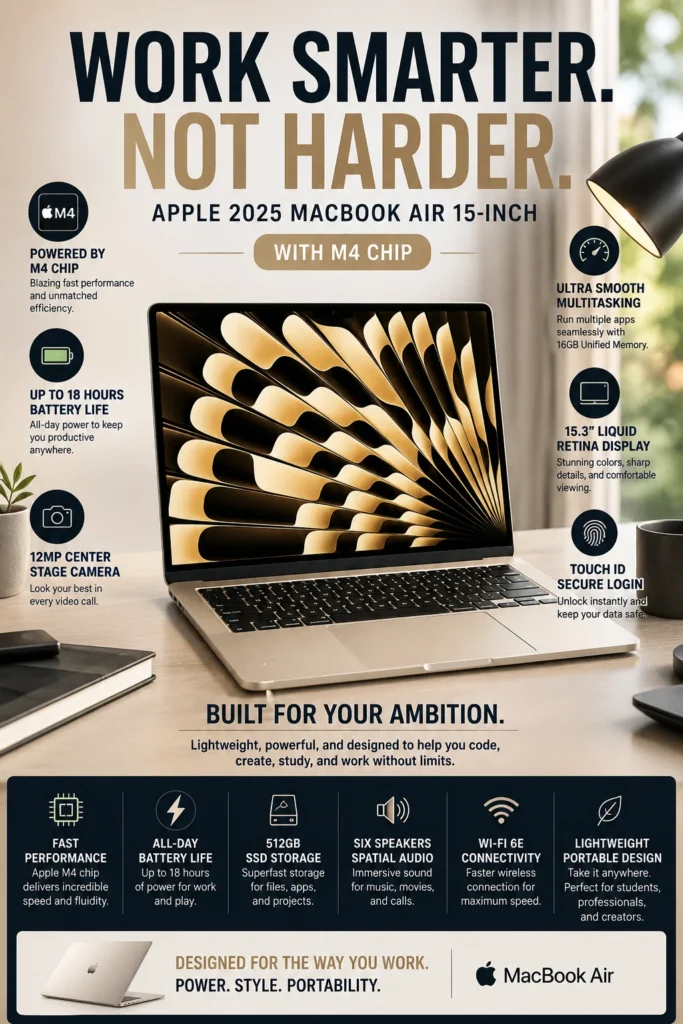
The Apple MacBook Air 15-inch (M4) is our top recommendation for the best programming laptop for students in 2026. Its combination of the efficient Apple M4 chip, 16GB of unified memory, fast SSD storage, exceptional battery life, and lightweight design makes it an outstanding choice for computer science, software engineering, web development, and everyday coding. Whether you're working in Visual Studio Code, managing Git repositories, running development tools, researching with dozens of browser tabs, or using AI-powered coding assistants, the MacBook Air delivers the responsiveness, portability, and battery life most students need without the size and weight of a gaming laptop.
The MacBook Air 15-inch (M4) earns our Best Overall Programming Laptop for Students award because it delivers an unusually strong combination of performance, portability, battery life, silent operation, and everyday usability. For students who spend hours writing code, researching, attending classes, and switching between development tools, it provides the kind of balanced experience that is difficult to match with larger performance-oriented laptops.
Compared with heavier Windows laptops equipped with dedicated RTX graphics, the MacBook Air is not designed for demanding GPU workloads, advanced game development, or sustained 3D rendering. However, for the majority of programming students whose workloads center on coding, web development, software projects, AI-assisted development, research, and productivity, its combination of efficiency and portability makes it the strongest overall choice in this guide.
Key Features
Lenovo ThinkPad E14 Gen 7
Best Windows Coding Laptop for Computer Science Students
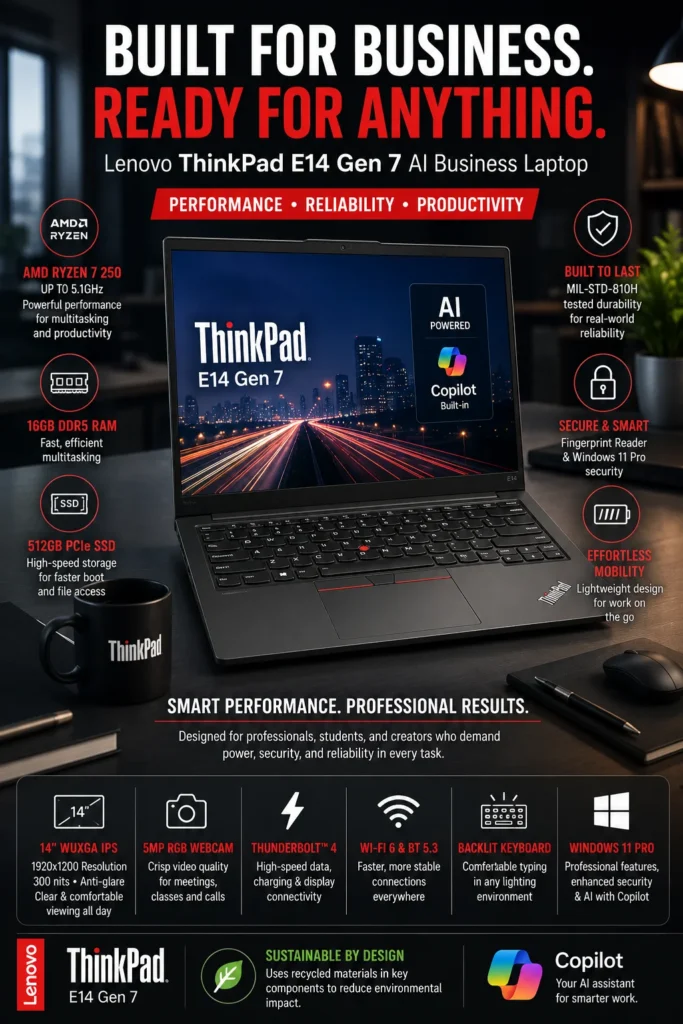
The Lenovo ThinkPad E14 Gen 7 is our top Windows recommendation for programming students who prioritize typing comfort, reliability, productivity, and everyday coding performance. Its combination of a capable AMD Ryzen processor, 16GB of DDR5 memory, a comfortable ThinkPad keyboard, durable business-oriented design, and compact 14-inch form factor makes it an excellent choice for computer science, software engineering, IT, and other students who spend hours writing code and working on technical projects. Rather than focusing on gaming performance or flashy hardware, the ThinkPad E14 is designed around the practical needs of students who need a dependable Windows development machine every day.
The ThinkPad E14 Gen 7 earns our Best Windows Laptop for Programming Students award because it focuses on the things that matter most during long study and coding sessions: a comfortable keyboard, dependable performance, practical portability, and a productivity-first design. For students who spend more time writing code than playing demanding games or running GPU-intensive workloads, this is a smarter fit than a heavier RTX gaming laptop.
Compared with the MacBook Air 15-inch (M4), the ThinkPad E14 offers the flexibility of Windows and a familiar business-laptop experience, while giving up some battery efficiency and premium display characteristics. Compared with RTX-equipped laptops such as the Dell Premium 16 and ASUS ROG Strix G16, it is significantly more focused on portability, keyboard comfort, everyday productivity, and efficient coding rather than GPU-intensive workloads. For programming students who want a practical Windows laptop without paying for graphics performance they may never use, the ThinkPad E14 is an excellent choice.
Key Features
ASUS Zenbook S 16
Best OLED Laptop for Coding, AI Workflows & Creative Development
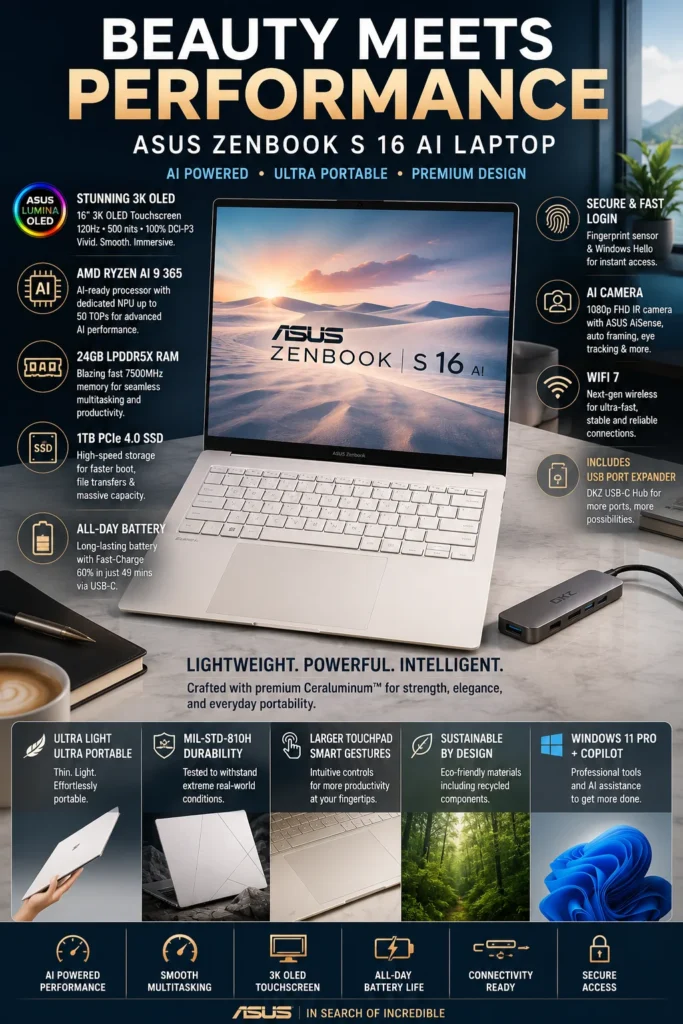
The ASUS Zenbook S 16 is our top premium Windows recommendation for programming students who want an exceptional display, strong multitasking performance, modern AI capabilities, and a remarkably thin design. Its combination of an AMD Ryzen AI processor, generous memory, 16-inch 3K OLED display, and premium lightweight chassis makes it particularly appealing to students who combine programming with AI-assisted development, UI/UX work, content creation, research, and demanding multitasking. It offers a more visually immersive and creator-friendly experience than traditional productivity laptops while remaining portable enough for everyday university use.
The Zenbook S 16 earns our Best Premium OLED Laptop for Programming Students award because it combines the qualities that are difficult to find together in one Windows laptop: a large high-resolution OLED display, strong processing performance, modern AI hardware, generous multitasking capability, and a remarkably portable design. For students who code during the day but also work with design, media, AI tools, or other visually demanding applications, it offers a more versatile premium experience than a conventional business ultrabook.
Compared with the MacBook Air 15-inch (M4), the Zenbook S 16 offers a larger OLED display, a more creator-oriented Windows environment, and dedicated AI acceleration, while the MacBook remains the stronger choice for students who prioritize battery efficiency, silent operation, and the macOS development ecosystem. Compared with heavier RTX laptops such as the Dell Premium 16 and ASUS ROG Strix G16, the Zenbook is better suited to students who value portability and display quality over sustained GPU-intensive workloads.
Key Features
Dell Premium 16 (XPS 16, 2025)
Best Windows Laptop for AI Development, RTX Workloads & Professional Coding
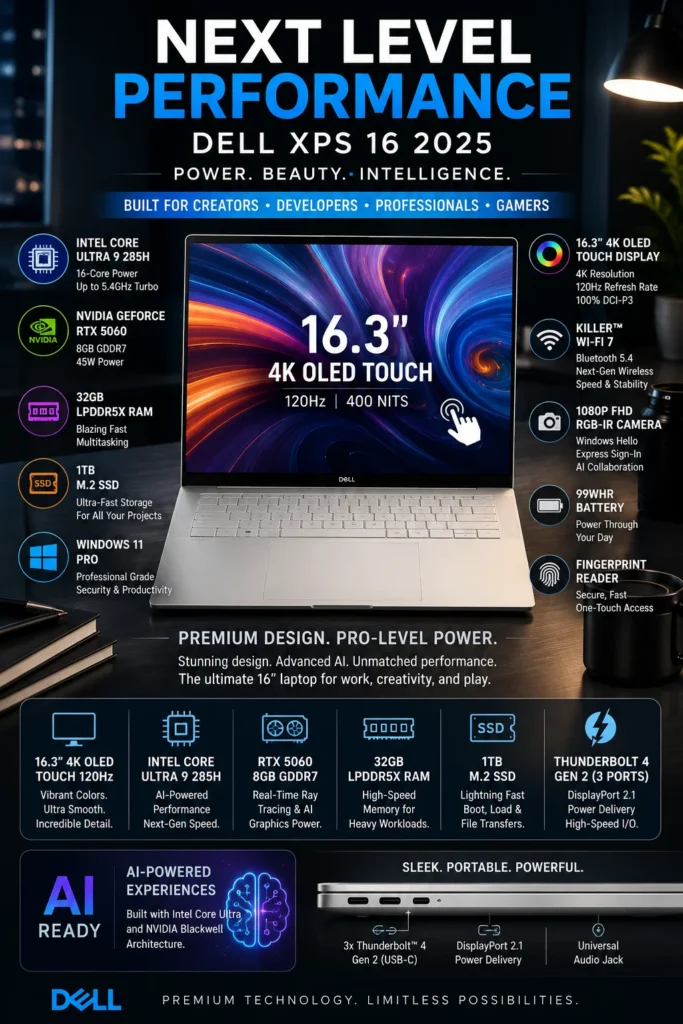
The Dell Premium 16 (XPS 16 2025) is our top high-performance Windows recommendation for programming students who need considerably more GPU power than a traditional ultrabook can provide. With a powerful Intel Core Ultra 9 processor, NVIDIA GeForce RTX 5060 graphics, 32GB of memory, and a premium 16-inch display, it is designed for demanding development workflows involving AI experimentation, CUDA applications, game engines, 3D workloads, virtualization, content creation, and heavy multitasking. It is especially compelling for students who want one premium Windows machine capable of handling both professional coding and GPU-accelerated workloads.
The Dell Premium 16 earns our Best High-Performance Laptop for AI, Game Development & Heavy Coding award because it fills a specific gap in this ranking: students who have outgrown integrated graphics and need genuine dedicated-GPU performance. From experimenting with CUDA and machine-learning frameworks to developing Unreal Engine projects, rendering 3D scenes, running virtual machines, and compiling demanding software projects, the RTX-equipped XPS 16 provides considerably more GPU capability than lightweight coding laptops.
Compared with the ASUS Zenbook S 16, the Dell offers a major advantage for GPU-accelerated workloads thanks to its dedicated NVIDIA graphics, while the Zenbook remains the better choice for students who prioritize lower weight, OLED portability, and everyday battery efficiency. Compared with the ASUS ROG Strix G16, the XPS 16 provides a more premium and professional design with a stronger emphasis on display quality and productivity, while the ROG Strix is better suited to users who prioritize sustained gaming and maximum cooling performance.
Key Features
ASUS ROG Strix G16
Best RTX Laptop for Game Development, Unreal Engine & Advanced Coding
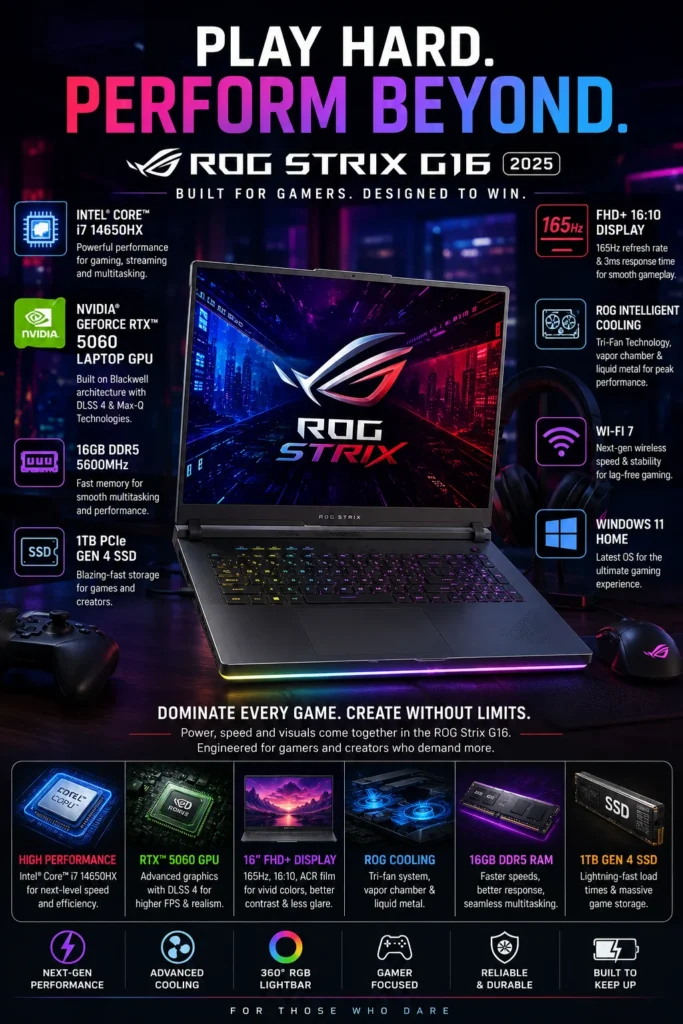
The ASUS ROG Strix G16 is our top recommendation for students and developers who need a high-performance programming laptop with serious GPU power. Equipped with an Intel Core i7-14650HX processor, NVIDIA GeForce RTX 5060 graphics, 16GB of DDR5 memory, and a fast 1TB Gen 4 SSD, it is built for demanding development workflows that go far beyond traditional web and application development. Whether you're working with Unreal Engine, Unity, Blender, CUDA, local AI tools, Docker, virtual machines, 3D projects, or large software environments, the ROG Strix G16 provides the raw performance and cooling capacity needed for sustained workloads. For students who prioritize performance over portability, it is one of the strongest RTX-powered programming laptops available in 2026.
The ROG Strix G16 earns our Best Laptop for Game Development & Heavy Programming award because it prioritizes the areas that matter most for demanding development workloads: CPU performance, dedicated RTX graphics, thermal stability, and sustained power. From building Unreal Engine projects and compiling large applications to experimenting with local AI models and rendering 3D assets, it provides substantially more GPU capability than typical student ultrabooks.
Compared with lightweight laptops such as the Apple MacBook Air 15-inch M4 and Lenovo ThinkPad E14 Gen 7, the ROG Strix G16 is significantly heavier and less focused on all-day portability. Its advantage is raw performance. For students who expect to work with game engines, 3D development, CUDA, AI workloads, rendering, or other GPU-intensive applications, the dedicated RTX platform and advanced cooling make it a much better fit than a thin-and-light productivity laptop.
Key Features
Lenovo Legion LOQ
Best Affordable RTX Laptop for Coding, Game Development & Multitasking
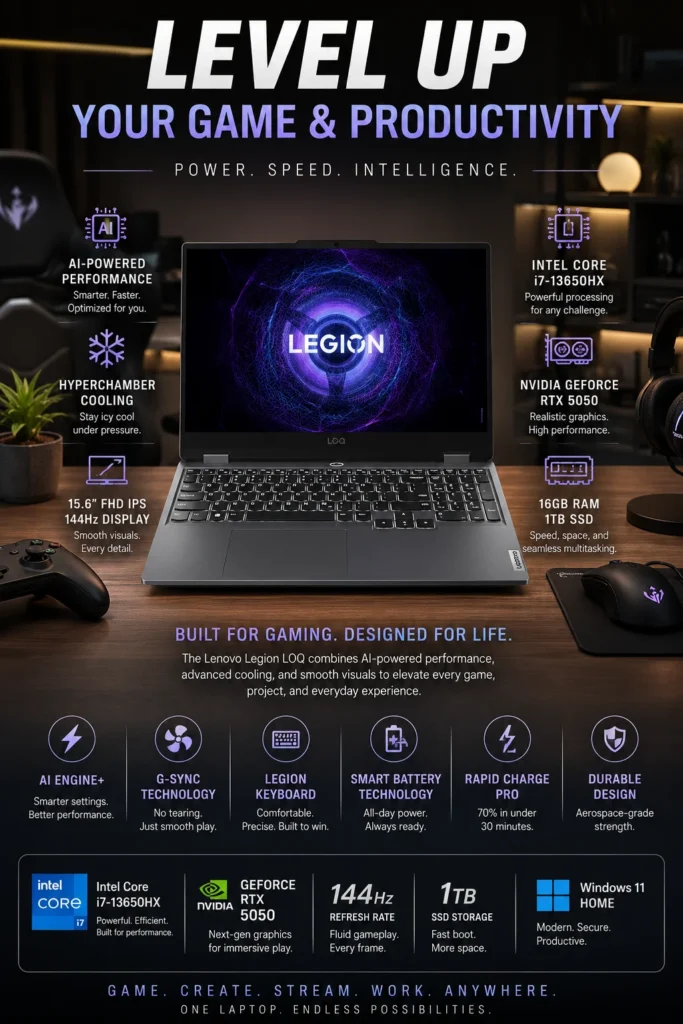
The Lenovo Legion LOQ is our top recommendation for students who want RTX-powered programming performance without paying premium gaming-laptop prices. Equipped with an Intel Core i7-13650HX processor, NVIDIA GeForce RTX 5050 graphics, 16GB of DDR5 memory, and a fast 1TB SSD, the Legion LOQ provides the performance needed for modern programming, game development, AI experimentation, and demanding multitasking. It can handle development environments such as Visual Studio Code, IntelliJ IDEA, Docker, Python, Unreal Engine, Unity, Blender, and CUDA-enabled applications while maintaining an attractive price-to-performance balance. For students who need dedicated graphics but cannot justify the cost of a premium RTX laptop, the Legion LOQ is one of the smartest value choices in 2026.
The Legion LOQ earns our Best Budget RTX Laptop for Programming Students award because it delivers the combination that matters most at this price level: strong CPU performance, dedicated RTX graphics, fast storage, upgrade potential, and capable thermal management. It is particularly compelling for students who want to learn game development, experiment with AI, or use GPU-accelerated tools without spending significantly more on a premium workstation or flagship gaming laptop.
Compared with the more powerful ASUS ROG Strix G16, the Legion LOQ gives up some performance, premium materials, display refinement, and high-end thermal capacity in exchange for a substantially stronger value proposition. For students whose primary goal is programming, coursework, occasional game development, and GPU experimentation, that trade-off makes the Legion LOQ one of the most practical RTX laptops in this ranking.
Key Features
HP Victus 15
Best Affordable RTX Laptop for Coding, College & Everyday Programming
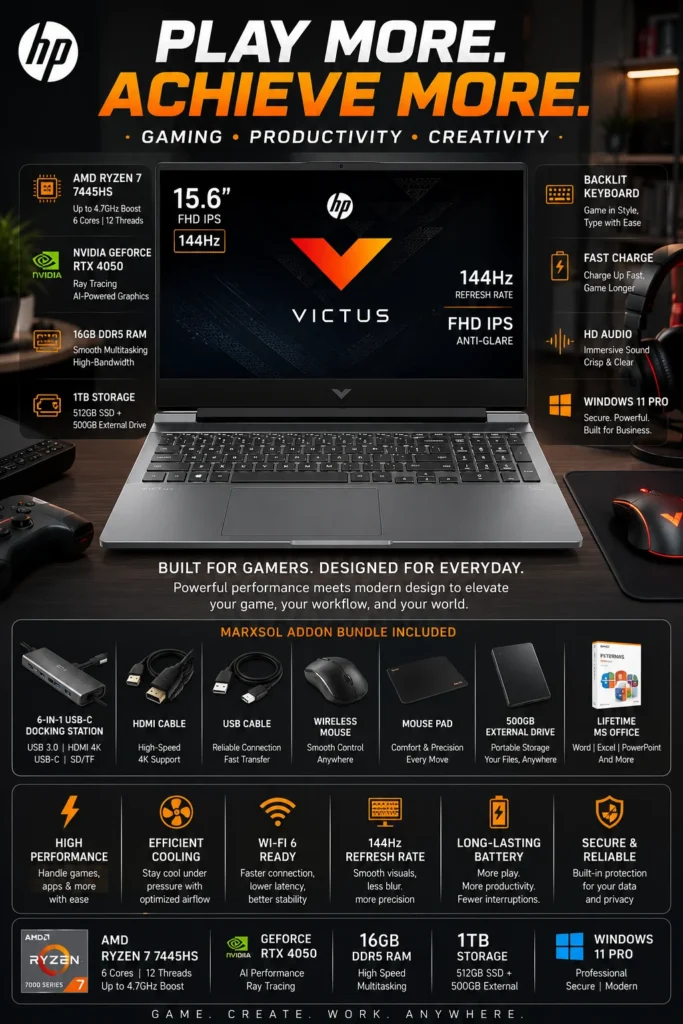
The HP Victus 15 is one of our top recommendations for the best budget gaming laptop for programming students in 2026. Equipped with an AMD Ryzen 7 7445HS processor, NVIDIA GeForce RTX 4050 graphics, 16GB of DDR5 memory, and fast storage, it provides excellent real-world performance for students learning web development, software engineering, programming, and computer science. Whether you're working with Visual Studio Code, IntelliJ IDEA, PyCharm, Android Studio, Git, Docker, databases, web browsers, or introductory AI and game development tools, the Victus 15 delivers the performance needed for everyday development without the price of a premium workstation or flagship gaming laptop. For students who want strong performance at a more accessible price, it offers an excellent balance of productivity, graphics capability, and value.
The HP Victus 15 earns our Best Budget Gaming Laptop for Programming Students recommendation because it delivers significantly more performance than typical entry-level student laptops while remaining accessible to students working with a limited budget. It is particularly well suited for learning programming, web development, Python, Java, software engineering fundamentals, game development, and introductory AI workloads while also providing enough graphics performance for gaming and creative applications.
Compared with more expensive RTX gaming and creator laptops, the HP Victus 15 makes some compromises in display quality, premium materials, acoustics, and overall refinement. However, those compromises allow it to deliver a much stronger price-to-performance ratio, making it one of the smartest choices for students who need a capable programming laptop without spending premium flagship-level prices.
Key Features
Best Laptops for Programming Students (2026)
Ranked for Coding Performance, AI Workloads, Computer Science, Game Development & Student Productivity
Choosing the best laptop for programming students isn't simply about buying the most powerful processor. Computer science and software engineering students need a machine that can handle Visual Studio Code, IntelliJ IDEA, PyCharm, Docker, Git, databases, browsers, virtual machines, AI tools, game engines, and everyday coursework while remaining practical enough for classes and campus life. We evaluated these laptops based on real-world coding performance, multitasking, graphics capability, thermals, display quality, keyboard comfort, portability, battery life, upgrade potential, and long-term value to help students choose the right laptop for both their studies and future development career.
| Laptop | CPU & Key Specs | Best For | Why It Wins | Editor's Verdict |
|---|---|---|---|---|
Best Overall
Apple MacBook Air 15 (M4)
Check Price
| Apple M4 16GB Unified Memory 512GB SSD 15.3" Liquid Retina | Computer Science Students Web Development Everyday Productivity | Excellent balance of performance, battery life, portability, silent operation, and long-term reliability. The M4 provides more than enough performance for most programming coursework and modern web development workflows. | Best Overall Laptop for Most Programming Students |
Best Coding Productivity
Lenovo ThinkPad E14 Gen 7
Check Price
| AMD Ryzen 7 16GB DDR5 Fast SSD Storage 14" WUXGA IPS | Programming Students Software Engineering Productivity | Excellent keyboard, durable business-oriented construction, strong multitasking performance, and a practical design make it ideal for students who spend hours writing and debugging code. | Best Laptop for Coding Comfort & Productivity |
Premium Pick
ASUS Zenbook S 16 OLED
Check Price
| AMD Ryzen AI 9 24GB LPDDR5X Fast SSD Storage 16" 3K OLED 120Hz | AI Students Developers Creators & Multitaskers | Outstanding OLED display, powerful Ryzen AI platform, generous memory capacity, and an ultra-premium lightweight design make it an exceptional choice for students who code and create. | Best Premium OLED Laptop for Programming Students |
Best AI Powerhouse
Dell Premium 16 (XPS 16 2025)
Check Price
| Intel Core Ultra 9 RTX 5060 8GB 32GB LPDDR5X 16.3" 4K OLED 120Hz | AI Development Machine Learning Advanced Coding | Exceptional CPU and RTX GPU performance make it ideal for AI development, CUDA workloads, virtualization, rendering, and demanding multitasking while maintaining a premium professional design. | Best High-Performance Windows Laptop for AI & Coding |
Best for Game Development
ASUS ROG Strix G16
Check Price
| Intel Core i7-14650HX RTX 5060 16GB DDR5 16" 165Hz Display | Game Development Unreal Engine Blender & AI | Strong HX-series CPU performance, RTX graphics, and advanced cooling provide excellent sustained performance for Unreal Engine, Unity, Blender, CUDA, AI workloads, and demanding development environments. | Best RTX Laptop for Game Development Students |
Best Budget RTX
Lenovo Legion LOQ
Check Price
| Intel Core i7-13650HX RTX 5050 16GB DDR5 1TB SSD | Programming + Gaming Game Development Beginner AI | Excellent price-to-performance ratio with RTX graphics, strong CPU performance, fast storage, and capable cooling. It is particularly attractive for students who want development and gaming capabilities without premium pricing. | Best Value Laptop for Coding + Gaming |
Best Budget Student Pick
HP Victus 15
Check Price
| AMD Ryzen 7 7445HS RTX 4050 16GB DDR5 15.6" 144Hz Display | Beginner Programmers College Students Coding + Gaming | Excellent entry-level RTX performance, strong multitasking capability, practical student-focused design, and a very competitive price-to-performance ratio make it an excellent starting point for programming students. | Best Affordable Programming Laptop for Students |
Recommended Next Reads
Explore more expert laptop buying guides for programming students, computer science majors, software developers, AI learners, and modern coding workflows.
Whether you're studying computer science, learning your first programming language, building software projects, working with AI tools, developing websites, or preparing for a professional software engineering career, these guides will help you choose the right laptop for your specific workload and budget.
Best Laptops for Computer Science Students in 2026
Compare the best laptops for computer science students working with programming, Python, Java, C++, data structures, algorithms, AI tools, databases, virtual machines, and demanding college workloads.
Explore computer science laptops →8 Best Laptops for Programming in 2026
Discover expert-recommended laptops for programmers working with Python, Java, C++, JavaScript, IDEs, databases, Docker, Git, and modern development environments.
Explore programming laptops → Coding GuideBest Laptops for Coding in 2026
Find the best laptops for coding with support for IDEs, programming languages, Docker, Git, databases, browser-based development, and everyday software projects.
Explore coding laptops → Software DevelopmentBest Laptops for Software Developers in 2026
Explore powerful laptops for professional software engineers building enterprise applications, APIs, backend systems, cloud platforms, and large development projects.
Explore software developer laptops → AI & Machine LearningBest Laptops for AI & Machine Learning in 2026
Explore powerful laptops for Python, TensorFlow, PyTorch, CUDA acceleration, local AI models, machine learning projects, and GPU-intensive development workflows.
Explore AI laptops → Web DevelopmentBest Laptops for Web Development in 2026
Compare the best laptops for front-end and full-stack developers working with React, Next.js, Node.js, TypeScript, Docker, databases, Figma, and modern web technologies.
Explore web development laptops → Student LaptopsBest Laptops for Students in 2026
Compare the best student laptops for college, programming, productivity, battery life, portability, entertainment, and different academic majors and budgets.
Explore student laptops →EDITOR'S FINAL RECOMMENDATIONS
After comparing coding performance, multitasking, battery life, portability, keyboard quality, thermals, GPU capabilities, display quality, and long-term value, these are our final laptop recommendations for programming students in 2026.
Apple MacBook Air 15-inch (M4)
The best all-around laptop for most programming students. The M4 chip delivers excellent coding performance while the lightweight design, silent operation, outstanding battery life, and large 15.3-inch display make it ideal for long days of classes, studying, projects, and everyday development.
- ✓ Apple M4 Chip
- ✓ 16GB Unified Memory
- ✓ 512GB SSD Storage
- ✓ Outstanding Battery Life
Lenovo ThinkPad E14 Gen 7
An excellent Windows laptop for students who spend hours writing code. The legendary ThinkPad keyboard, strong Ryzen performance, durable business-oriented design, and practical upgrade potential make it especially well suited for computer science coursework and productivity-heavy development.
- ✓ AMD Ryzen 7 Performance
- ✓ Strong Multitasking Capability
- ✓ Legendary ThinkPad Keyboard
- ✓ Durable Business-Class Design
ASUS Zenbook S 16 OLED
A premium choice for students who want more than basic coding performance. Its high-resolution OLED touchscreen, powerful Ryzen AI platform, lightweight design, and excellent multitasking capability make it particularly attractive for developers who also work with AI tools, creative applications, and demanding productivity workloads.
- ✓ Ryzen AI 9 Processor
- ✓ 3K OLED Touchscreen
- ✓ Premium Lightweight Design
- ✓ Excellent AI & Multitasking Performance
ASUS ROG Strix G16
The best choice for students who want a serious programming machine that can also handle Unreal Engine, Blender, AI workloads, GPU-accelerated development, and modern gaming. Its RTX graphics and powerful Intel HX platform provide considerably more performance for demanding development workloads than typical student ultrabooks.
- ✓ NVIDIA RTX 5060 Graphics
- ✓ Intel HX-Class Performance
- ✓ Advanced Cooling System
- ✓ Excellent for Unreal Engine & AI
Lenovo Legion LOQ
The strongest value option for students who need RTX graphics without paying flagship prices. The Legion LOQ combines powerful processing, dedicated RTX graphics, effective cooling, upgrade-friendly hardware, and strong multitasking performance for coding, game development, AI tools, and gaming.
- ✓ Intel Core i7-13650HX
- ✓ NVIDIA RTX 5050 Graphics
- ✓ 16GB DDR5 Memory
- ✓ 1TB SSD Storage
Which programming laptop should you buy?
MacBook Air 15 M4
ThinkPad E14 Gen 7
ASUS Zenbook S 16
ASUS ROG Strix G16
Lenovo Legion LOQ
- Choose the Apple MacBook Air 15 M4 if you want the best overall balance of coding performance, portability, battery life, silent operation, and everyday student productivity.
- Choose the Lenovo ThinkPad E14 Gen 7 if you prefer Windows and prioritize keyboard comfort, reliable productivity, durability, and long coding sessions.
- Choose the ASUS Zenbook S 16 OLED if you want a premium display, powerful AI-ready hardware, lightweight portability, and excellent multitasking for both programming and creative work.
- Choose the ASUS ROG Strix G16 if your studies include game development, Unreal Engine, Blender, AI workloads, GPU acceleration, or you also want serious gaming performance.
- Choose the Lenovo Legion LOQ if you need dedicated RTX graphics and strong development performance while keeping the overall cost lower than premium gaming workstations.
EDITOR'S FINAL VERDICT
After evaluating coding performance, multitasking, battery life, portability, keyboard comfort, display quality, thermals, GPU capabilities, upgrade potential, and long-term value, one conclusion stands out:The best programming laptop for a student is not necessarily the most expensive or the most powerful machine. It is the laptop that provides the right combination of performance, reliability, portability, comfort, and value for the way you actually learn, code, and build projects.
Programming students increasingly work with Visual Studio Code, IntelliJ IDEA, Python, JavaScript, Java, C++, Git, Docker, databases, virtual machines, AI coding assistants, browser-based development tools, and increasingly demanding development environments.
For most students, the ideal programming laptop should have a modern processor, at least 16GB of RAM, fast SSD storage, a comfortable keyboard, strong battery life, reliable thermal performance, and enough performance headroom to handle increasingly demanding projects throughout college.- Choose the Apple MacBook Air 15 M4 if you want the best overall balance of performance, portability, battery life, silent operation, and everyday programming productivity.
- Choose the Lenovo ThinkPad E14 Gen 7 if you prefer Windows and prioritize keyboard comfort, durability, multitasking, and long coding sessions for computer science coursework.
- Choose the ASUS Zenbook S 16 OLED if you want a premium student laptop with a high-resolution OLED display, powerful Ryzen AI hardware, excellent multitasking, and a lightweight design.
- Choose the Lenovo Legion LOQ if your programming workload includes game development, GPU-accelerated applications, AI tools, Blender, Unreal Engine, or gaming and you need dedicated RTX graphics without paying flagship prices.
Top Programming Student Laptop Recommendations (2026)
Apple MacBook Air 15 (M4)
Our Editor's Choice for most programming students because it combines excellent development performance, exceptional battery life, silent operation, portability, and a premium everyday experience that works particularly well for college and computer science coursework.
- ✓ Apple M4 Chip
- ✓ 16GB Unified Memory
- ✓ 512GB SSD Storage
- ✓ Outstanding Battery Life
Lenovo ThinkPad E14 Gen 7
The strongest choice for students who prefer Windows and spend long hours writing code. Its excellent keyboard, durable business-oriented design, strong multitasking performance, and practical productivity features make it especially well suited for programming coursework.
- ✓ AMD Ryzen 7 Performance
- ✓ Strong Multitasking
- ✓ Legendary ThinkPad Keyboard
- ✓ Durable Business-Class Design
Lenovo Legion LOQ
The best choice for students who need dedicated graphics for game development, AI tools, rendering, or gaming while still requiring strong everyday programming and multitasking performance.
- ✓ Intel Core i7-13650HX
- ✓ NVIDIA RTX 5050 GPU
- ✓ 16GB DDR5 Memory
- ✓ 1TB SSD Storage
- ✓ You want the best all-around programming laptop
- ✓ Battery life and portability matter most
- ✓ You want a fast and silent coding experience
- ✓ You primarily use modern development tools
- ✓ You prefer Windows
- ✓ You write code for several hours every day
- ✓ Keyboard comfort is a major priority
- ✓ You want practical long-term student value
- ✓ You need dedicated RTX graphics
- ✓ You are learning game development
- ✓ You use Blender, Unreal Engine, or AI tools
- ✓ You want strong performance without flagship pricing
A programming laptop is a tool that students will use for thousands of hours throughout college — writing code, debugging projects, studying, researching, running development environments, completing assignments, and building their first professional portfolio. Raw performance matters, but comfort, battery life, reliability, keyboard quality, and long-term usability matter just as much.
Among all seven laptops in this guide, the Apple MacBook Air 15 with the M4 chip offers the strongest overall combination of performance, battery life, portability, silent operation, and everyday usability for the majority of programming students. It is our Editor's Choice for the Best Programming Student Laptop of 2026.
However, students who need Windows-specific software or prefer a traditional Windows development environment should strongly consider the Lenovo ThinkPad E14 Gen 7, while students working with game development, GPU acceleration, AI workloads, or gaming will benefit more from the dedicated RTX graphics of the Lenovo Legion LOQ.
Compare current prices, RAM and storage configurations, warranty coverage, and availability before selecting the laptop that will support your programming education, projects, internships, and future development career.
Check Latest DealsEDITOR'S FAQ
Choosing the best programming laptop for college requires more than comparing processor specifications. Computer science and programming students need a machine that can handle coding environments, multiple browser tabs, IDEs, databases, virtual machines, AI tools, and everyday academic workloads while remaining portable and reliable throughout the school year.Below are the most important questions students should consider before buying a laptop for programming, computer science, software development, and AI-related coursework in 2026.
It combines excellent processing performance, outstanding battery efficiency, silent operation, portability, and long-term value. For most students working with Visual Studio Code, Python, JavaScript, Java, Git, web development tools, databases, and everyday development environments, the MacBook Air M4 provides more than enough performance.
- Excellent performance for coding and multitasking.
- Outstanding battery life for full days on campus.
- Silent fanless operation for classrooms and libraries.
- Lightweight design that is easy to carry between classes.
- Strong long-term value for computer science students.
Students who specifically need Windows-only engineering software, dedicated NVIDIA graphics, or heavier AI workloads should consider a Windows laptop instead.
Check PriceProgramming often involves much more than the code editor itself. Students may simultaneously run Visual Studio Code, multiple browser tabs, databases, Docker containers, development servers, communication applications, and virtual machines.
- 8GB → Only suitable for basic coding and light academic workloads.
- 16GB → Recommended for most programming and computer science students.
- 24GB–32GB → Better for Docker, virtualization, Android Studio, AI tools, and heavier multitasking.
- 32GB+ → Recommended for advanced development, local AI, large projects, and professional workloads.
Because memory is often difficult or impossible to upgrade later, choosing 16GB or more provides considerably better long-term flexibility.
Modern programming workloads rarely require a dedicated GPU. A MacBook Air is capable of handling programming languages, IDEs, Git, databases, web development frameworks, browser testing, and many development environments without the size, weight, and noise associated with gaming laptops.
- Excellent for Python, JavaScript, Java, Swift, and web development.
- Strong performance for Visual Studio Code and modern IDEs.
- Excellent battery efficiency for university environments.
- Silent operation is ideal for classrooms and libraries.
- Premium portability for students who move between classes.
A MacBook Pro becomes more attractive when the student's workload includes sustained professional development, virtualization, advanced AI workloads, or other demanding applications.
Check MacBook Air PriceMacBooks are particularly attractive for students who prioritize battery life, portability, Unix-based development tools, web development, and a premium everyday experience.
- Choose Mac → Best for battery life, portability, web development, Unix-based workflows, and students already using the Apple ecosystem.
- Choose Windows → Better for maximum software compatibility, gaming, NVIDIA graphics, engineering applications, and Windows-specific university software.
Computer science students should also check their university's required applications before choosing an operating system. Some engineering, virtualization, or specialized academic software may work better on Windows.
If you need a Windows machine specifically for long coding sessions, the Lenovo ThinkPad E14 Gen 7 is one of the strongest choices in this guide.
View ThinkPad DealFor conventional programming, CPU performance, RAM, SSD speed, battery life, and keyboard comfort are generally more important than having a powerful gaming GPU.
A gaming laptop becomes much more useful for students working with:
- Game development and Unreal Engine.
- AI and machine learning.
- CUDA-based development.
- 3D rendering and modeling.
- Video editing and GPU-accelerated creative applications.
- Gaming alongside programming.
For students who want one machine for both serious coding and gaming, the ASUS ROG Strix G16 is a strong hybrid option.
View ROG Strix G16For Python development, TensorFlow, PyTorch, local AI tools, CUDA workflows, and GPU-accelerated applications, a Windows laptop with a dedicated NVIDIA GPU can provide capabilities that integrated graphics and many thin-and-light laptops cannot.
The Dell Premium 16 (XPS 16 2025) is a strong high-performance option in this guide for students who need additional GPU power alongside programming and academic workloads.
- Dedicated NVIDIA RTX graphics.
- High-performance processor for demanding workloads.
- 32GB memory for advanced multitasking.
- Large high-resolution display for development and research.
- Better suited to GPU-accelerated applications than lightweight laptops.
However, students primarily learning Python, data science, or introductory machine learning do not necessarily need an expensive GPU laptop. Cloud-based AI platforms can handle many workloads without requiring local GPU hardware.
Check PriceProgramming involves reading code, documentation, terminal windows, browser previews, and development tools simultaneously. A larger display can therefore improve productivity, particularly when working without an external monitor.
- 13–14 inches → Best for students who prioritize portability.
- 15–16 inches → Better for multitasking and extended coding sessions.
- 16:10 displays → Excellent for development because they provide more vertical workspace.
- OLED → Excellent contrast and image quality, especially for students who also create content.
The ASUS Zenbook S 16 is particularly attractive for students who want a large premium display while maintaining a relatively portable design.
View Zenbook S 16Programming projects themselves are not always enormous, but development environments, SDKs, virtual machines, Docker images, databases, operating system files, applications, and personal media can consume storage surprisingly quickly.
- 256GB → Acceptable for basic coding when using cloud storage and external drives.
- 512GB → Recommended for most programming and computer science students.
- 1TB → Better for large projects, virtual machines, local AI models, creative applications, and long-term use.
Students planning to use virtualization, Android Studio, Docker, local datasets, or AI models should strongly consider 1TB when their budget allows it.
Students often spend entire days moving between classrooms, libraries, laboratories, study areas, and home. In that environment, battery efficiency can be more valuable than maximum peak performance.
- MacBook Air M4 → Best combination of battery efficiency, portability, and coding performance.
- ThinkPad E14 Gen 7 → Strong Windows option for productivity and long study sessions.
- ASUS Zenbook S 16 → Premium alternative with a large high-quality display.
Gaming laptops can deliver significantly more performance, but their dedicated GPUs and higher-power processors generally make them less attractive for students whose priority is all-day campus mobility.
- Best Overall → Apple MacBook Air 15-inch M4
- Best Windows Coding Laptop → Lenovo ThinkPad E14 Gen 7
- Best Premium Display → ASUS Zenbook S 16
- Best AI & GPU Workloads → Dell Premium 16 (XPS 16)
- Best Gaming + Coding → ASUS ROG Strix G16
- Best Value Performance → Lenovo Legion LOQ
- Best Budget Programming Laptop → HP Victus 15.6-inch
For the majority of students, the MacBook Air M4 is the easiest recommendation because it provides excellent coding performance, battery life, portability, and long-term usability without the bulk of a gaming workstation.
However, students who need NVIDIA graphics, Windows-only applications, engineering software, or heavier AI workloads should choose a Windows laptop designed around those requirements instead.
Check Best Programming Laptop DealPROGRAMMING LAPTOP BUYING GUIDE
Choosing a laptop for programming is not simply about buying the most powerful processor or the laptop with the largest specification sheet. Computer science students, software developers, and aspiring programmers need a machine that can handle code editors, browser multitasking, development environments, databases, virtual machines, Docker containers, AI tools, and years of academic and professional projects.The wrong laptop can become frustrating surprisingly quickly. Insufficient RAM, limited storage, poor keyboard quality, weak battery life, excessive weight, or choosing an operating system that does not support your required software can have a much greater impact on your daily experience than a small difference in benchmark performance.Before buying a programming laptop in 2026, avoid these common mistakes and choose hardware that can grow with your skills and workload.
Programming students do not need to buy the most expensive laptop available. The smarter approach is to prioritize the components and characteristics that affect development every day.For most programming students in 2026, we recommend at least 16GB of RAM, with 24GB or 32GB preferred for heavier workloads involving virtualization, Docker, Android Studio, local databases, AI tools, or multiple development environments. A modern Apple M-series, Intel Core Ultra, or AMD Ryzen processor, fast SSD storage, a comfortable keyboard, strong battery life, and a quality display will usually provide a better student experience than simply paying more for a powerful GPU.
Buying a laptop based only on processor performance
- A faster processor does not automatically make a laptop better for programming.
- Developers spend much of their time interacting with code editors, browsers, terminals, documentation, databases, and development tools.
- Battery efficiency, thermals, keyboard comfort, RAM, and storage can have a greater impact on everyday productivity.
Better decision: Look at the complete development experience rather than choosing a laptop based on CPU benchmark numbers alone.
Choosing too little RAM
- VS Code, browsers, local servers, databases, Docker, virtual machines, and development tools can consume significant memory.
- Computer science students frequently multitask between IDEs, documentation, browser tabs, terminals, and communication applications.
- AI coding assistants and more complex development environments can increase memory requirements over time.
Better decision: Treat 16GB as the practical starting point for serious programming in 2026. Choose 24GB or 32GB when you expect to use virtualization, Docker, AI workloads, large projects, or demanding development environments.
Ignoring keyboard quality and ergonomics
- Programming involves thousands of hours of typing code, commands, documentation, and technical notes.
- An uncomfortable keyboard can become frustrating during long programming sessions.
- Trackpad quality, palm-rest comfort, screen positioning, and overall build quality also influence daily productivity.
Better decision: Prioritize a comfortable keyboard, accurate trackpad, solid chassis, and a display that makes long coding sessions comfortable.
Buying a dedicated GPU you do not need
- Most web development, software development, and computer science coursework does not require a dedicated RTX GPU.
- Modern integrated graphics are more than capable for coding, browsing, IDEs, databases, and typical development environments.
- Dedicated graphics can increase cost, weight, heat, fan noise, and power consumption.
Better decision: Choose dedicated RTX graphics only if your coursework or workflow includes machine learning, CUDA, local AI models, game development, 3D applications, video production, or other GPU-accelerated workloads.
Ignoring storage requirements
- Development environments, SDKs, package managers, virtual environments, databases, and project files can consume storage quickly.
- Modern software projects often contain large dependency folders, build files, caches, and development tools.
- A small SSD can become restrictive long before the laptop itself becomes slow.
Better decision: Choose at least 512GB of SSD storage for a serious programming laptop. Consider 1TB if you expect to keep multiple projects, virtual machines, datasets, development environments, or media files locally.
Choosing the wrong operating system for your degree
- macOS provides an excellent Unix-based environment for programming, web development, terminal workflows, and many software engineering tools.
- Windows provides broad hardware compatibility and is particularly useful for Microsoft technologies, engineering applications, gaming, and specialized Windows software.
- Some university courses require software that may only officially support Windows.
Better decision: Before purchasing, check the software requirements for your degree, university courses, and intended career path. The best operating system is the one that supports the tools you actually need.
Smart Buying Advice for Programming Students
You want excellent battery life, low weight, silent operation, strong programming performance, and a premium laptop for computer science, web development, coding classes, research, and everyday university work.
You need broader software compatibility, Windows-specific applications, engineering tools, gaming capabilities, or access to a wider range of hardware configurations and dedicated GPUs.
Your studies or personal projects involve machine learning, CUDA, game development, 3D rendering, local AI models, video editing, or other workloads that can take advantage of dedicated graphics.
Key takeaway: The best programming laptop is not necessarily the most expensive model. It is the machine that gives you enough performance, memory, storage, battery life, portability, keyboard comfort, and reliability to handle your coursework today while remaining useful as your programming skills and projects become more advanced.
After evaluating the laptops featured throughout this guide, these are our Editor's top recommendations for programming students in 2026:
- Best Overall Programming Laptop: Apple MacBook Air 15-inch M4 — an excellent combination of performance, exceptional battery efficiency, portability, silent operation, and long-term value for most programming students.
- Best Windows Programming Laptop: Lenovo ThinkPad E14 Gen 7 — a practical choice for students who prefer Windows and prioritize keyboard comfort, reliability, portability, and everyday development productivity.
- Best Premium Display: ASUS Zenbook S 16 — an excellent choice for students who want a large, high-quality OLED display for coding, multitasking, research, and creative work.
- Best Advanced Performance Laptop: Dell Premium 16 (XPS 16) — designed for students whose workloads extend beyond conventional programming into AI development, GPU acceleration, demanding multitasking, and other intensive applications.
- Best Gaming + Programming Laptop: ASUS ROG Strix G16 — the better choice for students who need serious RTX graphics for gaming, game development, AI workloads, or GPU-accelerated applications.
Need help choosing your laptop?
Not sure which option fits your workflow? Get a personalized recommendation based on your budget, performance needs, and usage.
Get personalized recommendation⚡ Usually responds within 24 hours