
Explore More Laptop Recommendations
This guide is part of our curated laptop buying collections. If you are comparing laptops by budget, performance, and overall value, explore our broader recommendations to find the right balance of price, features, and long-term usability.
Best Laptops Under $1,500 in 2026: 5 Top Picks Worth Buying Right Now
A $1,500 budget gives you access to some of the best premium laptops available in 2026, but choosing the right one depends on what you actually need from your computer. The best laptop for everyday productivity is not necessarily the best choice for creators, frequent travelers, or gamers.From ultra-portable laptops with exceptional battery life to powerful gaming machines and premium OLED displays, this guide focuses on the five laptops that deliver the strongest combination of performance, quality, portability, and value under $1,500.
After evaluating the laptops featured in this guide across real-world performance, battery life, display quality, portability, gaming capability, build quality, and overall value, we selected the 5 best laptops under $1,500 in 2026.The Apple MacBook Air M5 is our Best Overall choice for most buyers, while the ASUS Zenbook S 16 stands out for its premium 3K OLED display. The Dell XPS 13 is our battery-life and travel-focused pick, the Lenovo Legion 5i delivers the strongest gaming performance, and the Acer Swift Edge 14 AI is the best choice for buyers who prioritize extreme portability.
Apple MacBook Air 13 (M5)
Best Overall Laptop Under $1500 for Performance, Battery Life & Everyday Use
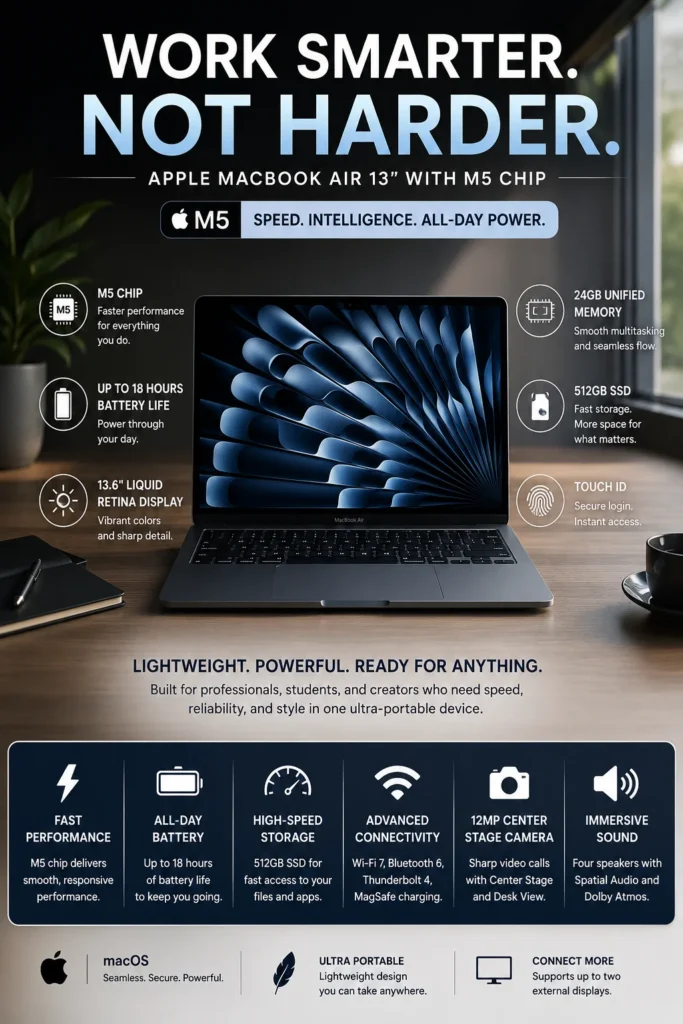
The Apple MacBook Air 13-inch (M5) is our top recommendation for the best laptop under $1500 in 2026. It delivers an exceptional combination of performance, battery life, portability, display quality, build quality, and long-term usability. Whether you're a student, professional, remote worker, frequent traveler, or everyday user, the MacBook Air M5 provides enough performance for demanding productivity while remaining remarkably thin, light, quiet, and easy to carry.
The MacBook Air M5 earns our Best Overall Laptop Under $1500 award because it offers one of the strongest overall combinations of performance, battery life, portability, display quality, and premium build quality in this price range. It is powerful enough for demanding productivity while remaining substantially more portable than most high-performance Windows and gaming laptops.
Its biggest advantage is balance. The MacBook Air M5 does not try to be the fastest gaming laptop or the most powerful workstation in this guide. Instead, it delivers a consistently strong experience across the areas that matter most to the majority of buyers. For students, professionals, travelers, and everyday users who want a premium laptop without moving far beyond the $1500 budget, it is the safest overall recommendation in this comparison.
Key Features
ASUS Zenbook S 16
Best Premium Windows Laptop Under $1500 for Creators, Professionals & Productivity
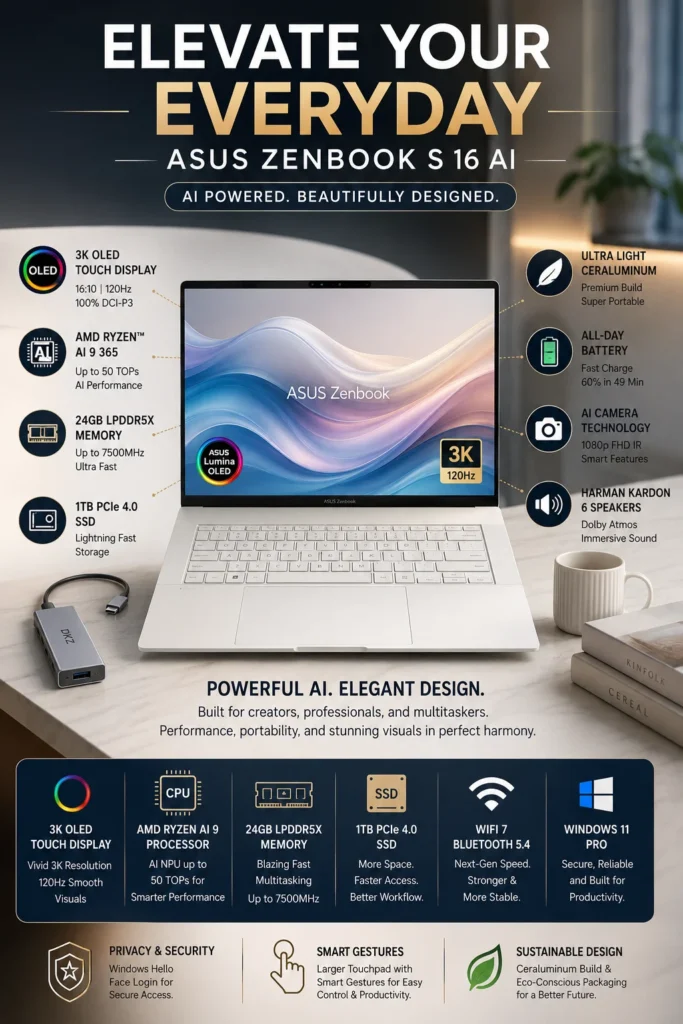
The ASUS Zenbook S 16 is our top recommendation for the best premium Windows laptop under $1500 in 2026. It combines a large high-resolution OLED display, strong AMD Ryzen AI performance, premium construction, excellent portability, and modern connectivity in a remarkably thin Windows laptop. It is particularly well suited to professionals, creators, students, and productivity-focused users who want a more immersive display and the flexibility of Windows.
The Zenbook S 16 earns our Best Premium Windows Laptop Under $1500 award because it delivers a combination that is difficult to find at this price: a large premium OLED display, strong processing performance, lightweight construction, and a polished Windows experience. It is especially compelling for buyers who spend significant time working with multiple windows or visual content and want more screen space without moving to a bulky workstation-class laptop.
Compared with the MacBook Air M5, the Zenbook S 16 takes a different approach rather than simply being better or worse. The MacBook Air remains the stronger choice for buyers who prioritize Apple's ecosystem, silent operation, portability, and battery efficiency, while the Zenbook S 16 is particularly attractive to users who want Windows, a much larger OLED display, touchscreen functionality, and greater flexibility across PC software and hardware. For Windows users, that combination makes the Zenbook S 16 one of the most compelling premium laptops available under $1500 in 2026.
Key Features
Dell XPS 13 9345
Best Battery Life Laptop Under $1500 for Business, Travel & Productivity
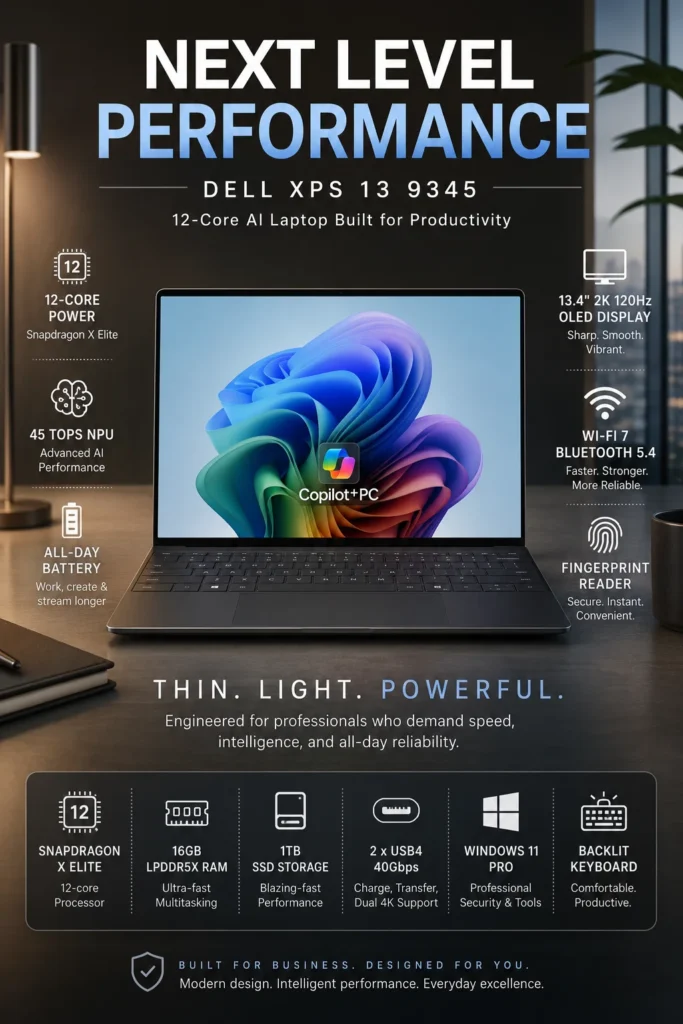
The Dell XPS 13 9345 is our top recommendation for the best battery-life laptop under $1500 in 2026. Powered by the Snapdragon X Elite platform, it combines excellent power efficiency, premium construction, a compact design, and strong everyday performance in one of the most portable Windows laptops in this lineup. It is particularly well suited to professionals, students, frequent travelers, and remote workers who prioritize long unplugged use.
The XPS 13 9345 earns our Best Battery Life Laptop Under $1500 award because it prioritizes efficiency without turning into a low-performance ultraportable. Its combination of Snapdragon X Elite performance, compact dimensions, premium construction, and strong battery efficiency makes it particularly compelling for people who spend long periods working away from a desk.
Compared with the MacBook Air M5, the XPS 13 is not necessarily the better laptop overall. The MacBook Air remains our overall recommendation, while the Dell is the stronger choice for buyers who specifically want Windows, a compact premium design, and excellent battery efficiency. The main consideration is software compatibility: because the XPS 13 9345 uses an ARM-based Snapdragon platform, buyers who rely on specialized legacy Windows applications, drivers, or peripherals should verify compatibility before purchasing.
Key Features
Lenovo Legion 5i
Best Gaming Laptop Under $1500 for Performance, Gaming & Power Users
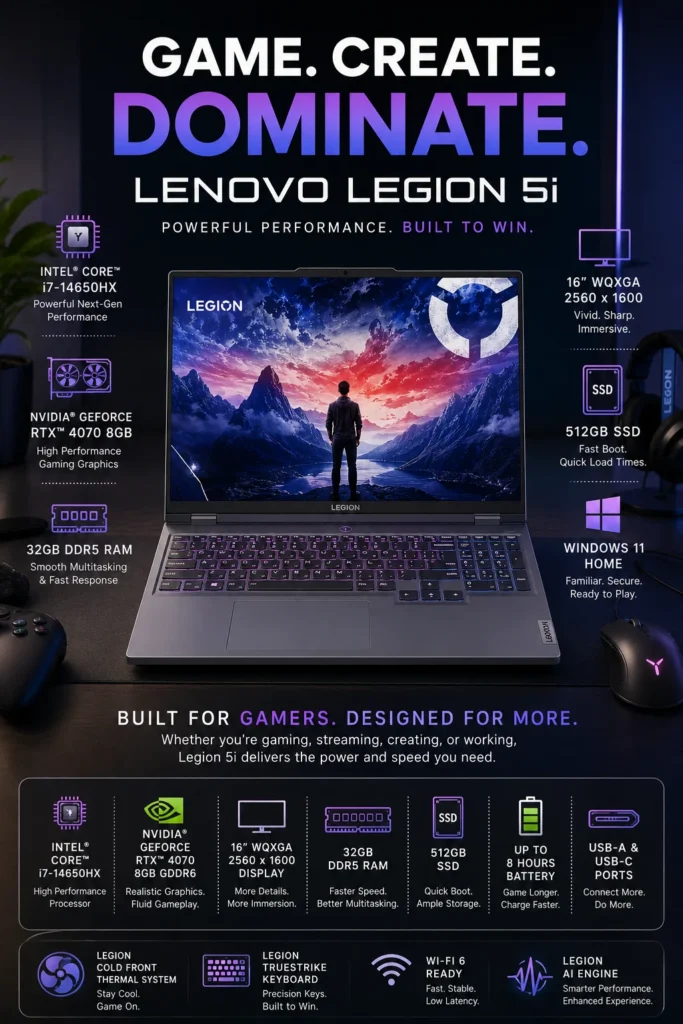
The Lenovo Legion 5i with Intel Core i7-14650HX, RTX 4070, 32GB RAM, and 512GB SSD is our top recommendation for the best gaming laptop under $1500 in 2026. It delivers significantly more graphics performance than the other laptops in this guide, making it the strongest choice for gamers, streamers, creators, and power users who prioritize GPU performance over portability and battery life.
The Lenovo Legion 5i earns our Best Gaming Laptop Under $1500 award because it offers the strongest combination of dedicated graphics performance, processor power, memory, cooling, and gaming capability among the laptops featured in this guide. The RTX 4070 is the key advantage: it gives the Legion 5i a level of gaming and GPU performance that integrated-graphics laptops such as the MacBook Air M5, Dell XPS 13, and Acer Swift Edge 14 AI cannot match.
The trade-off is portability. At roughly 5 pounds, the Legion 5i is considerably heavier than the premium ultraportable laptops in this guide, and gaming laptops generally provide shorter battery life when running demanding workloads. For buyers who spend most of their time at a desk, however, that trade-off is worthwhile. If your priority is gaming performance, GPU power, and the ability to handle demanding applications, the Legion 5i is the clear performance-focused choice under $1500.
Key Features
Acer Swift Edge 14 AI
Best Ultra-Light Productivity Laptop Under $1500 for Travel, Remote Work & Students
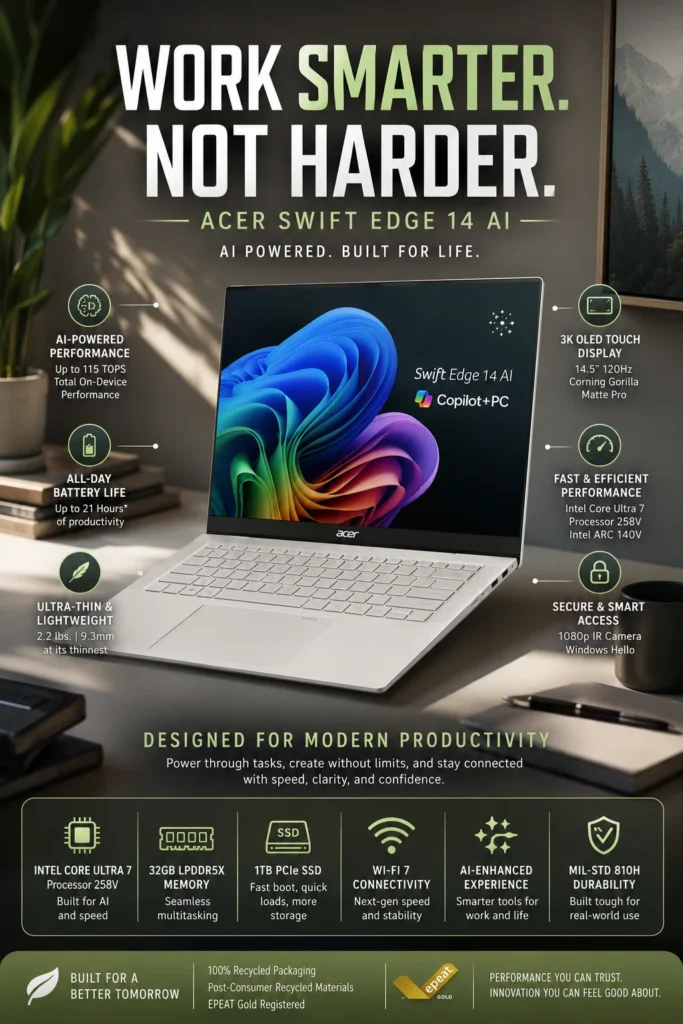
The Acer Swift Edge 14 AI with Intel Core Ultra 7, 32GB RAM, 1TB SSD, and a 3K OLED display is our top recommendation for the best ultra-light productivity laptop under $1500 in 2026. It is designed for buyers who value portability, battery efficiency, display quality, and everyday productivity without moving to a heavier performance-oriented laptop. Its exceptionally lightweight chassis makes it particularly attractive for students, professionals, frequent travelers, and remote workers who carry their computer throughout the day.
The Acer Swift Edge 14 AI earns our Best Ultra-Light Productivity Laptop award because it offers an unusually strong combination of low weight, OLED display quality, battery efficiency, memory capacity, and everyday performance. At roughly 2.2 pounds, it is significantly easier to carry than most 14-inch performance laptops, making it particularly appealing to students, consultants, business travelers, and remote professionals who value mobility throughout the day.
Compared with the Dell XPS 13, the Swift Edge 14 AI provides a larger display and a stronger focus on visual quality and productivity flexibility. Its 32GB memory and 1TB SSD configuration also give it substantial multitasking and storage headroom. The trade-off is that buyers seeking maximum graphics performance, gaming capability, or sustained GPU-intensive workloads should choose a laptop with a dedicated graphics processor instead. For buyers whose priority is maximum portability combined with premium productivity features, the Swift Edge 14 AI is one of the strongest choices in this guide.
Key Features
Best Laptops Under $1500 in 2026
Ranked by Performance, Battery Life, Display Quality, Portability, Gaming & Overall Value
Choosing the best laptop under $1500 in 2026 depends on more than processor speed. Some buyers need maximum battery life and portability, while others prioritize display quality, gaming performance, multitasking, or long-term value. We evaluated these five laptops based on real-world performance, battery efficiency, display quality, portability, workload capability, build quality, and overall value to help you choose the right laptop for your needs.
| Laptop | Key Specs | Best For | Why It Wins | Editor's Verdict |
|---|---|---|---|---|
Best Overall
Apple MacBook Air 13-inch (M5)
Check Price
| Apple M5 24GB Unified Memory 512GB SSD 13.6" Liquid Retina | Students Professionals Everyday Productivity | Excellent balance of performance, battery life, portability, premium build quality, and long-term value. The M5 platform provides more than enough performance for productivity, academic work, multitasking, and everyday professional use. | Best Overall Laptop Under $1500 |
Best Premium Windows
ASUS Zenbook S 16
Check Price
| AMD Ryzen AI 9 365 24GB LPDDR5X RAM 1TB SSD 16" 3K OLED | Creators Designers Premium Windows Users | Its 3K 120Hz OLED display, powerful Ryzen AI platform, premium construction, and large 16-inch workspace make it an excellent choice for creators and professionals who want a high-end Windows experience without moving into much more expensive flagship systems. | Best Premium Windows Laptop Under $1500 |
Best Battery Life
Dell XPS 13 9345
Check Price
| Snapdragon X Elite 16GB LPDDR5X RAM 1TB SSD 13.4" Display | Business Users Travelers Remote Workers | Exceptional battery efficiency and a compact premium design make the XPS 13 particularly attractive for professionals who spend long periods away from a power outlet. Its Snapdragon platform also provides dedicated on-device AI acceleration. | Best Battery Life Laptop Under $1500 |
Best Gaming
Lenovo Legion 5i
Check Price
| Intel Core i7-14650HX NVIDIA RTX 4070 8GB 32GB DDR5 RAM 512GB SSD | Gamers Streamers Power Users | The RTX 4070 and high-performance Intel HX processor provide substantially more graphics and gaming capability than the other laptops in this lineup. The trade-off is a heavier chassis and lower portability. | Best Gaming Laptop Under $1500 |
Best Ultra-Light
Acer Swift Edge 14 AI
Check Price
| Intel Core Ultra 7 258V 32GB LPDDR5X RAM 1TB SSD 14.5" 3K OLED | Travelers Remote Workers Students | At approximately 2.2 lbs, the Swift Edge 14 AI is exceptionally easy to carry while still offering a high-resolution OLED display, strong multitasking capability, long battery life, and modern AI acceleration. | Best Ultra-Light Productivity Laptop Under $1500 |
Find the Right Laptop for Your Needs
Still deciding which laptop is right for you? Explore our expert laptop buying guides organized around budget, students, work, gaming, displays, and specialized workloads.
Whether you're looking for a more affordable laptop, a student-focused model, a powerful gaming machine, or a premium OLED system, these guides can help you narrow down your options and make a more confident buying decision.
Best Laptops Under $1000 in 2026
If you don't need to spend the full $1500, explore the best laptops under $1000 for students, work, productivity, and everyday use without sacrificing the features that matter most.
Explore Laptops Under $1000 →Best Laptops for Students in 2026
Compare the best laptops for college and university students across different budgets, workloads, majors, portability needs, and battery requirements.
Explore student laptops → Work & Everyday UseBest Laptops for Work, Gaming & Everyday Use
Explore versatile laptops for professionals, productivity, entertainment, everyday computing, and users who want one machine that can handle multiple roles.
Explore versatile laptops → GamingBest Gaming Laptops Under $2500 in 2026
Need more gaming performance than a $1500 budget allows? Explore higher-performance RTX gaming laptops designed for demanding games, streaming, and power users.
Explore gaming laptops → Premium DisplaysBest OLED Laptops in 2026
Compare the best OLED laptops for creators, professionals, entertainment, and anyone who prioritizes color accuracy, contrast, resolution, and visual quality.
Explore OLED laptops → AI & Advanced WorkloadsBest Laptops for AI & Machine Learning in 2026
Explore more powerful laptops for Python, local AI, machine learning, development environments, and demanding computational workloads.
Explore AI laptops →EDITOR'S FINAL RECOMMENDATIONS
After comparing performance, display quality, battery life, portability, AI capabilities, gaming performance, and overall value, these are our five recommended laptops under $1500 in 2026. Each model is designed for a different type of buyer, so the best choice depends on how you actually plan to use your laptop every day.
Apple MacBook Air 13-inch (M5)
The best overall laptop under $1500 for most buyers. The MacBook Air M5 combines strong everyday performance, excellent battery efficiency, premium construction, silent operation, and exceptional portability, making it an outstanding choice for students, professionals, and everyday users.
- ✓ Apple M5 Chip
- ✓ Excellent Everyday Performance
- ✓ Premium Lightweight Design
- ✓ Outstanding Battery Efficiency
ASUS Zenbook S 16
The strongest premium Windows option under $1500 for buyers who want a large, high-quality OLED display, modern AMD Ryzen AI performance, premium materials, and a more immersive productivity and entertainment experience.
- ✓ 16-inch 3K OLED Display
- ✓ AMD Ryzen AI Performance
- ✓ Premium Ceraluminum Design
- ✓ Excellent Productivity Performance
Dell XPS 13 9345
The best choice for buyers who prioritize battery endurance and portability. Its Snapdragon X Elite platform provides excellent efficiency in an ultra-compact premium design, making it particularly attractive for professionals, frequent travelers, and Windows users who spend long periods away from an outlet.
- ✓ Snapdragon X Elite
- ✓ Exceptional Battery Efficiency
- ✓ Ultra-Light Premium Design
- ✓ Excellent Travel Companion
Lenovo Legion 5i
The clear choice for buyers who want serious gaming performance under $1500. With a powerful Intel HX processor, dedicated NVIDIA graphics, generous memory, and a large high-resolution display, the Legion 5i is designed for gaming, streaming, demanding applications, and performance-heavy workloads.
- ✓ Intel Core HX Performance
- ✓ NVIDIA RTX 4070 Graphics
- ✓ 32GB DDR5 Memory
- ✓ 16-inch WQXGA Display
Acer Swift Edge 14 AI
The best option for buyers who value extreme portability without giving up premium features. Its ultra-light chassis, high-resolution OLED display, long battery life, and modern AI hardware make it particularly well suited for professionals, students, travelers, and remote workers.
- ✓ Ultra-Light 2.2 lb Design
- ✓ 3K OLED 120Hz Display
- ✓ Intel Core Ultra AI Platform
- ✓ Excellent Battery Life
Which laptop under $1500 should you buy?
Apple MacBook Air 13-inch (M5)
ASUS Zenbook S 16
Dell XPS 13 9345
Lenovo Legion 5i
Acer Swift Edge 14 AI
- Choose the MacBook Air 13-inch (M5) if you want the best overall combination of performance, portability, battery efficiency, premium design, and everyday usability under $1500.
- Choose the ASUS Zenbook S 16 if you want a premium Windows laptop with a large OLED display, strong AI performance, and an excellent experience for productivity and creative work.
- Choose the Dell XPS 13 9345 if battery life, portability, and long periods of unplugged Windows use are your highest priorities.
- Choose the Lenovo Legion 5i if gaming performance is your priority and you want dedicated NVIDIA graphics capable of handling demanding games and other performance-heavy workloads.
- Choose the Acer Swift Edge 14 AI if you travel frequently or simply want one of the lightest premium productivity laptops while still getting a high-quality OLED display, strong battery life, and modern AI capabilities.
EDITOR'S FINAL VERDICT
After comparing performance, display quality, battery life, portability, memory, storage, gaming capability, productivity performance, and long-term value, one conclusion stands out:There is no single laptop under $1500 that is perfect for everyone. The best choice depends on whether you prioritize everyday productivity, creative work, business travel, gaming performance, or maximum portability.
A $1500 laptop should provide enough performance to remain useful for several years while also delivering the display quality, battery life, build quality, and portability that match your everyday workflow.
The best laptop under $1500 is not necessarily the most powerful model. It is the one that gives you the right combination of performance, usability, portability, and long-term value for the way you actually work, study, or play.- Choose the Apple MacBook Air M5 if you want the best overall combination of performance, battery life, portability, premium build quality, and everyday usability under $1500.
- Choose the ASUS Zenbook S 16 if display quality, creative work, a larger screen, and strong productivity performance matter more than maximum portability.
- Choose the Dell XPS 13 9345 if you prioritize battery life, portability, premium Windows hardware, and a lightweight machine for business, travel, and everyday productivity.
- Choose the Lenovo Legion 5i if gaming performance is your priority and you want substantially more graphics power than the other laptops in this lineup.
- Choose the Acer Swift Edge 14 AI if portability is your highest priority and you want an exceptionally lightweight laptop with a premium OLED display, strong battery life, and modern AI capabilities.
Top Laptop Recommendations Under $1500 (2026)
Apple MacBook Air M5
Our Editor's Choice for most buyers because it delivers an exceptional balance of performance, battery life, portability, premium construction, and long-term usability. It is the safest overall recommendation for students, professionals, and everyday productivity users who do not need a dedicated gaming GPU.
- ✓ Apple M5 Performance
- ✓ Excellent Battery Life
- ✓ Premium Lightweight Design
- ✓ Excellent Everyday Performance
ASUS Zenbook S 16
The strongest choice for buyers who place a high value on display quality and creative productivity. Its large 3K OLED display, high refresh rate, and powerful processor make it particularly attractive for creators and professionals.
- ✓ 3K OLED 120Hz Display
- ✓ Ryzen AI Performance
- ✓ Creator-Friendly Display
- ✓ Excellent Productivity Performance
Lenovo Legion 5i
The clear choice for serious gaming under $1500. Its dedicated RTX 4070 graphics, high-performance processor, and 32GB of RAM provide substantially more gaming power than the thin-and-light laptops in this comparison.
- ✓ NVIDIA RTX 4070
- ✓ Intel Core i7 HX Processor
- ✓ 32GB DDR5 RAM
- ✓ Excellent AAA Gaming Performance
- ✓ You want the best overall laptop under $1500
- ✓ Battery life and portability are important
- ✓ You value premium build quality and long-term usability
- ✓ You primarily need productivity, study, business, or creative applications
- ✓ Gaming performance is your highest priority
- ✓ You want an RTX 4070 dedicated GPU
- ✓ You play demanding AAA games
- ✓ You are willing to sacrifice portability for performance
- ✓ Prioritize the workload you actually perform every day
- ✓ Look beyond processor specifications and consider battery life and display quality
- ✓ Choose portability if you regularly travel, commute, or work away from a desk
- ✓ Spend more only when the additional performance genuinely benefits your workflow
A laptop in the $1000–$1500 range should be purchased based on how it will actually be used rather than on specifications alone. Battery life, display quality, portability, thermal performance, build quality, and long-term usability can have a greater impact on your daily experience than small differences in processor performance.
Among the laptops evaluated in this guide, the Apple MacBook Air M5 delivers the strongest overall combination of performance, battery life, portability, premium design, and everyday usability. For most buyers who do not need dedicated gaming graphics, it is our Editor's Choice for the best laptop under $1500 in 2026.
Laptop prices and configurations can change frequently. Compare the latest prices, available memory and storage configurations, warranty coverage, and current deals before making your final purchase.
Check Latest DealsEDITOR'S FAQ
Choosing the best laptop under $1500 in 2026 requires more than comparing processor specifications. Buyers need to consider real-world performance, display quality, battery life, portability, gaming capability, memory, storage, build quality, and long-term value.Below are the most common questions buyers ask when choosing a laptop in this price range, including which model is best overall, which laptop is best for gaming, how much RAM and storage you need, and which options make the most sense for work, travel, creative applications, and everyday use.
It provides one of the strongest combinations of performance, battery life, portability, premium build quality, and long-term usability in this price range. For students, professionals, and everyday productivity users, it delivers more than enough performance without the added weight or cost of a high-performance gaming laptop.
- Excellent everyday performance.
- Outstanding battery efficiency.
- Premium lightweight design.
- Excellent portability for travel and work.
- Strong long-term value for most buyers.
For buyers who do not need dedicated gaming graphics, the MacBook Air M5 is the safest overall choice in this comparison.
Check PriceUnlike the thin-and-light laptops in this comparison, the Legion 5i is designed around high-performance gaming. Its dedicated NVIDIA RTX 4070 graphics, high-performance Intel processor, and 32GB of RAM provide substantially more graphics performance for demanding games and GPU-intensive workloads.
- NVIDIA RTX 4070 8GB graphics.
- Intel Core i7 HX-class performance.
- 32GB DDR5 memory.
- Large high-resolution gaming display.
- Strong cooling for sustained performance.
The trade-off is portability. The Legion 5i is considerably heavier than the MacBook Air, Dell XPS 13, or Acer Swift Edge, but it is the clear choice when gaming performance matters most.
View Gaming DealIts lightweight design and efficient Snapdragon platform make it particularly attractive for business users, executives, remote professionals, and frequent travelers who spend much of their time working away from a desk.
- Ultra-light premium design.
- Excellent battery efficiency.
- Premium Windows laptop experience.
- Well suited to productivity and business applications.
- Excellent option for frequent travelers.
If your work depends heavily on Windows-specific applications, the XPS 13 provides a more natural choice than moving to macOS.
Check PriceIts large 3K OLED panel, 120Hz refresh rate, and wide color coverage make it particularly attractive for creators, designers, photographers, media enthusiasts, and professionals who spend significant amounts of time looking at their screen.
- 3K OLED display.
- 120Hz refresh rate.
- Excellent color reproduction.
- Large 16-inch-class workspace.
- Excellent for creative and visual workloads.
For buyers who care more about display quality and creative productivity than maximum gaming performance, the Zenbook S 16 is one of the strongest choices under $1500.
Check PriceBattery performance depends heavily on workload, display brightness, applications, and power settings, but both models are designed around efficiency rather than maximum sustained power consumption.
- MacBook Air M5 → Best overall combination of efficiency, performance, and portability.
- Acer Swift Edge 14 AI → Excellent battery life combined with an exceptionally lightweight design.
- Dell XPS 13 9345 → Strong choice for efficient Windows productivity and travel.
For frequent travel, university classes, meetings, or long work sessions away from an outlet, battery efficiency can be more valuable than having the fastest possible processor.
Its approximately 2.2-pound design makes it exceptionally easy to carry between meetings, classrooms, airports, coffee shops, and remote work locations. It combines that lightweight construction with a premium OLED display, strong battery life, and modern AI hardware.
- Approximately 2.2-pound weight.
- Ultra-light premium chassis.
- 3K OLED display.
- Strong battery life.
- Modern AI processing capabilities.
If portability is your number-one priority, the Swift Edge 14 AI is one of the most compelling choices in the entire $1500 price range.
Check Portable Laptop DealModern applications, browsers, productivity software, creative tools, and games can consume significantly more memory than they did several years ago. Choosing enough RAM now can also help extend the useful life of the laptop.
- 8GB → Suitable only for lighter everyday workloads.
- 16GB → Recommended for most productivity, student, business, and everyday users.
- 32GB → Better for gaming, professional creative work, development, engineering, and heavy multitasking.
If you are choosing between a faster processor and substantially more memory for a long-term productivity machine, additional RAM can often provide more practical benefits once the processor is already powerful enough for your workload.
The MacBook Air M5 is particularly strong for battery life, portability, everyday productivity, software development, and users already invested in Apple's ecosystem. Windows laptops provide broader hardware selection and are generally the better choice for dedicated gaming and certain specialized applications.
- MacBook Air M5 → Best for battery life, portability, productivity, and macOS users.
- ASUS Zenbook S 16 → Excellent for Windows productivity and creative work.
- Dell XPS 13 → Strong for premium Windows business productivity and travel.
- Lenovo Legion 5i → Best for gaming and GPU-intensive workloads.
- Acer Swift Edge 14 AI → Excellent for ultra-portable Windows productivity.
Choose the platform that supports the applications and workflow you actually use rather than choosing based only on brand.
- Best Overall → Apple MacBook Air M5
- Best for Creators → ASUS Zenbook S 16
- Best for Business → Dell XPS 13 9345
- Best Gaming → Lenovo Legion 5i
- Best Portability → Acer Swift Edge 14 AI
For most buyers who want a premium laptop for productivity, study, business, and everyday use, the MacBook Air M5 is the strongest overall recommendation. Gamers should choose the Legion 5i, while creators should strongly consider the Zenbook S 16.
Check Best Overall DealLAPTOP BUYING GUIDE
Spending up to $1500 gives you access to a wide range of premium laptops, but a higher budget does not automatically guarantee a better buying decision.At this price point, buyers can choose between lightweight ultrabooks, premium productivity machines, creator-focused OLED laptops, powerful gaming systems, and business-oriented laptops. The biggest mistake is choosing based on specifications alone instead of matching the laptop to the way you actually plan to use it.Before buying a laptop under $1500, avoid these common mistakes and focus on performance, battery life, display quality, portability, build quality, and long-term value.
A $1500 budget should give you enough flexibility to buy a genuinely high-quality laptop without paying for hardware you will never use.For most buyers, the ideal configuration is not the one with the highest benchmark score. It is the laptop that provides the right balance of processor performance, memory, storage, display quality, battery life, portability, and reliability for the workload you perform every day.
Buying Based Only on Specifications
- A faster processor or more powerful GPU does not automatically make a laptop better for your particular workflow.
- High-end specifications can increase price, weight, heat, and power consumption without providing a meaningful benefit for everyday users.
- Two laptops with similar specifications can deliver very different experiences because of differences in displays, keyboards, battery life, cooling, and build quality.
Better decision: Match the hardware to your actual workload instead of choosing the laptop with the most impressive specification sheet.
Spending $1500 on Performance You Don't Need
- Many students, professionals, and everyday users do not need a high-end dedicated GPU or workstation-class processor.
- Premium ultrabooks can provide excellent performance while offering better battery life, portability, and everyday comfort.
- Paying for gaming or professional hardware you rarely use reduces the value of your purchase.
Better decision: Spend your budget where it improves your actual workflow. Prioritize battery life, display quality, memory, storage, and portability when those characteristics matter more than raw performance.
Ignoring Battery Life and Portability
- A powerful laptop can become frustrating if it is too heavy or requires frequent access to a charger.
- Gaming laptops and high-performance systems often sacrifice portability and battery efficiency for performance.
- Students, commuters, and mobile professionals may benefit more from an efficient ultrabook than from a heavier performance-oriented laptop.
Better decision: If you regularly carry your laptop between home, school, work, or travel locations, prioritize a lightweight design and strong real-world battery life.
Choosing the Wrong Display for Your Work
- A display that looks impressive on paper may not be ideal for your specific workload.
- Creators can benefit from OLED panels with strong color reproduction, while gamers may prioritize refresh rate and response time.
- Professionals and students who spend hours reading and writing should also consider brightness, resolution, viewing comfort, and screen size.
Better decision: Choose the display based on your workflow. OLED is particularly attractive for creators and media consumption, while high-refresh displays make more sense for gaming and motion-heavy workloads.
Buying Too Little Memory or Storage
- Modern browsers, productivity applications, development tools, creative software, and large projects can quickly consume system resources.
- Limited memory can make multitasking less comfortable and reduce long-term flexibility.
- A small SSD can become frustrating when storing applications, media, games, academic files, and professional projects locally.
Better decision: Prioritize a configuration with enough memory and storage for the next several years. For demanding workloads, more memory and a larger SSD can be more valuable than a small processor upgrade.
Buying the Wrong Laptop Category
- A gaming laptop is not automatically the best choice for office work or university.
- A thin ultrabook may not be appropriate for demanding gaming, 3D rendering, or sustained GPU workloads.
- A premium MacBook may be an excellent choice for many users but may not support every specialized Windows application.
Better decision: Choose the laptop category first, then select the best model within that category. Think about whether you need an ultrabook, business laptop, creator laptop, gaming system, or general-purpose premium machine.
Smart Buying Advice for a $1500 Laptop Budget
Your priorities are portability, battery life, everyday performance, premium construction, quiet operation, and long-term productivity. Models such as the MacBook Air and other premium thin-and-light laptops are particularly attractive for students, professionals, and frequent travelers.
You regularly work with photo editing, video production, color-sensitive applications, content creation, or other workflows where display quality and sustained performance matter. An OLED display and stronger graphics performance can justify spending more of your budget.
Gaming performance is one of your primary requirements. A dedicated RTX GPU and stronger cooling system can provide substantially more graphics performance, although you should expect additional weight, heat, fan noise, and lower battery efficiency compared with premium ultrabooks.
You prioritize portability, reliability, professional features, comfortable daily productivity, strong connectivity, and a design intended for work rather than maximum gaming or graphics performance.
Key takeaway: The best laptop under $1500 is not necessarily the fastest or most expensive model available. It is the laptop that provides the right combination of performance, display quality, battery life, portability, build quality, memory, storage, and long-term value for your actual workflow.
After evaluating the laptops featured in this guide, these are our Editor's key recommendations for buyers with a $1500 budget in 2026:
- Best Overall: Apple MacBook Air M5 — an excellent combination of performance, battery efficiency, premium construction, portability, and everyday usability for most buyers.
- Best for Creators: ASUS Zenbook S 16 — a strong choice for users who prioritize a large high-quality OLED display, portability, and creative productivity.
- Best for Business: Dell XPS 13 9345 — a premium lightweight option for professionals who prioritize portability, battery efficiency, and everyday business productivity.
- Best for Gaming: Lenovo Legion 5i — the better choice when gaming performance and dedicated graphics power matter more than portability and battery life.
- Best for Portability: Acer Swift Edge 14 AI — an attractive option for mobile professionals and students who prioritize an extremely lightweight design, OLED display quality, and battery efficiency.
Need help choosing your laptop?
Not sure which option fits your workflow? Get a personalized recommendation based on your budget, performance needs, and usage.
Get personalized recommendation⚡ Usually responds within 24 hours