
Explore Our Gaming Laptop Guides
Discover our complete collection of gaming laptop recommendations, performance comparisons, and expert buying guides designed to help you find the best laptop for competitive gaming, AAA titles, and high-performance experiences.
Best ASUS Laptops in 2026: 7 Expert Picks for Gaming, Work, Students & Creators
The best ASUS laptop in 2026 depends on how you plan to use it. A lightweight Zenbook can be ideal for everyday productivity and travel, while a ROG gaming laptop is designed for demanding games and creative workloads. Students, business professionals, creators, and budget-conscious buyers all have different priorities.With ASUS offering everything from premium OLED ultrabooks and powerful gaming machines to innovative dual-screen laptops and affordable Chromebooks, choosing the right model requires more than simply looking at specifications.
In this guide, we've selected the 7 best ASUS laptops in 2026 based on performance, display quality, battery life, portability, build quality, gaming capability, productivity features, and overall value. Each model is recommended for a specific type of buyer, making it easier to identify the ASUS laptop that best matches your needs and budget.The ASUS Zenbook 14 OLED is our best overall choice for most people, while the ROG Zephyrus G16 is the premium option for serious gaming and high-performance workloads. Creators can look to the Vivobook S16, business professionals can consider the ExpertBook B9, and students seeking a simple and affordable option may prefer the Chromebook Plus CX34.
ASUS Zenbook 14 OLED
Best Overall ASUS Laptop for Work, Students, Productivity & Travel
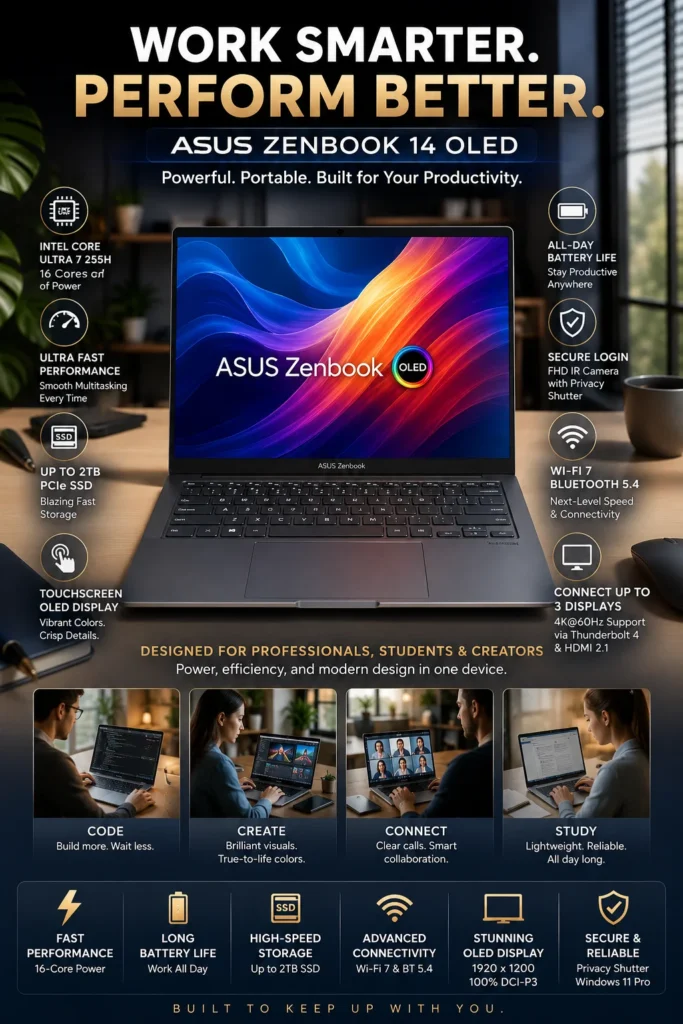
The ASUS Zenbook 14 OLED is our top recommendation for the best ASUS laptop overall in 2026. It offers one of the most balanced combinations in the lineup, bringing together strong Intel Core Ultra performance, a high-quality 3K OLED display, excellent portability, long battery endurance, and versatile connectivity in a compact 14-inch design. For professionals, students, remote workers, and everyday users who want a premium Windows laptop without moving into a larger or heavier performance machine, the Zenbook 14 OLED is the safest all-around choice.
The Zenbook 14 OLED earns our Best ASUS Laptop Overall award because it avoids the compromises that often come with choosing a laptop for a single purpose. It is not ASUS's most powerful gaming machine or its most specialized business laptop, but it delivers an unusually strong combination of display quality, performance, portability, battery capacity, and connectivity for everyday users who want one premium laptop that can handle a wide range of tasks.
Compared with larger ASUS gaming and creator-focused models, the Zenbook 14 OLED is significantly easier to carry and better suited to everyday mobility. Its integrated graphics also mean it is not the right choice for buyers who need dedicated-GPU performance for demanding gaming or professional 3D workloads. For everyone else, however, its OLED display, compact design, modern Core Ultra platform, and versatile port selection make it one of the most complete ASUS laptop packages in 2026.
Key Features
ASUS ROG Zephyrus G16
Best Premium ASUS Gaming Laptop for Gaming, Creators & High-Performance Workloads
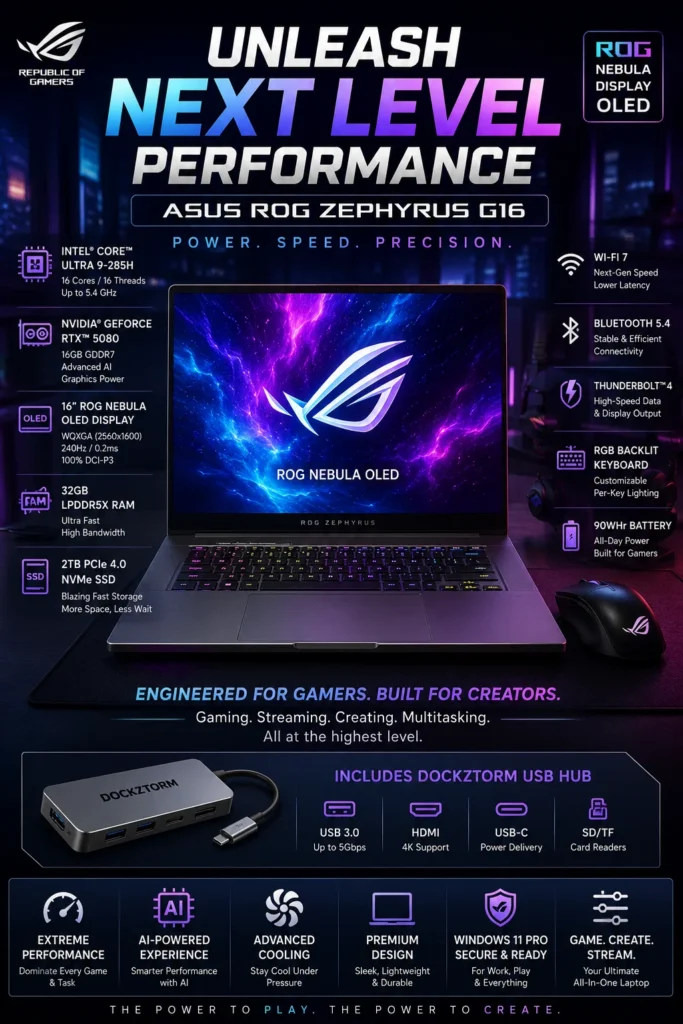
The ASUS ROG Zephyrus G16 is our top recommendation for the best premium ASUS gaming laptop in 2026. It combines high-end CPU and GPU performance with a premium 16-inch OLED display, advanced cooling, fast memory and storage, and a relatively portable design. For gamers, creators, and power users who want substantially more performance than a typical ultraportable can provide, the Zephyrus G16 is the performance-focused choice in this lineup.
The ROG Zephyrus G16 earns our Best Premium ASUS Gaming Laptop award because it combines performance and portability better than a conventional desktop-replacement gaming laptop. Its high-end graphics hardware, powerful processor, premium OLED display, and advanced thermal design make it capable of handling demanding games and creative applications while maintaining a more refined form factor than many larger gaming machines.
The trade-off is price and power consumption. The Zephyrus G16 is considerably more expensive than mainstream gaming laptops such as the ASUS TUF Gaming A15, and its high-performance hardware is unnecessary for buyers who primarily play lighter games or perform everyday productivity tasks. For users who genuinely need high-end gaming and GPU performance, however, the G16 provides a much more complete premium experience and is one of ASUS's strongest performance-oriented laptops in 2026.
Key Features
ASUS Vivobook S16 Copilot+
Best AI ASUS Laptop for Professionals, Creators & Productivity
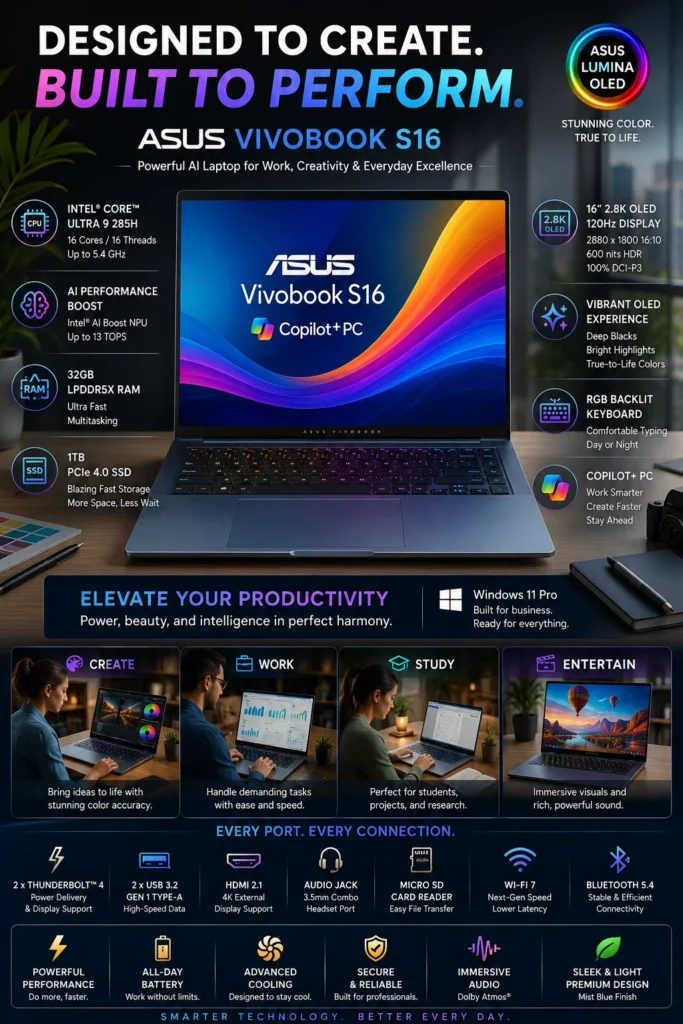
The ASUS Vivobook S16 is our recommendation for the best AI ASUS laptop in 2026 for buyers who want modern AI-capable hardware, a large premium OLED display, strong multitasking performance, and a more accessible price than ASUS's highest-end performance laptops. Its combination of an Intel Core Ultra platform, integrated AI acceleration, 32GB memory, and a 16-inch 2.8K OLED display makes it particularly appealing to professionals, creators, students, and productivity-focused users who need more workspace without moving to a bulky workstation.
The Vivobook S16 earns our Best AI ASUS Laptop award because it focuses on the features that matter most to professionals and creators who want modern computing capabilities without paying for hardware they may not need. Its combination of a large OLED display, strong Core Ultra performance, integrated AI acceleration, generous memory, and fast storage makes it one of the most balanced productivity-focused ASUS laptops in this lineup.
The main limitation is that the Vivobook S16 is not a replacement for a dedicated-GPU gaming or workstation laptop. Its integrated graphics are better suited to everyday creative work, productivity, media, and lighter GPU workloads than demanding 3D rendering or high-end gaming. For buyers who prioritize a premium display, large workspace, AI-capable hardware, and strong multitasking over dedicated graphics performance, however, the Vivobook S16 is an excellent middle ground between an ultraportable and a high-performance machine.
Key Features
ASUS TUF Gaming A15
Best Budget ASUS Gaming Laptop for Affordable Performance & 1080p Gaming

The ASUS TUF Gaming A15 is our recommendation for the best budget ASUS gaming laptop in 2026 for buyers who want genuine dedicated-GPU gaming performance without moving into the price range of premium gaming machines. Its combination of an AMD Ryzen 5 processor, NVIDIA GeForce RTX 3050 graphics, 16GB of memory, a high-refresh-rate display, and a durable chassis makes it a practical choice for 1080p gaming, school, and everyday productivity.
The TUF Gaming A15 earns our Best Budget ASUS Gaming Laptop award because it focuses on the features that matter most when gaming performance is the priority but the budget is limited. The dedicated RTX graphics, capable Ryzen processor, 16GB memory configuration, high-refresh-rate display, and durable chassis create a well-balanced entry point into PC gaming without requiring the cost of a premium ROG machine.
The main limitation is performance headroom. The RTX 3050 is designed primarily for 1080p gaming and should not be considered equivalent to the high-end GPUs found in premium gaming laptops such as the ROG Zephyrus G16 featured higher in this guide. Buyers who want maximum settings, advanced ray tracing, high-refresh-rate gaming at higher resolutions, or demanding creative GPU workloads should move to a more powerful ASUS model. For budget-conscious users who mainly want dependable 1080p gaming and everyday versatility, however, the TUF Gaming A15 remains one of the most sensible ASUS choices in this lineup.
Key Features
ASUS ExpertBook B9 OLED
Best ASUS Business Laptop for Professionals, Executives & Business Travel

The ASUS ExpertBook B9 OLED is our recommendation for the best ASUS business laptop in 2026 for professionals who place a particularly high value on portability, premium construction, business-focused features, and an excellent display. Its lightweight design makes it especially attractive to executives, consultants, frequent travelers, and hybrid professionals who need a capable work machine that is easy to carry throughout the day.
The ExpertBook B9 OLED earns our Best ASUS Business Laptop award because it prioritizes something many business laptops compromise on: mobility. Instead of focusing primarily on maximum performance or a large screen, ASUS designed the B9 around professionals who carry their laptop constantly and still expect a premium experience. Its lightweight chassis, OLED display, business-oriented features, and modern Intel platform make it particularly compelling for executives and frequent travelers.
The main trade-off is that the ExpertBook B9 is designed around portability rather than maximum performance. Professionals who spend most of their time at a desk and need a larger display, extensive connectivity, or workstation-class processing may be better served by a larger business laptop. For users who value minimal weight, premium build quality, professional features, and travel-friendly design, however, the ExpertBook B9 is one of the strongest ASUS business-focused options in this lineup.
Key Features
ASUS Zenbook DUO 14
Best Dual OLED Laptop for Multitasking, Productivity & Creative Work
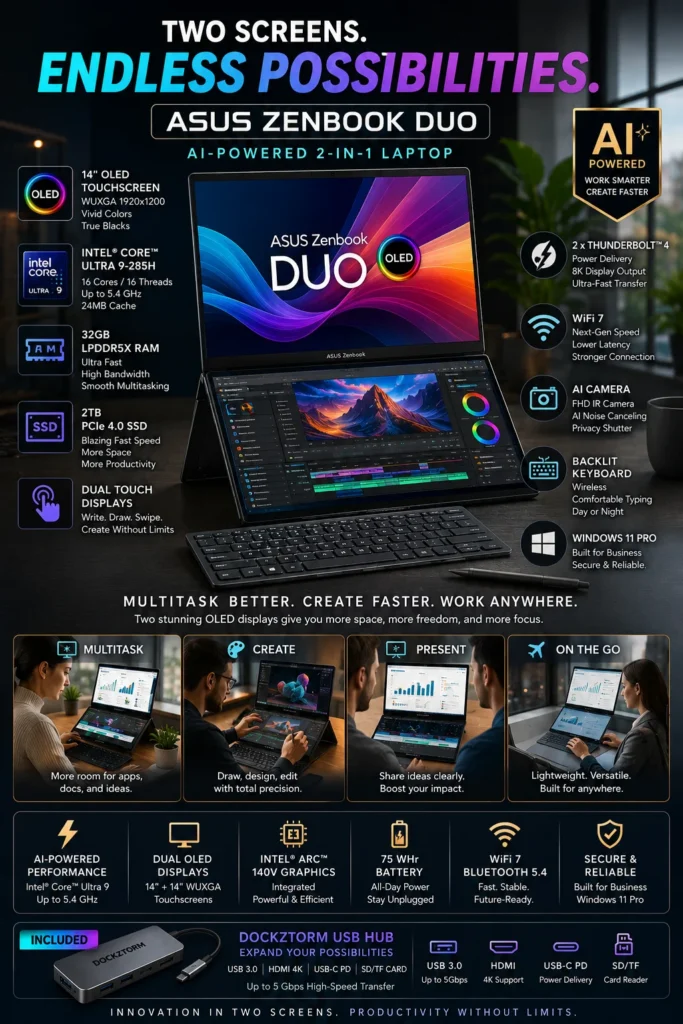
The ASUS Zenbook DUO (14-inch) is our recommendation for the best dual-screen ASUS laptop in 2026 for professionals, creators, programmers, and power users who need more workspace without carrying a traditional dual-monitor setup. Its two integrated OLED displays create a unique mobile workstation experience that makes multitasking, content creation, coding, research, and productivity workflows significantly more flexible.
The Zenbook DUO earns our Best Dual-Screen Laptop for Productivity & Creators award because its biggest advantage is not simply faster hardware — it is the additional workspace created by its two integrated displays. Users can keep a timeline, code editor, document, browser, reference material, communication application, or other secondary workflow visible without constantly switching between windows.
The dual-screen design also comes with trade-offs. The Zenbook DUO is more complex and typically less straightforward to use on a lap than a conventional clamshell laptop, while its additional display hardware can affect weight, thickness, battery consumption, and overall portability. For users who primarily want a simple everyday laptop, the Zenbook 14 OLED remains the better choice. For power users who can take advantage of the second display, however, the Zenbook DUO offers a level of mobile multitasking flexibility that conventional laptops cannot easily reproduce.
Key Features
ASUS Chromebook Plus CX34 14"
Best ASUS Chromebook for Students, Everyday Productivity & Cloud-Based Work
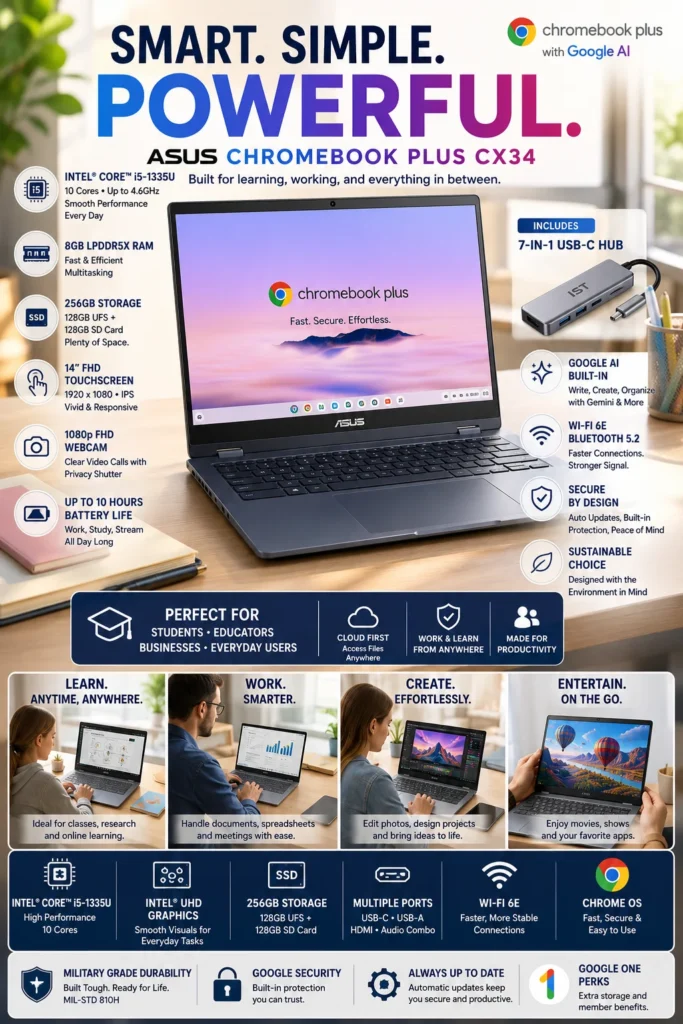
The ASUS Chromebook Plus CX34 (14-inch) is our recommendation for the best ASUS Chromebook for students and everyday cloud productivity in 2026. Instead of trying to compete with premium Windows laptops on raw performance, the CX34 focuses on simplicity, responsive everyday use, easy access to Google services, and a low-maintenance ChromeOS experience. It is particularly well suited to students, educators, families, and users whose work is primarily browser- and cloud-based.
The ASUS Chromebook Plus CX34 earns our Best ASUS Chromebook for Students & Everyday Productivity award because it focuses on simplicity rather than unnecessary hardware. ChromeOS is particularly effective for users who spend most of their time in a browser, using Google Docs, Sheets, Slides, Gmail, Google Drive, educational platforms, streaming services, and other web-based applications.
The main limitation is the operating system itself. ChromeOS is not designed to provide the same compatibility with traditional Windows desktop software as a Windows laptop. Users who depend on specialized professional applications, advanced desktop creative software, traditional Windows utilities, or demanding local workloads should consider one of the Windows-based ASUS laptops higher in this guide. For students and cloud-first users who value simplicity, portability, easy maintenance, and everyday productivity, however, the Chromebook Plus CX34 is a practical and accessible choice.
Key Features
Best ASUS Laptops in 2026
Ranked by Performance, Display Quality, Portability, Gaming Power, Productivity & Overall Value
Choosing the best ASUS laptop in 2026 requires more than simply comparing processor specifications. ASUS offers everything from lightweight Zenbook ultraportables and creator-focused Vivobook systems to high-performance ROG gaming machines, business-oriented ExpertBook models, innovative dual-screen laptops, and affordable Chromebooks.We evaluated these laptops according to real-world performance, display quality, battery efficiency, portability, build quality, connectivity, workload suitability, and overall value. The goal is to help you choose the ASUS laptop that best matches your workflow rather than simply choosing the model with the most powerful specifications.
| Laptop | Key Specifications | Best For | Why It Wins | Editor's Verdict |
|---|---|---|---|---|
Best Overall
ASUS Zenbook 14 OLED
Check Price
|
Intel Core Ultra 7 16GB Memory 1TB SSD 14" OLED Touchscreen |
Professionals Students Remote Workers Everyday Productivity | The Zenbook 14 OLED delivers the strongest overall balance in the lineup. Its combination of premium OLED display quality, modern Intel Core Ultra performance, portability, battery efficiency, and versatile connectivity makes it the safest choice for buyers who want one ASUS laptop capable of handling a wide range of everyday workloads. | Best ASUS Laptop for Most Users |
Best Premium Gaming
ASUS ROG Zephyrus G16
Check Price
|
Intel Core Ultra 9 GeForce RTX 5080 32GB Memory 16" 240Hz OLED |
Gamers Content Creators Power Users | The ROG Zephyrus G16 is the performance specialist of the lineup. Its combination of a powerful discrete GPU, high-end processor, fast OLED display, generous memory, and premium chassis makes it ideal for demanding AAA gaming, creative applications, rendering, and other GPU-intensive workloads. | Best Premium ASUS Gaming Laptop |
Best AI & Creator Value
ASUS Vivobook S16 Copilot+
Check Price
|
Intel Core Ultra 9 32GB Memory 1TB SSD 16" 2.8K OLED |
Creators Designers Professionals Multitaskers | The Vivobook S16 combines a large high-resolution OLED display with strong processing performance, generous memory, fast storage, and modern AI capabilities. It is particularly attractive to creators and professionals who want a larger workspace and premium display without moving into a flagship gaming-laptop price category. | Best ASUS AI Laptop for Professionals & Creators |
Best Budget Gaming
ASUS TUF Gaming A15
Check Price
|
AMD Ryzen 5 GeForce RTX 3050 16GB DDR5 15.6" 144Hz Display |
Budget Gamers Students First-Time Gaming Laptop Buyers | The TUF Gaming A15 focuses on delivering practical 1080p gaming performance without pushing buyers into premium pricing. Its dedicated RTX graphics, high-refresh-rate display, capable Ryzen processor, and durable chassis make it one of the strongest value-oriented gaming options in the ASUS lineup. | Best Budget ASUS Gaming Laptop |
Best Business
ASUS ExpertBook B9 OLED
Check Price
|
Intel Core 7 16GB LPDDR5X 512GB SSD 14" OLED |
Executives Business Professionals Frequent Travelers | The ExpertBook B9 focuses on professional mobility, business-oriented security, premium construction, and an exceptionally lightweight design. It is particularly compelling for executives and professionals who spend significant time traveling and want a premium productivity machine that is easy to carry. | Best ASUS Business Laptop for Professionals |
Best Dual-Screen
ASUS Zenbook DUO 14"
Check Price
|
Intel Core Ultra 9 32GB Memory 2TB SSD Dual 14" OLED Displays |
Creators Developers Multitaskers Productivity Power Users | The Zenbook DUO is the most unconventional laptop in the lineup, replacing the traditional single-screen workflow with two OLED displays and a flexible detachable-keyboard design. It is especially valuable for users who regularly work across multiple applications and want a portable alternative to a dual-monitor setup. | Best ASUS Laptop for Dual-Screen Productivity |
Best Chromebook
ASUS Chromebook Plus CX34
Check Price
|
Intel Core i5 8GB LPDDR5 256GB Storage 14" Full HD |
Students Teachers Cloud Users Everyday Productivity | The Chromebook Plus CX34 is designed for buyers who primarily use web applications, Google Workspace, online learning platforms, streaming services, and cloud-based productivity tools. ChromeOS provides a simple, secure, and low-maintenance experience that makes it particularly attractive for students and families. | Best ASUS Chromebook for Students |
Recommended Next Reads
Still deciding which ASUS laptop is right for you? Explore our expert laptop guides covering ASUS models, OLED displays, gaming performance, AI workloads, student needs, and different budgets.
Whether you're looking for a premium ASUS laptop, a powerful gaming machine, an OLED display, an AI-ready system, or an affordable laptop for school and everyday work, these guides can help you narrow down the right option for your needs.
Best ASUS Laptops in 2026
Explore our complete ASUS laptop rankings, including the best models for work, gaming, creators, students, business professionals, AI workloads, and different budgets.
Explore ASUS Laptops →Best OLED Laptops in 2026
Compare the best OLED laptops for creators, professionals, students, entertainment, and everyday productivity across different price ranges.
Explore OLED Laptops → Gaming PerformanceBest Gaming Laptops Under $2500 in 2026
Compare powerful gaming laptops with modern RTX graphics, high-refresh-rate displays, strong processors, and premium performance for demanding games.
Explore Gaming Laptops → AI & Machine LearningBest Laptops for AI & Machine Learning in 2026
Find high-performance laptops for Python, TensorFlow, local AI, machine learning workloads, development, and demanding computational tasks.
Explore AI Laptops → Student LaptopsBest Laptops for Students in 2026
Compare the best laptops for college, school, productivity, research, online learning, programming, and everyday student workloads.
Explore Student Laptops → Budget & ValueBest Laptops Under $1000 in 2026
Looking for better value? Compare the strongest laptops under $1,000 for work, school, gaming, productivity, and everyday use.
Explore Laptops Under $1000 → Creative WorkflowsBest Laptops for Video Editing in 2026
Find powerful laptops for video editors, YouTubers, creators, and professionals who need strong processors, graphics performance, memory, and high-quality displays.
Explore Video Editing Laptops →EDITOR'S FINAL RECOMMENDATIONS
After comparing ASUS laptops across everyday productivity, gaming performance, display quality, AI capabilities, portability, battery life, durability, multitasking, and overall value, these are our final recommendations for 2026. Whether you need a dependable everyday laptop, a premium gaming machine, a business-focused system, a creator workstation, a dual-screen productivity device, or an affordable Chromebook, there is an ASUS option here for your specific workflow and budget.
ASUS Zenbook 14 OLED
The best overall ASUS laptop for most users in 2026. The Zenbook 14 OLED combines excellent portability, a high-quality OLED touchscreen, strong everyday performance, impressive battery efficiency, and a premium design that works equally well for professionals, students, and everyday users.
- ✓ OLED Touchscreen Display
- ✓ Intel Core Ultra Performance
- ✓ Premium Lightweight Design
- ✓ Excellent Everyday Battery Efficiency
ASUS ROG Zephyrus G16
The premium performance choice for serious gamers and creators. The ROG Zephyrus G16 combines powerful RTX 5080 graphics, an Intel Core Ultra 9 processor, and a high-refresh-rate OLED display in a premium portable gaming chassis.
- ✓ NVIDIA GeForce RTX 5080
- ✓ Intel Core Ultra 9
- ✓ 240Hz OLED Display
- ✓ 32GB RAM & 2TB SSD
ASUS Vivobook S16
A strong creator and productivity laptop for users who want a large OLED display, modern Intel AI hardware, generous memory, and premium everyday performance without moving into the highest flagship price category.
- ✓ Intel Core Ultra 9
- ✓ 16-inch 2.8K OLED
- ✓ 32GB LPDDR5X Memory
- ✓ 1TB SSD Storage
ASUS TUF Gaming A15
The value-focused gaming choice for buyers who want dedicated NVIDIA graphics without moving into premium gaming laptop prices. Its Ryzen processor, RTX graphics, 144Hz display, and durable construction make it an excellent entry point for serious 1080p gaming.
- ✓ NVIDIA GeForce RTX 3050
- ✓ AMD Ryzen 5 7535HS
- ✓ 144Hz Full HD Display
- ✓ MIL-STD-810H Durability
ASUS ExpertBook B9 OLED
The premium business choice for executives, professionals, and frequent travelers. The ExpertBook B9 focuses on ultra-portability, business-oriented security, premium OLED visuals, and a lightweight design that makes it especially practical for mobile professionals.
- ✓ Intel Core Business Platform
- ✓ 14-inch OLED Display
- ✓ Ultra-Lightweight Design
- ✓ Business Security Features
ASUS Zenbook DUO
The most innovative productivity option in the lineup. Its dual OLED touchscreen design provides a unique portable workstation experience for creators, developers, designers, and power users who want more workspace without carrying a traditional dual-monitor setup.
- ✓ Dual 14-inch OLED Displays
- ✓ Intel Core Ultra 9
- ✓ 32GB LPDDR5X Memory
- ✓ Detachable Wireless Keyboard
ASUS Chromebook Plus CX34
The most practical ASUS choice for students, teachers, cloud-first users, and families who want an affordable laptop with ChromeOS simplicity, strong everyday performance, long software support, and minimal maintenance.
- ✓ Intel Core i5-1335U
- ✓ Full HD Touchscreen
- ✓ ChromeOS & Google AI
- ✓ Automatic Updates Through 2032
Which ASUS laptop should you buy?
ASUS Zenbook 14 OLED
ASUS ROG Zephyrus G16
ASUS Vivobook S16
ASUS TUF Gaming A15
ASUS ExpertBook B9 OLED
ASUS Zenbook DUO
ASUS Chromebook Plus CX34
- Choose the ASUS Zenbook 14 OLED if you want the strongest overall combination of portability, display quality, everyday performance, battery efficiency, and premium design.
- Choose the ASUS ROG Zephyrus G16 if gaming performance, graphics power, high-refresh-rate OLED visuals, and demanding creative workloads are your priorities.
- Choose the ASUS Vivobook S16 if you want a large OLED display, strong AI-ready performance, generous memory, and excellent value for creative and professional workflows.
- Choose the ASUS TUF Gaming A15 if you want dedicated RTX graphics and strong 1080p gaming performance while keeping the purchase price under control.
- Choose the ASUS ExpertBook B9 OLED if portability, business features, security, premium construction, and frequent travel are more important than gaming performance.
- Choose the ASUS Zenbook DUO if you want maximum multitasking capability and a dual-screen workstation experience without relying on an external monitor.
- Choose the ASUS Chromebook Plus CX34 if your priority is affordable everyday productivity, education, Google Workspace, cloud applications, and minimal system maintenance.
EDITOR'S FINAL VERDICT
After comparing ASUS laptops across performance, display quality, battery life, portability, gaming capability, productivity features, connectivity, build quality, and long-term value, one conclusion stands out:The best ASUS laptop in 2026 is not necessarily the most powerful or most expensive model. It is the laptop that provides the right balance of performance, features, portability, and value for the way you actually use it every day.
ASUS offers an unusually broad laptop lineup in 2026, ranging from lightweight Zenbook models and business-focused ExpertBooks to high-performance ROG gaming systems, creator-oriented Vivobooks, innovative dual-screen laptops, and affordable Chromebooks.
The right choice depends on your workflow: prioritize OLED quality and portability for everyday productivity, dedicated graphics for gaming and creative work, business features for professional use, or ChromeOS simplicity for students and cloud-based workloads.- Choose the ASUS Zenbook 14 OLED if you want the best overall combination of premium display quality, portability, battery life, and everyday performance.
- Choose the ASUS ROG Zephyrus G16 if gaming, demanding creative applications, and high-performance graphics are your top priorities.
- Choose the ASUS ExpertBook B9 OLED if you are a business professional who values extreme portability, enterprise-oriented security, premium construction, and professional productivity.
- Choose the ASUS Zenbook DUO if your workflow benefits from multiple displays and you want a genuinely different productivity setup without carrying a traditional external monitor.
- Choose the ASUS Chromebook Plus CX34 if you primarily use Google Workspace, web applications, online learning, and cloud-based services and want to keep the purchase price under control.
Top ASUS Laptop Recommendations in 2026
ASUS Zenbook 14 OLED
Our Editor's Choice for most users because it delivers one of the strongest combinations of OLED display quality, portability, battery efficiency, performance, and everyday usability in the ASUS lineup. It is the safest recommendation for buyers who want one premium laptop that can handle work, school, entertainment, and everyday productivity.
- ✓ Premium OLED Touchscreen
- ✓ Intel Core Ultra Performance
- ✓ Lightweight Portable Design
- ✓ Excellent Everyday Battery Life
ASUS ROG Zephyrus G16
The strongest ASUS choice for gamers and power users who need dedicated graphics performance without giving up a premium laptop experience. Its high-end GPU options, powerful processor, and OLED display make it particularly compelling for gaming, video editing, 3D work, and demanding creative workloads.
- ✓ High-End NVIDIA RTX Graphics
- ✓ Powerful Intel Core Ultra Platform
- ✓ High-Refresh-Rate OLED Display
- ✓ Excellent Gaming & Creator Performance
ASUS Vivobook S16
A strong choice for creators, designers, students, and professionals who want premium display quality and modern performance without moving into the price range of ASUS flagship gaming systems. It offers an excellent balance between creative capability, productivity, and overall value.
- ✓ High-Resolution OLED Display
- ✓ Intel Core Ultra Performance
- ✓ AI-Capable Platform
- ✓ Strong Creator Value
- ✓ You want the best overall ASUS laptop
- ✓ Display quality and portability matter
- ✓ You need one laptop for work, school, and everyday use
- ✓ You want premium features without buying a gaming laptop
- ✓ Gaming performance is a major priority
- ✓ You edit video, create content, or use demanding applications
- ✓ You want dedicated RTX graphics
- ✓ You are willing to spend more for significantly higher performance
- ✓ Choose specifications based on your actual workload
- ✓ Prioritize OLED if display quality is important to you
- ✓ Consider battery life and weight if you travel frequently
- ✓ Do not pay for gaming-class hardware if you primarily use productivity applications
ASUS has one of the most diverse laptop lineups available in 2026, which is a major advantage for buyers but can also make choosing the right model more difficult. The best ASUS laptop depends on whether your priority is everyday productivity, gaming, creative work, professional mobility, or affordable cloud-based computing.
Among the models evaluated in this guide, the ASUS Zenbook 14 OLED offers the strongest overall balance for the largest number of buyers. It combines premium OLED visuals, strong everyday performance, excellent portability, and long-term usability without requiring users to pay for hardware they may never need.For gamers and demanding creators, the ASUS ROG Zephyrus G16 is the better choice. For business professionals who prioritize extreme mobility and enterprise-oriented features, the ASUS ExpertBook B9 OLED stands out. And for students and cloud-first users, the ASUS Chromebook Plus CX34 delivers a simpler and more affordable experience.
Compare current prices, configurations, memory, storage, display options, and availability before choosing the ASUS laptop that best matches your workload and budget.
Check Latest ASUS DealsEDITOR'S FAQ
Choosing the best ASUS laptop in 2026 depends on more than processor specifications or display quality. The right model should match your workload, budget, portability requirements, battery expectations, and the applications you use every day.These frequently asked questions address the most important buying decisions, from choosing the best overall ASUS laptop to selecting a model for gaming, business, creative work, students, multitasking, and long-term everyday use.
It offers one of the strongest combinations of portability, OLED display quality, battery efficiency, everyday performance, and premium design in the ASUS lineup. For professionals, students, remote workers, and everyday users who want one versatile laptop, the Zenbook 14 OLED provides an excellent balance without moving into the larger and more specialized gaming category.
- Excellent OLED display for productivity and entertainment.
- Lightweight design makes it practical for travel and daily use.
- Strong performance for office applications, browsing, multitasking, and general productivity.
- Premium construction and portability.
- Well balanced for users who want one laptop for multiple types of work.
If your priority is a versatile premium ASUS laptop rather than maximum gaming performance or specialized dual-screen productivity, the Zenbook 14 OLED is the safest starting point.
Check PriceThe ROG Zephyrus G16 is designed for buyers who want substantially more graphics performance than a traditional productivity laptop can provide. Its combination of high-end NVIDIA GeForce RTX graphics, a high-refresh OLED display, strong processing performance, and premium design makes it particularly attractive to gamers and creators who need serious GPU performance.
- High-end RTX graphics performance.
- High-refresh OLED display options.
- Strong performance for demanding games and creative applications.
- Suitable for video editing, 3D workloads, and other GPU-intensive tasks.
- More versatile than a traditional gaming-only machine.
If you want strong gaming performance while still maintaining a relatively premium and portable design, the Zephyrus G16 is the better choice. Buyers with a tighter budget should consider the ASUS TUF Gaming A15 instead.
View DealASUS offers several business-oriented and productivity-focused laptops, but professionals should pay particular attention to keyboard quality, battery life, portability, security features, connectivity, display quality, and long-term reliability rather than focusing only on processor performance.
- Zenbook series → Best suited to professionals who prioritize premium design, portability, display quality, and everyday productivity.
- ExpertBook series → Better suited to business users who prioritize enterprise-oriented features, security, and professional mobility.
- Vivobook series → Strong option for professionals and creators who want productivity performance and value.
For most individual professionals who want a premium ASUS laptop for office work, remote work, meetings, browsing, productivity applications, and travel, the Zenbook lineup is an excellent place to start.
Students often need a laptop that can handle research, browser multitasking, documents, presentations, video calls, streaming, productivity applications, and coursework without becoming unnecessarily expensive or difficult to carry.
- Large display provides more workspace for multitasking.
- Strong everyday performance for academic applications.
- OLED display options provide excellent image quality.
- Well suited to students who also create content or perform more demanding work.
- More versatile than a basic entry-level laptop.
Students whose workloads are primarily browser-based and who want to minimize cost may prefer the ASUS Chromebook Plus CX34. The Vivobook S16 is the better choice when additional performance and flexibility are important.
Check PriceThe dual-screen design can provide a meaningful productivity advantage for programmers, designers, content creators, researchers, and professionals who frequently work with multiple applications simultaneously.
- Programming → Code on one screen while keeping documentation, terminals, or browser windows on the other.
- Creative work → Keep editing tools, timelines, references, or previews visible alongside the main workspace.
- Research → Reference material can remain visible while working on the primary display.
- Multitasking → Multiple applications can remain accessible without constantly switching windows.
The Zenbook DUO makes the most sense when its dual-screen workflow will actually be used every day. If you mainly need a conventional laptop for browsing, office work, and general productivity, a standard Zenbook may provide better simplicity and value.
Its ChromeOS platform is particularly well suited to users who spend most of their time in web applications, Google Workspace, cloud services, email, documents, streaming, and browser-based productivity tools.
- Designed for everyday cloud and browser-based workloads.
- Good fit for students and basic productivity.
- Lower-cost approach than premium ASUS Windows laptops.
- Simple operating environment for users who primarily work online.
However, a Chromebook is not the right choice for everyone. Users who require traditional Windows desktop applications, specialized professional software, advanced engineering applications, or demanding creative programs should choose a Windows-based ASUS laptop instead.
Check OfferFor frequent travelers and professionals who spend long periods away from an outlet, battery efficiency can be more valuable than maximum processing power.
- Zenbook models → Strong combination of portability, performance, and battery efficiency.
- ExpertBook models → Particularly attractive for professional mobility and business use.
- Gaming laptops → Better suited to performance-intensive workloads but generally less focused on unplugged endurance.
If battery life is one of your highest priorities, look beyond advertised battery estimates and consider the processor, display resolution, refresh rate, workload, and actual configuration of the laptop you are buying.
Creators should prioritize more than processor performance. Display quality, color reproduction, GPU performance, memory capacity, storage, thermals, and sustained performance can all affect the experience of editing photos, video, 3D content, and other creative projects.
- Vivobook S16 → Better suited to productivity-focused creators, designers, and users who value a large OLED workspace.
- ROG Zephyrus G16 → Better for video editing, 3D work, demanding creative applications, and GPU-intensive workflows.
- Zenbook DUO → Particularly attractive when multitasking and additional screen space improve your creative workflow.
The best choice depends on whether your workflow is primarily display and productivity focused or requires substantial dedicated GPU performance.
Check Vivobook PriceGaming laptops are designed around higher sustained performance and dedicated graphics hardware. That makes them excellent for gaming, video editing, 3D applications, and GPU-intensive workloads, but they can also be heavier and less focused on portability.
- Choose Zenbook → Office work, school, travel, remote work, browsing, productivity, and general everyday use.
- Choose ROG Zephyrus → Premium gaming, demanding creative workloads, and high-end GPU performance.
- Choose TUF Gaming → Gaming performance and value are more important than premium portability.
Buying a gaming laptop simply because it has higher specifications can be unnecessary if your daily workload consists mainly of office applications, web browsing, video meetings, and productivity software.
Check TUF Gaming DealUse this quick decision guide:
- Best Overall → ASUS Zenbook 14 OLED
- Best Premium Gaming → ASUS ROG Zephyrus G16
- Best for Creators → ASUS Vivobook S16
- Best Dual-Screen Productivity → ASUS Zenbook DUO
- Best Gaming Value → ASUS TUF Gaming A15
- Best Budget / Cloud Productivity → ASUS Chromebook Plus CX34
If you want the safest recommendation for general professional, student, and everyday use, start with the ASUS Zenbook 14 OLED. If gaming, creative performance, dual-screen multitasking, or a lower purchase price is more important, choose the model that specifically matches that requirement.
Check Best ASUS Laptop PriceASUS LAPTOP BUYING GUIDE
Choosing an ASUS laptop in 2026 is not simply about finding the most powerful processor or the highest-resolution display. ASUS offers laptops across several categories, including premium ultraportables, business systems, creator machines, gaming laptops, dual-screen models, and affordable Chromebooks.The biggest buying mistake is choosing the wrong category for your actual workflow. A powerful gaming laptop may be unnecessary for office work, while an inexpensive Chromebook may be unsuitable for professional Windows applications. Avoid these common mistakes before making your purchase.
The best ASUS laptop is rarely the model with the most impressive specification sheet. The right choice depends on how you actually use the computer every day.Before comparing processor names, GPU specifications, or display technologies, identify your primary workload. Professionals may value portability, battery life, keyboard comfort, connectivity, and security. Creators may prioritize display quality, memory, storage, and GPU performance. Gamers need stronger graphics hardware and cooling, while students may benefit more from portability, battery efficiency, and overall value.The goal is not to buy the most powerful ASUS laptop available. It is to buy the ASUS laptop that provides enough performance and features for your workload without paying for capabilities you will rarely use.
Choosing a Laptop Based Only on Specifications
- A higher processor tier does not automatically mean a better laptop for your specific workflow.
- Additional graphics performance can be unnecessary for office work, browsing, documents, and basic productivity.
- Other characteristics such as battery life, display quality, keyboard comfort, portability, and thermals can have a greater impact on everyday use.
Better decision: Start with your workload and choose the performance level that actually supports it. Then evaluate battery life, display quality, memory, storage, portability, connectivity, and build quality.
Buying the Wrong ASUS Laptop Category
- ASUS offers very different laptop families designed for different types of users.
- A gaming laptop and an ultraportable productivity laptop prioritize very different characteristics.
- Choosing the wrong category can result in unnecessary weight, higher cost, shorter battery life, or insufficient performance.
Better decision: Choose the category before choosing the model. Zenbook is well suited to premium mobility and productivity, ROG and TUF target gaming, Vivobook focuses on versatile productivity and value, Zenbook DUO targets specialized multitasking, and Chromebook models are designed primarily for cloud-based workflows.
Ignoring Battery Life and Portability
- A powerful laptop can become inconvenient if it is too heavy for your daily routine.
- Frequent travelers and students may benefit more from efficiency and low weight than maximum processing performance.
- Gaming-oriented hardware can consume considerably more power under demanding workloads.
Better decision: Consider how often you carry your laptop and how frequently you work away from an outlet. If mobility is a priority, ASUS Zenbook and other lightweight models deserve greater consideration than large gaming systems.
Choosing the Wrong Display for Your Workflow
- Display quality can have a major effect on the daily experience because users spend hours looking at the screen.
- Creators can benefit from high-quality panels with strong color reproduction and contrast.
- Gamers should consider refresh rate and response characteristics rather than focusing only on resolution.
Better decision: Choose the display based on how you work. OLED can be particularly attractive for creators and premium productivity, while gamers should pay closer attention to refresh rate, response time, GPU capability, and thermal performance.
Buying a Gaming Laptop for Basic Productivity
- Dedicated gaming hardware can add weight, heat, noise, and cost.
- Office applications, browsing, documents, video meetings, and general productivity rarely require a high-end gaming GPU.
- A lighter productivity-focused laptop can be more comfortable for daily travel and office use.
Better decision: Choose a Zenbook or productivity-focused Vivobook when your workload is primarily office work, school, browsing, communication, and everyday productivity. Choose ROG or TUF when gaming or GPU-intensive applications are genuinely part of your workflow.
Buying Too Little Memory or Storage
- Modern multitasking can quickly consume available system memory.
- Large applications, media libraries, creative projects, and games can require substantial storage capacity.
- Choosing the smallest configuration simply to reduce the initial price can create limitations later.
Better decision: Choose a configuration that provides enough memory and storage for your expected ownership period. For heavier multitasking, creative applications, development, and professional workloads, additional memory can be more valuable than spending the entire budget on a faster processor.
Smart Buying Advice for ASUS Laptop Buyers
You want the strongest overall combination of premium design, portability, display quality, battery efficiency, and everyday performance. It is the safest starting point for buyers who want one versatile ASUS laptop for work, school, travel, and general use.
Gaming and demanding creative workloads are central to your routine. Its high-performance graphics hardware and premium display make it much better suited to demanding GPU workloads than a conventional productivity laptop.
Key takeaway: The best ASUS laptop is not necessarily the most powerful or most expensive model. It is the one that provides the right balance of performance, display quality, battery life, portability, memory, storage, build quality, and features for your actual workflow.
After evaluating the ASUS laptops featured in this guide, these are our Editor's key recommendations for different types of buyers in 2026:
- Best Overall: ASUS Zenbook 14 OLED — the strongest all-around combination of portability, display quality, battery efficiency, premium design, and everyday performance.
- Best Premium Gaming: ASUS ROG Zephyrus G16 — the preferred choice for buyers who need high-end gaming performance and serious GPU capability for demanding creative workloads.
- Best for Creators: ASUS Vivobook S16 — a strong productivity and creator-focused option for users who value a large OLED workspace and versatile performance.
- Best Dual-Screen Productivity: ASUS Zenbook DUO — particularly compelling for programmers, designers, creators, and professionals whose workflow benefits from two integrated displays.
- Best Gaming Value: ASUS TUF Gaming A15 — a more value-oriented choice for buyers who prioritize gaming performance and dedicated graphics over premium portability.
- Best Budget / Cloud Productivity: ASUS Chromebook Plus CX34 — a practical choice for students and users whose work is primarily browser-based and cloud-focused.
Need help choosing your laptop?
Not sure which option fits your workflow? Get a personalized recommendation based on your budget, performance needs, and usage.
Get personalized recommendation⚡ Usually responds within 24 hours